

Loc8
by Loc8 • Founded 2011
What is Loc8?
Get Best Quote for Loc8
Connect with SaaSrat experts to get the best quote for your business.
You're all set!
A specialist for Loc8 will reach out within 1 business day.
Loc8 Features
Job management
Scheduling
Dispatching
Gps tracking
Asset management
Inventory management
View All 25 Features
Loc8 Pricing Plans
Lite
- Jobs
- Quoting & invoicing
- Calendar & mapping
- Pre-built reports
- Knowledgebase & Live Chat
Pro
- All Lite features +
- Jobs with sub-tasks
- Job types & templates
- Asset management
- Maintenance planning
- Xero & Quickbooks Integration
- Knowledgebase & Live Chat
Pro +
- All Lite & Pro features +
- Custom reports
- Trades & regions
- Extensive integrations
- Configurable automation
- Report-a-Problem
- Customer portal
- Knowledgebase & Live Chat
Loc8 Resources
Loc8 Screenshots
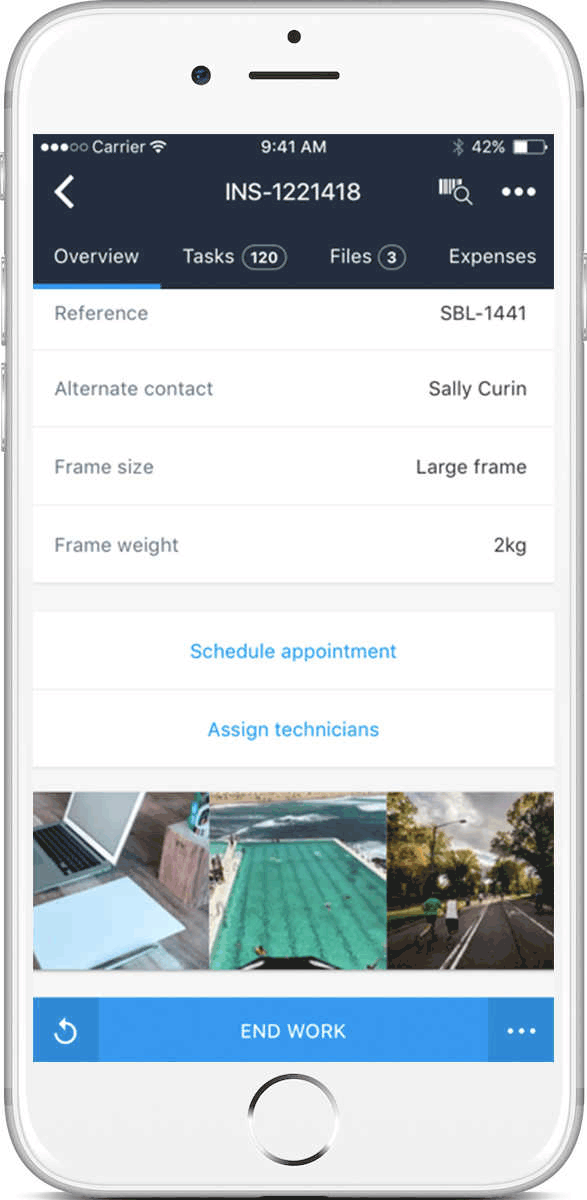
Description
Loc8 at a Glance
| Best for | Service businesses needing configurable operational workflows, asset management, and structured field data capture rather than lightweight job scheduling |
|---|---|
| Deployment | Cloud SaaS with web app and mobile apps for field technicians |
| Starting price | Contact Vendor (subscription pricing scoped by technician count and module bundle) |
| Key strengths | Configurable status workflows, job signatures on web and mobile, smart forms with related-entity pre-fill, asset management depth, Australian-native product |
| Not ideal for | Very small residential service contractors under 5 users where Housecall Pro or Jobber cover the workflow, or teams needing enterprise construction management like Procore |
Loc8 Overview
Loc8 is a field service management platform for service businesses that need scheduling, job execution, asset management, and configurable operational workflows.
Job signatures capture customer or user signatures when changing job statuses; available on web and mobile from version 1.2.3+.
Status workflows add accountability with configurable requirements for comments, attachments, or signatures before status changes; teams enforce operational discipline through the workflow engine rather than convention.
Smart forms boost efficiency with pre-filled fields from related entities plus form completion tracking, reducing repetitive data entry across service jobs.
Capabilities and Named Features
The Loc8 thesis is that field service teams need configurable operational discipline (workflow requirements, signatures, structured forms) rather than just scheduling and dispatch.
Status workflows with configurable requirements for comments, attachments, or signatures before status changes turn field-team workflow into enforceable operational discipline. Managers no longer chase technicians for missing information after jobs close.
Job signatures on web and mobile capture customer sign-off during service delivery rather than on paper collected later. This matters for compliance-driven service work and dispute reduction.
Smart forms boost efficiency with pre-filled fields from related entities. When a technician opens a form on an asset, the customer information, asset history, and job context auto-populate rather than requiring manual entry.
Asset management depth means Loc8 tracks equipment, customers, and job history across service visits so technicians see the full picture when arriving on site.
Regular release cadence shows an active product development pattern with recent updates covering job signatures, status workflows, and smart forms.
The configurable-workflow model matters for service businesses in regulated verticals (healthcare equipment maintenance, food-service equipment repair, safety-critical inspections) where documented sign-off and audit trails are contractually required.
The Australian-native origin gives Loc8 a design perspective informed by Asia-Pacific service business operating patterns, which sometimes differ from US-first FSM assumptions about labor availability, service radius, and customer-communication expectations.
Multi-user access with role-based permissions plus API access for third-party integration means Loc8 extends into broader operational stacks rather than staying a standalone FSM silo.
Named feature list
- Job scheduling and dispatch
- Job signatures on web and mobile (v1.2.3+)
- Status workflows with configurable requirements
- Smart forms with pre-filled related-entity data
- Form completion tracking
- Asset management with equipment tracking
- Customer and contact management
- Mobile app for field technicians
- Web app for dispatchers and managers
- Configurable comments, attachments, and signatures
- Preventive maintenance scheduling
- Service history per asset
- Photo capture on jobs
- Reporting and dashboards
- Configurable job types and workflows
- Multi-user access with role-based permissions
- Australian-native product with international operations
- Regular release cadence with version updates
- API access for third-party integration
Pricing and Plans
Loc8 does not publish public per-technician pricing on the vendor website.
Subscription pricing is scoped by technician count, module bundle, and integration scope.
Prospective buyers request a demo or trial through the vendor website; scoped pricing conversations follow initial discovery.
| Tier | Price | What is included |
|---|---|---|
| Core FSM | Contact Vendor | Base field service management with scheduling, dispatch, mobile app, and asset management. Sized to technician count |
| Configurable Workflows | Contact Vendor | Status workflows with configurable requirements for comments, attachments, or signatures. Smart forms with related-entity pre-fill |
| Asset Management | Contact Vendor | Full asset and equipment tracking with service history and preventive maintenance scheduling |
| Enterprise | Contact Vendor | Multi-branch or high-volume deployments with custom integrations, dedicated CSM, and priority support |
Pros
- Configurable status workflows with required comments, attachments, or signatures turn field-team discipline into enforceable operational rules rather than manager chasing.
- Smart forms with related-entity pre-fill reduce repetitive data entry; technicians spend less time on paperwork and more time on billable service work.
- Job signatures on web and mobile capture customer sign-off during service delivery, reducing disputes and supporting compliance-driven service documentation.
Cons and Trade-offs
- Quote-based pricing slows self-serve evaluation versus published-price residential FSM competitors like Housecall Pro or Jobber.
- Brand recognition outside Australia and Asia-Pacific is lighter than US-first FSM platforms; buyers in North America should validate regional support.
- Modern AI-first FSM features (generative AI dispatch, autonomous scheduling agents) are lighter than newer AI-native competitors.
Loc8 vs Alternatives
| Capability | Loc8 | Housecall Pro | ServiceTitan |
|---|---|---|---|
| Configurable status workflows | Native | Standard workflows | Native with enterprise depth |
| Smart forms with pre-fill | Native from related entities | Basic forms | Custom forms |
| Job signatures on web and mobile | v1.2.3+ native | Native | Native |
| Regional focus | Australia and international | US residential home service | US residential and commercial |
| Best fit | Service teams needing configurable workflows | Small US residential contractors | Enterprise trade shops |
Who Should Choose Loc8
Service businesses needing configurable operational workflows, asset management, and structured field data capture rather than lightweight job scheduling.
Regulated-service work where signatures, comments, and attachments must be captured before status changes benefits from the configurable workflow engine.
Not appropriate for very small residential service contractors under 5 users (Housecall Pro or Jobber fit better) or teams needing enterprise construction management (Procore fits better).
Named Alternatives to Loc8
- Housecall Pro. Residential home-service FSM with published per-seat pricing. Chosen for small US residential contractors under 30 technicians.
- Jobber. Job-based FSM for small trades. A better fit for solo operators and micro-teams under 5 technicians.
- ServiceTitan. Enterprise trade shops (residential and commercial). Preferred for large multi-branch trade operations.
- Zuper. AI-first FSM with vertical bundles. Chosen when the buyer wants AI-driven workflow orchestration.
- ServiceTrade. Commercial trades FSM. A better fit for fire and life safety, HVAC, and mechanical contractors.
Implementation and Deployment
Loc8 deployments typically run 3-8 weeks depending on technician count, configurable workflow complexity, and asset catalog import scope.
Standard sequence: technician account setup, mobile app rollout with training, asset and equipment catalog import, status workflow configuration (comments, attachments, signatures required per status change), smart form configuration with related-entity pre-fill, and pilot with a single team before wider rollout.
Enterprise deployments add multi-branch configuration, custom integrations, and dedicated CSM support.
Configurable-workflow discovery workshops typically front-load implementation. Because the platform lets teams enforce operational discipline through workflow requirements, up-front decisions about which status changes need comments, attachments, or signatures drive downstream technician experience.
Migration from a lighter FSM tool (Housecall Pro, Jobber, or spreadsheets) typically runs 1-2 weeks for data import; the Loc8 team supports data mapping and workflow translation from the legacy system into the configurable Loc8 model.
What Real Buyers Say About Loc8
Operator discussions on Reddit r/msp field service discussions and LinkedIn Field Service Management community surface the following themes.
Australian and Asia-Pacific service business operators on LinkedIn FSM communities discuss Loc8 as a strong regional FSM alternative to US-first platforms.
The configurable status workflows and smart forms are the most-cited value drivers over lighter FSM competitors.
Common critique from US buyers: brand recognition is lighter than Housecall Pro or ServiceTitan in North America; buyers should validate regional support before commit.
Regulated-service operators (medical equipment maintenance, safety inspections, food-service equipment repair) point to Loc8 configurable-workflow discipline as the reason for choosing it over generic FSM tools; documented sign-off and audit trails are contractually required in their work.
The asset management depth is repeatedly highlighted by teams servicing customer-owned equipment where per-asset service history and preventive maintenance scheduling drive customer retention.
Regular release cadence with recent updates covering job signatures, status workflows, and smart forms is cited as evidence of active product development, which matters for regional buyers evaluating vendor commitment.
Vendor references: Loc8 field service management overview, Loc8 features and workflows, Loc8 customer case studies.
Related Loc8 Comparisons and Categories on SaaSRat
Explore related products and categories on SaaSRat to compare Loc8 against alternatives.
- Field Service Management on SaaSRat
- Asset Management on SaaSRat
- HVAC Software on SaaSRat
- Housecall Pro: residential home-service FSM
- Jobber: small residential trades
- ServiceTitan: enterprise trade shops
- ServiceTrade: commercial FSM
- Zuper: AI-first FSM
The Bottom Line on Loc8
Loc8 is a strong fit for service businesses needing configurable operational workflows, asset management, and structured field data capture rather than lightweight job scheduling.
Configurable status workflows plus smart forms with related-entity pre-fill are the standout differentiators for teams needing enforceable field-team discipline.
Australian-native product with international operations makes it a strong regional choice for Asia-Pacific service businesses.
Very small residential service contractors should look at Housecall Pro or Jobber instead.
Enterprise trade shops or commercial construction teams should compare ServiceTitan, ServiceTrade, or Procore for the appropriate scale.
Verified on 2026-08-04 against vendor website.
Frequently Asked Questions
What is Loc8?
Who is Loc8 best for?
How does Loc8 pricing work?
What are Status Workflows in Loc8?
What are Smart Forms in Loc8?
Does Loc8 support job signatures?
Does Loc8 have a mobile app?
Where is Loc8 headquartered?
Does Loc8 offer a free trial?
How does Loc8 handle asset management?
Find Your Perfect Software
See how it can transform your workflow
- Personalized for your needs Tailored recommendations based on your unique requirements.
- Save time & resources Streamline your workflow and boost team productivity.
- Trusted by thousands Join 10,000+ businesses already growing with SaaSrat.
You're all set! 🎉
A specialist for will reach out within 1 business day with tailored recommendations for your needs.