

HopToDesk
by HopToDedk • Founded 2021
What is HopToDesk?
Get Best Quote for HopToDesk
Connect with SaaSrat experts to get the best quote for your business.
You're all set!
A specialist for HopToDesk will reach out within 1 business day.
HopToDesk Features
Cross platform support
File transfer
Screen sharing
Remote printing
Session recording
Multi monitor support
View All 30 Features
HopToDesk Pricing Plans
Free
- All features
HopToDesk Resources
HopToDesk Screenshots
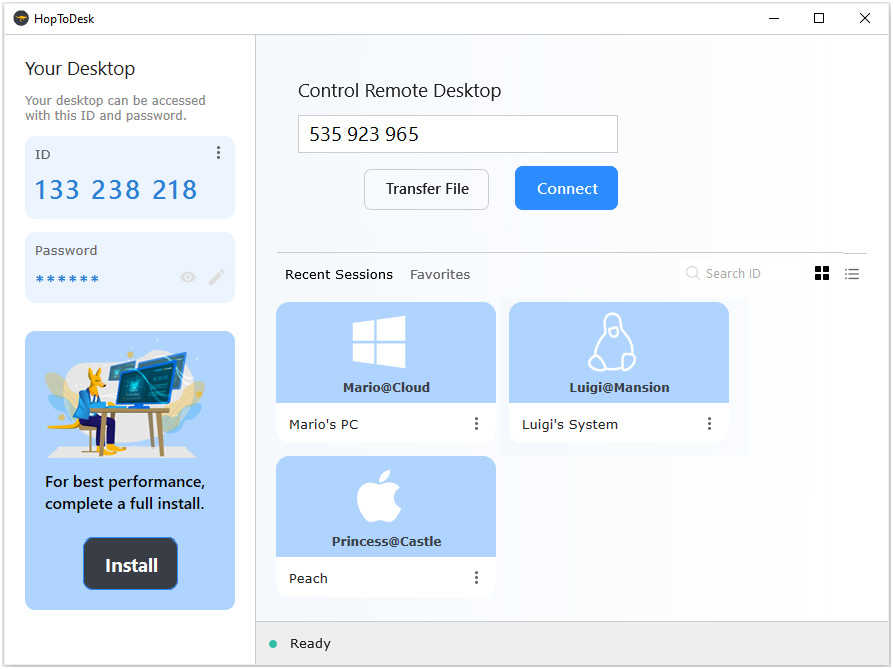
Description
HopToDesk at a Glance
| Company | HopToDesk (open source project) |
|---|---|
| Category | Remote desktop, open source remote access, IT support, MSP remote access |
| Best for | Users and IT teams wanting free open-source remote access with optional managed dashboard |
| Platforms | Windows, macOS, Linux, Android, iOS, Chrome OS, Raspberry Pi |
| Free tier | Free client for personal and commercial use, no limits |
| Trust anchor | Open source, end-to-end encrypted |
HopToDesk Overview
HopToDesk is a free open-source remote desktop platform aimed at users and IT teams that want secure remote access without paying TeamViewer or AnyDesk licensing. The client is free for both personal and commercial use with no limits, and contributions to the open source project are welcome.
The paid Dashboard adds managed platform capabilities on top of the free client: real-time device monitoring, unattended access, built-in ticketing and live chat, session recording, team roles with SSO, white-label custom-branded clients, AI agents, MCP for automation, and deployment via GPO, Intune, SCCM, Jamf, or Ansible.
HopToDesk Capabilities and Named Features
The free HopToDesk client works across every major platform: Windows, macOS, Linux, Android, iOS, Chrome OS, and Raspberry Pi. All traffic is protected with end-to-end encryption including screen sharing, chats, and file transfer.
The paid Dashboard turns the free client into a managed IT support platform. Real-time device monitoring and alerts, unattended access to every device, built-in ticketing and live chat, session recording, and team roles with SSO cover the daily IT support workflow.
MSP and enterprise features include white-label custom-branded clients (ship your own branded client to end users), AI agents plus MCP for automation, and deployment via GPO, Intune, SCCM, Jamf, and Ansible.
The open source model is a real trust anchor for buyers who want auditability. Contributions to the project are welcome, and the free-for-commercial-use license removes the licensing overhead that TeamViewer and AnyDesk impose.
Named feature list
- Free open-source remote desktop client
- Free for both personal and commercial use without limits
- Windows, macOS, Linux, Android, iOS, Chrome OS, Raspberry Pi support
- End-to-end encryption on all traffic
- File transfer with end-to-end encryption
- Live chat during remote sessions
- Web app plus Dashboard
- Real-time device monitoring (Dashboard)
- Unattended access to every device (Dashboard)
- Built-in ticketing (Dashboard)
- Session recording (Dashboard)
- Team roles, invites, and SSO (Dashboard)
- White-label custom-branded clients (Dashboard)
- AI agents and MCP for automation (Dashboard)
- Deployment via GPO, Intune, SCCM, Jamf, Ansible (Dashboard)
- On-premises deployment option
- Free 3-device Dashboard tier
- Enterprise and MSP plans for unlimited fleets
- Open source contributions welcome
HopToDesk Pricing
HopToDesk does not publish a standalone tier pricing page: the free client is the anchor product, and Dashboard tiers are described on the vendor site with free starter access for the first three devices. Enterprise and MSP plans support unlimited device fleets.
The main dials that move a buyer between plans are device count (3 free vs unlimited), unattended access, session recording, white-label branding, SSO, AI agents, and deployment automation across GPO, Intune, SCCM, Jamf, or Ansible.
| Tier | Price | What is included |
|---|---|---|
| Free Client | USD 0 | Free forever for both personal and commercial use. Cross-platform, end-to-end encrypted, file transfer, live chat. No device limits on client-to-client connections. |
| Dashboard Starter | USD 0 (3 devices) | Free Dashboard tier with real-time device monitoring on up to 3 devices, unattended access, and built-in ticketing and live chat. |
| Dashboard Pro / MSP | Contact Vendor | Unlimited devices, session recording, team roles, SSO, white-label custom-branded clients, AI agents, MCP for automation, deployment automation via GPO, Intune, SCCM, Jamf, Ansible. |
| Enterprise | Contact Vendor | Full MSP plus on-premises deployment option for regulated buyers wanting to keep the platform inside their own infrastructure. |
HopToDesk Pros
- Free client for personal and commercial use without limits is a real cost differentiator versus TeamViewer and AnyDesk licensing.
- End-to-end encryption on all traffic including screen sharing, chats, and file transfer.
- Cross-platform including Chrome OS and Raspberry Pi (rare in the category).
- Open source auditability supports regulated and compliance-sensitive procurement.
- Free 3-device Dashboard tier lets IT teams evaluate the managed platform risk-free.
- White-label custom-branded clients on paid plans support MSPs branding client software.
HopToDesk Cons and Trade-offs
- Dashboard tier pricing is Contact Vendor for unlimited devices, so budget planning requires a sales call.
- The free client model is generous but ongoing project sustainability depends on Dashboard revenue.
- Brand recognition is still building versus TeamViewer, AnyDesk, and RustDesk in enterprise IT procurement.
- AI agents and MCP for automation is a newer capability; buyers should validate what specific automation is production-ready.
- Some very-large enterprise features (advanced audit, HIPAA BAA, SOC 2) should be validated during Dashboard sales conversation.
HopToDesk vs Alternatives
| Capability | HopToDesk | TeamViewer | AnyDesk |
|---|---|---|---|
| Core focus | Free open-source remote desktop plus paid Dashboard for MSPs and IT | Category-leading commercial remote access | Commercial remote desktop with focus on speed |
| Free commercial use | Yes, unlimited on the free client | Free personal use only; commercial requires paid plan | Free personal use only; commercial requires paid plan |
| Open source | Yes, contributions welcome | No, proprietary | No, proprietary |
| Platform support | Windows, macOS, Linux, Android, iOS, Chrome OS, Raspberry Pi | Windows, macOS, Linux, Android, iOS, Chrome OS, Raspberry Pi | Windows, macOS, Linux, Android, iOS, Chrome OS, Raspberry Pi, FreeBSD |
| Best for | Cost-sensitive teams, MSPs wanting white-label, open source-first buyers | Enterprises wanting the established remote support brand | Speed-sensitive buyers wanting commercial licensing |
| MSP features | White-label, AI agents, deployment automation on Dashboard | Tensor commercial platform | Advanced customization on premium plans |
Who Should Choose HopToDesk
HopToDesk is a fit for cost-sensitive IT teams, MSPs, and individual users wanting free open-source remote access with optional managed capabilities on the Dashboard. Buyers currently paying TeamViewer or AnyDesk commercial licenses may find the free-for-commercial-use client covers their base need.
It is less of a fit for enterprises fully committed to TeamViewer or AnyDesk ecosystem plus existing integrations, and for very small teams that would not benefit from the Dashboard management layer. Very large enterprises with complex remote access compliance should validate specific features (audit, HIPAA, SOC 2).
Named Alternatives to HopToDesk
- TeamViewer. Category-leading commercial remote access platform. Chosen when the buyer wants the biggest brand and broadest enterprise features.
- AnyDesk. Commercial remote desktop with focus on speed. A better fit for speed-sensitive buyers already on the AnyDesk ecosystem.
- RustDesk. Open source remote desktop alternative. Preferred when the buyer wants an alternative open-source project.
- Splashtop. Remote access for individuals, business, and MSPs. Chosen when the buyer wants a commercial platform with strong MSP focus.
- Chrome Remote Desktop. Free browser-based remote access from Google. A better fit for very light remote access use cases inside the Google ecosystem.
HopToDesk Implementation and Deployment
Onboarding is self-serve: download the free HopToDesk client for the platform of choice, and connect to another device in seconds. No account required for basic client-to-client connections.
Dashboard setup adds account creation, device enrollment, and team member invites. The free 3-device tier lets IT teams evaluate real-time monitoring and unattended access before moving to paid plans for unlimited devices.
MSP and enterprise deployments layer white-label custom-branded clients, SSO, session recording, and deployment automation via GPO, Intune, SCCM, Jamf, or Ansible. On-premises deployment is available for regulated buyers.
What Real Buyers Say About HopToDesk
The vendor publishes user testimonials on the home page and details the Dashboard features. See the vendor HopToDesk home page for the current user testimonial feed and download links.
Public commentary on IT and MSP buyer forums positions HopToDesk as one of the leading open-source alternatives to TeamViewer and AnyDesk, especially for buyers who want free commercial use plus optional managed capabilities. RustDesk is the primary open-source competitor.
The trade-off most reviewers name is that the Dashboard managed platform requires paid tiers for unlimited devices, session recording, and enterprise features. Free-client-only users get real value but MSPs and mid-market IT typically move to Dashboard within the first year.
Sources
- vendor website, HopToDesk home page describing free open-source client plus paid Dashboard
- vendor website, HopToDesk Dashboard page describing MSP and enterprise features
Frequently Asked Questions about HopToDesk
What is HopToDesk?
A free open-source remote desktop platform with end-to-end encrypted traffic, file transfer, and live chat across Windows, macOS, Linux, Android, iOS, Chrome OS, and Raspberry Pi. The paid Dashboard adds managed device monitoring, ticketing, session recording, and MSP features.
Is HopToDesk really free?
Yes. The client is free for both personal and commercial use without limits. The Dashboard also has a free tier with real-time device monitoring on up to 3 devices.
Which platforms does HopToDesk support?
Windows, macOS, Linux, Android, iOS, Chrome OS, and Raspberry Pi. Cross-platform sessions work across all supported systems.
Is HopToDesk open source?
Yes. HopToDesk is an open source project. Contributions to the project are welcome, and the codebase can be audited.
What does the Dashboard add?
Real-time device monitoring, unattended access to every device, built-in ticketing and live chat, session recording, team roles with SSO, white-label custom-branded clients, AI agents plus MCP for automation, and deployment via GPO, Intune, SCCM, Jamf, or Ansible.
Can I white-label the client?
Yes. Dashboard MSP and Enterprise plans support white-label custom-branded clients. Ship your own branded client to end users with a pre-configured connection.
Is there an on-premises deployment option?
Yes. On-premises deployment is available for regulated buyers wanting to keep the platform inside their own infrastructure.
Who develops HopToDesk?
HopToDesk is an open source project. Contributions from the community are welcome on the codebase.
The Bottom Line on HopToDesk
HopToDesk is a fit for cost-sensitive IT teams, MSPs, and individual users wanting free open-source remote access with optional managed capabilities on the Dashboard. Buyers currently paying TeamViewer or AnyDesk commercial licenses may find the free-for-commercial-use model covers their base need at zero recurring cost.
The tradeoffs are Dashboard tier Contact Vendor pricing for unlimited devices and the newer brand recognition versus TeamViewer and AnyDesk. Enterprises fully committed to established ecosystems may find migration effort outweighs the savings.
A useful evaluation is to download the free client on two devices, test the end-to-end encrypted session plus file transfer, then enable the free 3-device Dashboard tier for real-time monitoring. That surfaces both the client quality and the Dashboard workflow value before committing to a paid MSP or Enterprise plan.
Verified on 2026-08-01 against vendor website.
Frequently Asked Questions
What is HopToDesk?
Is HopToDesk really free?
Which platforms does HopToDesk support?
Is HopToDesk open source?
What does the Dashboard add?
Can I white-label the client?
Is there an on-premises deployment option?
Who develops HopToDesk?
Find Your Perfect Software
See how it can transform your workflow
- Personalized for your needs Tailored recommendations based on your unique requirements.
- Save time & resources Streamline your workflow and boost team productivity.
- Trusted by thousands Join 10,000+ businesses already growing with SaaSrat.
You're all set! 🎉
A specialist for will reach out within 1 business day with tailored recommendations for your needs.