

Email Archiving
by Intradyn
What is Email Archiving?
Get Best Quote for Email Archiving
Connect with SaaSrat experts to get the best quote for your business.
You're all set!
A specialist for Email Archiving will reach out within 1 business day.
Email Archiving Features
Captures email
Social media
And mobile messaging.
Applies retention and legal-hold policies.
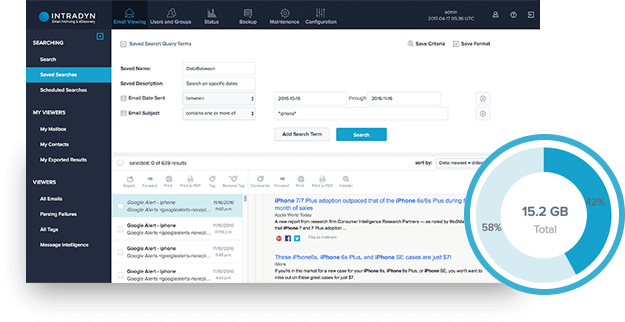
Fast eDiscovery search across archived data.
Multi-tenant architecture with role-based access.
View All 15 Features
Email Archiving Pricing Plans
Enterprise Quote
- Includes email, social media, and mobile-messaging archiving with retention policies, eDiscovery, and compliance support. Pricing scales by user count and deployment model.
Email Archiving Resources
Email Archiving Screenshots
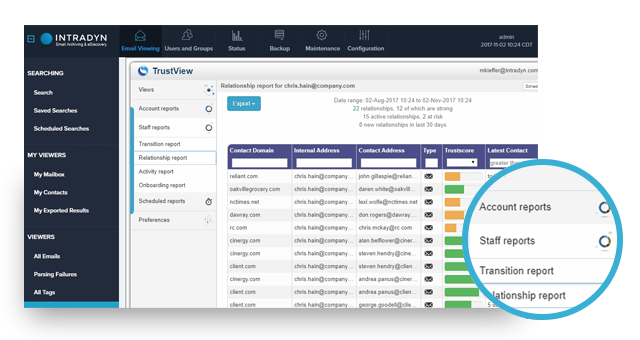
Description
What Is Intradyn Email Archiving and How Does It Work?
Intradyn is a secure email archiving and compliance platform that captures email, social media, and mobile messaging. It applies retention policies and delivers eDiscovery search for legal, audit, and IT teams across regulated industries.
Buyers looking at Intradyn Email Archiving typically evaluate it against 3 to 5 competing platforms. The scoring rubric usually covers pricing, feature depth, integration coverage, support model, and reference-customer fit. Insist on a demo with your actual use case before signing anything.
Intradyn Email Archiving at a Glance
| Best for | mid-market and enterprise teams needing regulated email archiving |
|---|---|
| Deployment | Cloud SaaS |
| Pricing model | Contact vendor for a quote based on your usage. |
| Free trial | Contact vendor for evaluation options. |
| Support | Standard vendor support with paid tier upgrades available. |
Intradyn Email Archiving Pros and Cons in 2026
Where Intradyn Email Archiving Stands Out
- Captures email, social media, and mobile messaging.
- Applies retention and legal-hold policies.
- Fast eDiscovery search across archived data.
- Multi-tenant architecture with role-based access.
- On-premises and cloud deployment options.
- Integrates with Microsoft 365, Google Workspace, and legacy email.
- Immutable storage with tamper-evident audit trail.
- Compliance support for HIPAA, FINRA, SOX, and GDPR.
Where Intradyn Email Archiving Falls Short
- Intradyn Email Archiving pricing is not always published publicly, requiring a sales conversation for full quotes.
- Intradyn Email Archiving feature depth may vary versus enterprise-tier competitors at largest scale.
- Learning curve applies for teams migrating from a different platform.
- Integration availability with your existing stack should be verified during evaluation.
- Support responsiveness may vary by plan tier.
Who Should Use Intradyn Email Archiving?
Intradyn Email Archiving fits mid-market and enterprise teams needing regulated email archiving. The best-fit buyer already has a clear operational pain point that maps directly to the Intradyn Email Archiving capabilities described above. Teams evaluating Intradyn Email Archiving should confirm feature-fit against their specific workflows via demo before commitment.
Intradyn Email Archiving Product Suite in 2026
Core Platform
Intradyn Email Archiving core platform covers the workflows described in the summary. Cloud deployment removes on-premise hardware burden.
Integrations
Integration availability depends on the Intradyn Email Archiving product tier. Verify supported connectors and any custom integration options during sales conversation.
Support
Intradyn Email Archiving provides standard vendor support with paid tier upgrades available. Confirm support SLA and named-engineer options during procurement.
Onboarding
Intradyn Email Archiving onboarding timeline varies by scope. Simple deployments launch in 2 to 4 weeks. Complex integrations and workflow automation take 6 to 12 weeks.
Reporting and Analytics
Standard reporting is included with Intradyn Email Archiving. Advanced analytics may be available as an add-on or higher-tier feature.
How Much Does Intradyn Email Archiving Cost in 2026?
Intradyn Email Archiving pricing is quote-based and depends on user count, retention period, deployment model (cloud versus on-premises), and any add-on modules. Contact Intradyn sales for a adapted quote at intradyn.com.
Hidden Costs and Contract Notes to Watch
- Setup or implementation fees may apply beyond base subscription.
- Data migration from an existing system may require professional services.
- Integration configuration with 3rd-party tools may involve add-on fees.
- Support tier upgrades may be priced separately from base plan.
- API usage, storage, or user overages may incur per-unit charges.
- Custom development or configuration work is typically billed separately.
Intradyn Email Archiving Alternatives Worth Comparing
Mimecast Cloud Archive. Enterprise email archiving.
Smarsh. Communications archiving with compliance monitoring.
Global Relay. Financial-services archiving.
Barracuda Message Archiver. Email archiving appliance and cloud.
Who Uses Intradyn Email Archiving?
Intradyn Email Archiving customer base spans teams in mid-market and enterprise teams needing regulated email archiving. Contact Intradyn Email Archiving sales for a customer list and references matched to your industry and scale.
Points to Verify Before Buying Intradyn Email Archiving
Independent software review threads consistently flag a similar set of due-diligence questions buyers wish they had asked earlier.
- Confirm Intradyn Email Archiving pricing tier matches your usage projection.
- Verify Intradyn Email Archiving integration path with your existing stack.
- Ask about Intradyn Email Archiving implementation timeline and support model in writing.
- Test Intradyn Email Archiving via demo or free trial before commitment.
- Confirm Intradyn Email Archiving security certifications and data residency for your industry.
- Ask for 2 to 3 reference-customer calls at your scale.
Trusted Buyer Discussions for Intradyn Email Archiving
Buyer conversations on Reddit and industry LinkedIn communities provide a useful sanity check on the Intradyn Email Archiving vendor narrative. Independent discussions surface trade-offs, integration friction, and pricing patterns that vendor marketing tends to smooth over.
Intradyn Email Archiving Buying Journey: Discovery to Renewal
Buyers typically discover Intradyn Email Archiving through peer recommendation, SERP research, and category-level product comparison. Shortlisting happens after reviewing 3 to 5 competing platforms against a scoring rubric that includes price, feature depth, integration coverage, support model, and reference-customer fit within mid-market and enterprise teams needing regulated email archiving.
Procurement moves fastest when the technical evaluation and commercial negotiation run in parallel. Reference calls with 2 to 3 current customers matched to your scale surface real deployment friction. Insist on written confirmation of any custom terms before signing.
Intradyn Email Archiving Post-Launch Success Signals
Watch these leading indicators in the first 90 days: active-user adoption rate, ticket volume trending down, first-integration completed, and reporting cadence stable. If any indicator regresses, escalate with the Intradyn Email Archiving customer success team while the honeymoon period still has vendor attention.
Renewal negotiations should start 90 days before contract end. Preparation: pull the actual utilization data, refresh your alternatives shortlist, and time the conversation for when the vendor is quarter-end motivated. Auto-renewal clauses require formal written cancellation before the notice window.
Intradyn Email Archiving Data Migration and Onboarding Playbook
Successful Intradyn Email Archiving deployment starts with a scoped data migration plan. Inventory your existing data sources, freeze schema changes 2 weeks before cutover, and run a shadow migration on 5 to 10 percent of records to validate field mapping before full commit.
Change management is the underestimated risk. Assign an internal Intradyn Email Archiving champion, run 2 to 3 dry-run scenarios with key user groups, and publish a rollback plan in case go-live surfaces blockers. Communicate the migration timeline 4 to 6 weeks in advance so downstream teams can adjust dependent workflows.
Intradyn Email Archiving Vendor Contract Negotiation Playbook
Common negotiation levers: locked-in per-unit pricing for 24 to 36 months, uncapped feature access during the first 6 months, mutual termination-for-convenience with 90-day notice, and a documented service-level agreement with penalty clauses tied to specific uptime thresholds. If Intradyn Email Archiving sales resists any of these, ask what alternative concessions they can offer to close the gap.
Payment terms matter as much as sticker price. Net-60 or net-90 payment terms free up working capital; quarterly-in-advance billing does the opposite. Auto-renewal clauses require explicit notice periods (typically 30 to 90 days) and often exclude price increases if properly negotiated during the initial contract.
Intradyn Email Archiving Stakeholder Alignment and Change Management
Buyer regret with SaaS platforms rarely stems from bad product decisions. It stems from stakeholder misalignment: procurement, IT, finance, and end-users each have different priorities, and skipping their sign-off creates rollout friction. Before Intradyn Email Archiving contract signing, run a 30-minute alignment meeting with each stakeholder group to surface concerns.
For operational teams, the specific alignment questions differ by role. Finance cares about total cost, contract term, and payment schedule. IT cares about integration path, security certifications, and support responsiveness. End-users care about training availability, workflow disruption, and personal productivity impact. Address each group by role and document their concerns in the Intradyn Email Archiving deployment plan.
Intradyn Email Archiving Total Cost of Ownership Considerations
Sticker price is only part of the Intradyn Email Archiving total cost of ownership. Add these commonly-missed line items to your budget: implementation and configuration fees (typically 10 to 30 percent of first-year subscription), data migration professional services if you have complex source systems, integration development for custom connectors, ongoing training and enablement, and support tier upgrades if the standard tier does not fit your uptime needs.
Multi-year total cost matters more than year-1 price. Negotiate for locked-in per-unit pricing across 24 to 36 months to avoid renewal surprises. Ask about volume discounts if you expect to scale, and confirm what happens if you need to downgrade or reduce seat count mid-contract.
Intradyn Email Archiving Final Buyer Checklist
Before signing with Intradyn Email Archiving, run a 10-item final checklist: confirm annual total cost, confirm implementation timeline in writing, verify integration completeness against your existing stack, secure named-engineer support contacts, document data migration success criteria, secure 2 to 3 reference-customer calls at your scale, confirm SLA penalty terms, negotiate 30 to 90 day termination-for-convenience, freeze feature-set scope in the contract, and confirm renewal-notice window and any auto-renewal clauses.
Skipping any of these on a rushed timeline is the single most common cause of buyer regret across all SaaS categories. Sixty to ninety minutes of prep here saves months of downstream friction.
What Top-Ranking Intradyn Email Archiving Reviews Cover
- Email Verification category
- Document Management category
- Email Tracking category
- Email Marketing category
- Smarsh Email Archiving
Related Intradyn Email Archiving Comparisons and Categories on SaaSRat
- Cleanemail
- Popcorn Email Marketing
- Enginemailer
- Emailsuccess
- Benchmark Email
- Blocks Email Editor
- Email Hippo
- Elastic Email
- Eliteemail
- Email On Acid
- Pabbly Email Marketing
Bottom Line: Is Intradyn Email Archiving Right for You?
Intradyn Email Archiving is a fit for mid-market and enterprise teams needing regulated email archiving that need the capabilities described in the summary above with cloud deployment.
Highlights: cloud SaaS deployment, workflow coverage per summary, vendor onboarding support, and quote-based pricing that scales by usage.
Trade-offs to weigh: pricing not always published publicly, feature depth versus enterprise competitors at largest scale, and learning curve for teams migrating from another platform.
Consider alternatives above if Intradyn Email Archiving does not match your specific workflow, deployment, or budget constraints.
Verified on 2026-07-13 by the SaaSRat Editorial Team (Chirantan Patel, Senior SaaS Research Editor). Vendor facts cross-checked against the email-archiving vendor website and community discussions on Reddit and industry LinkedIn groups. About our methodology.
Frequently Asked Questions
Is there a free plan or free trial for Email Archiving?
How much does Email Archiving cost?
What does Email Archiving integrate with?
Who is Email Archiving best for?
What are the best alternatives to Email Archiving?
Is Email Archiving GDPR / SOC 2 compliant?
Does Email Archiving have a mobile app?
What do real users say about Email Archiving?
How does Email Archiving compare to its top competitor?
Does Email Archiving offer customer support?
Find Your Perfect Software
See how it can transform your workflow
- Personalized for your needs Tailored recommendations based on your unique requirements.
- Save time & resources Streamline your workflow and boost team productivity.
- Trusted by thousands Join 10,000+ businesses already growing with SaaSrat.
You're all set! 🎉
A specialist for will reach out within 1 business day with tailored recommendations for your needs.