
Dropbox
by Dropbox
What is Dropbox?
Get Best Quote for Dropbox
Connect with SaaSrat experts to get the best quote for your business.
You're all set!
A specialist for Dropbox will reach out within 1 business day.
Dropbox Features
File storage
File sharing
File synchronization
Version history
Access controls
Collaboration tools
View All 28 Features
Dropbox Pricing Plans
Standard
- 3 TB (3,072 GB) of space
- 120 days of file recovery
- Smart Sync
- Dropbox Paper admin tools
- Office 365 integration
- Admin console and audit log
- Granular sharing permissions
Advanced
- All Features in Standard
- As much space as needed
- Advanced admin controls
- Dropbox Showcase
- Tiered admin roles
- Domain verification
Dropbox Resources
Dropbox Screenshots
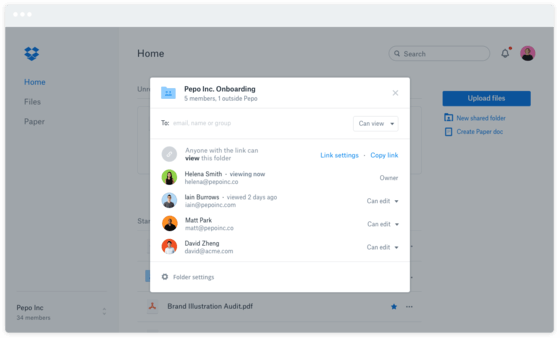
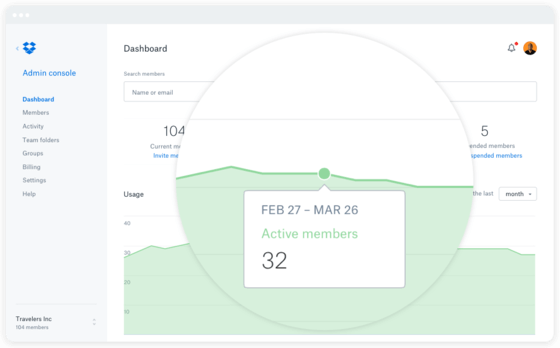
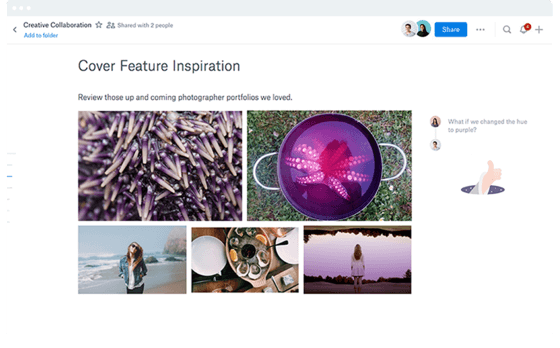
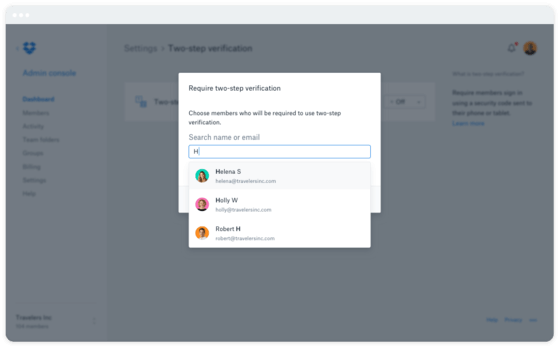
Description
Dropbox at a Glance
| Company | Dropbox, Inc. (publicly traded) |
|---|---|
| HQ | San Francisco, CA, US |
| Category | Cloud storage, file sharing, and content collaboration platform |
| File storage and syncing | Across desktop, mobile, and web |
| Dropbox Replay | Video review and collaboration |
| Dropbox Sign | Document signing (formerly HelloSign) |
| DocSend | Document analytics and secure sharing |
| Reclaim.ai | AI calendar scheduling |
| Dropbox Dash | Universal search across cloud content |
| Standard tier | 15 USD per user per month (minimum 1 person, 3 TB team storage) |
| Advanced tier | 24 USD per user per month (minimum 3 people, 15 TB team storage) |
| Enterprise tier | Custom pricing (contact sales) |
| Security | End-to-end encryption, ransomware detection with automatic file recovery |
| Best fit | SMB, mid-market, and enterprise teams wanting cloud storage with ecosystem of productivity products |
Dropbox Overview
Dropbox is a secure cloud storage, file sharing, and content collaboration platform by Dropbox, Inc. (publicly traded on NASDAQ) headquartered in San Francisco, CA delivering file storage and syncing across devices plus adjacent products including Dropbox Replay for video collaboration, Dropbox Sign (formerly HelloSign) for e-signature, DocSend for document analytics, Reclaim.ai for calendar scheduling, and Dropbox Dash for universal search.
The distinctive commercial angle is broad SMB-to-enterprise cloud storage adoption combined with adjacent productivity products creating an ecosystem around content collaboration. Where alternative enterprise cloud content platforms (Box) focus enterprise-first with AI-native positioning, Dropbox operates as a broader cloud storage platform spanning individual, team, and enterprise scenarios with acquired productivity products (Dropbox Sign formerly HelloSign, DocSend, Reclaim.ai, Dash) rather than a single monolithic content platform.
The product covers file storage and syncing across desktop, mobile, and web devices, Dropbox Replay for video review and collaboration workflows, Dropbox Sign for document signing (acquired from HelloSign), PDF editing and annotation, team folders and sharing controls, and security features including end-to-end encryption and ransomware detection with automatic file recovery. Business pricing tiers: Standard at 15 USD per user per month (minimum 1 person, starts at 3 TB team storage), Advanced at 24 USD per user per month (minimum 3 people, starts at 15 TB team storage), and Enterprise with custom pricing (contact sales). Companion products including Dash for universal search across cloud content, DocSend for document analytics and secure sharing, and Reclaim.ai for AI calendar scheduling extend the platform beyond core storage.
Capabilities and Named Features
Dropbox delivers a full cloud storage and content collaboration workflow across storage, video collaboration, e-signature, and adjacent productivity products. File storage and syncing across desktop, mobile, and web devices provides the foundational cloud storage capability with automatic sync letting users access files anywhere. Dropbox Replay handles video review and collaboration workflows for creative teams reviewing video content with timestamped comments, version control, and playback synchronization. Dropbox Sign (formerly HelloSign, acquired by Dropbox) handles document signing with template management, signer routing, and audit trail for signature compliance. PDF editing and annotation lets users edit PDFs, add annotations, and merge documents without separate PDF editor software. Team folders and sharing controls let admins manage team-wide content organization with granular permissions (view, comment, edit) and expiration dates on shared links. Security features include end-to-end encryption protecting content at rest and in transit plus ransomware detection with automatic file recovery to versions before ransomware attack occurred. Companion product Dropbox Dash provides universal search across Dropbox and connected cloud services (Google Drive, Microsoft OneDrive, Slack, Notion) letting users find content across their cloud content sprawl. DocSend delivers document analytics (who viewed what pages, how long they engaged) and secure sharing for sales and investor deck scenarios. Reclaim.ai provides AI-powered calendar scheduling for meeting coordination and focus time protection. Business pricing tiers deliver clear entry points: Standard at 15 USD per user per month for smaller teams, Advanced at 24 USD per user per month with larger 15 TB storage for growing businesses, and Enterprise with custom pricing for large organizations.
Named feature list
- File storage and syncing across devices
- Desktop client (Windows, macOS, Linux)
- Mobile apps (iOS, Android)
- Web access
- Dropbox Replay for video review
- Dropbox Sign (formerly HelloSign)
- PDF editing and annotation
- Team folders
- Sharing controls with granular permissions
- Link expiration dates
- End-to-end encryption
- Ransomware detection with automatic recovery
- Dropbox Dash universal search
- DocSend document analytics
- Reclaim.ai AI calendar scheduling
Pricing and Plans
Dropbox publishes transparent Business tier pricing with Standard at 15 USD per user per month (minimum 1 person, 3 TB team storage) and Advanced at 24 USD per user per month (minimum 3 people, 15 TB team storage) plus custom Enterprise pricing. Individual plans (Plus, Family, Professional) available for personal and freelancer use with separate pricing. Dropbox Sign, DocSend, Reclaim.ai, and Dash are separate products with independent pricing.
| Tier | Price | What is included |
|---|---|---|
| Standard | 15 USD per user per month | Minimum 1 person | 3 TB team storage | Core business features |
| Advanced | 24 USD per user per month | Minimum 3 people | 15 TB team storage | Advanced admin controls |
| Enterprise | Custom pricing (Contact Dropbox) | Enterprise tier with dedicated support, custom SLA, and enterprise controls |
| Dropbox Sign | Separate pricing (Contact Dropbox) | Document signing product with template management and audit trail |
| DocSend + Reclaim.ai + Dash | Separate pricing (Contact Dropbox) | Companion products with independent per-product pricing |
Pros
- Broad SMB-to-enterprise adoption with clear tier progression from Standard (15 USD) to Advanced (24 USD) to custom Enterprise
- Adjacent productivity products (Dropbox Sign, DocSend, Reclaim.ai, Dash) create ecosystem around cloud storage
- Ransomware detection with automatic file recovery to pre-attack versions delivers security protection
- Publicly traded parent (Dropbox, Inc.) provides financial stability and long-term platform commitment
- Dropbox Replay for video review addresses creative team collaboration scenarios
- End-to-end encryption protects content at rest and in transit
- Dropbox Dash universal search across connected cloud services addresses cloud content sprawl
Cons and Trade-offs
- AI capabilities depth may lag Box AI, Microsoft Copilot for OneDrive, or Google Drive Gemini
- Companion products (Sign, DocSend, Reclaim.ai, Dash) have separate pricing potentially adding cost complexity
- Enterprise features may lag Box or SharePoint for regulated industry deep compliance scenarios
- Named enterprise customer disclosure limited on the pricing page
- Consumer heritage may add friction for enterprise buyers evaluating enterprise-first alternatives
Dropbox vs Alternatives
| Vendor | Best for | Adjacent products ecosystem |
|---|---|---|
| Dropbox | SMB, mid-market, and enterprise teams wanting cloud storage with productivity ecosystem | Yes, Sign+DocSend+Reclaim+Dash |
| Box | Enterprises wanting AI-native content management with data residency | Box AI + Sign + Zones |
| Microsoft SharePoint + OneDrive | Microsoft ecosystem content management | Microsoft 365 ecosystem |
| Google Drive (Workspace) | Google Workspace content storage and collaboration | Google Workspace ecosystem |
| iCloud (Apple) | Apple ecosystem consumer and prosumer cloud storage | Apple ecosystem |
Who Should Choose Dropbox
Dropbox fits SMB, mid-market, and enterprise teams wanting cloud storage with an ecosystem of adjacent productivity products (Dropbox Sign, DocSend, Reclaim.ai, Dash). The strongest fit is small and mid-market teams wanting Standard (15 USD per user per month) or Advanced (24 USD per user per month) pricing with clear tier progression, creative teams needing Dropbox Replay for video collaboration, sales teams wanting DocSend for document analytics on shared decks, teams wanting Reclaim.ai for AI calendar scheduling, and organizations wanting Dropbox Dash universal search across cloud content sprawl. Enterprise buyers wanting AI-native content management with data residency may prefer Box. Microsoft ecosystem buyers may prefer SharePoint plus OneDrive. Google Workspace buyers may prefer Google Drive. Apple ecosystem consumer buyers may prefer iCloud.
Named Alternatives to Dropbox
- Box. Enterprises wanting AI-native content management with data residency
- Microsoft SharePoint + OneDrive. Microsoft ecosystem content management
- Google Drive (Workspace). Google Workspace content storage and collaboration
- iCloud (Apple). Apple ecosystem consumer and prosumer cloud storage
Implementation and Deployment
Dropbox rollouts typically complete in 1-8 weeks for SMB and mid-market deployments and 8-26 weeks for enterprise deployments. Standard phases: tier selection (Standard, Advanced, Enterprise), user provisioning, migration from existing file storage (personal Dropbox accounts, Google Drive, Microsoft OneDrive, network drives), team folder structure design with sharing permissions, security configuration including end-to-end encryption and ransomware detection settings, companion product setup if applicable (Dropbox Sign for e-signature, DocSend for document analytics, Reclaim.ai for calendar scheduling, Dash for universal search), integration with Microsoft 365, Google Workspace, Slack, and other business systems, user training, pilot deployment, and full production rollout.
What Real Buyers Say About Dropbox
SMB owners, mid-market IT leaders, and enterprise content management buyers on Reddit r/dropbox, r/sysadmin, and cloud storage publications describe Dropbox as a distinctive SMB-to-enterprise cloud storage platform with productivity ecosystem versus Box, Microsoft SharePoint plus OneDrive, Google Drive, and iCloud. Buyers cite the broad tier progression (Standard 15 USD, Advanced 24 USD, Enterprise custom), adjacent productivity products (Dropbox Sign, DocSend, Reclaim.ai, Dash), ransomware detection with automatic file recovery, and Dropbox Replay for video collaboration as decisive versus enterprise-first alternatives with less SMB accessibility. Common friction: AI capabilities depth may lag Box AI, companion products have separate pricing adding cost complexity, and enterprise features may lag Box or SharePoint for regulated industry deep compliance scenarios.
Vendor references: Dropbox corporate homepage, Dropbox Business plans, Dropbox Business pricing.
Related Category Guides on SaaSRat
Prospective Dropbox evaluators may find related buyer guidance on SaaSRat useful. See our category coverage for cloud storage, file sharing, collaboration for adjacent software category evaluation.
Additional Context from Buyer Communities
Broader discussion of this category can be found in buyer communities and professional publications. Relevant threads include Dropbox Business discussion on Reddit and Cloud storage comparison on LinkedIn.
The Bottom Line on Dropbox
Dropbox is a secure cloud storage, file sharing, and content collaboration platform by Dropbox, Inc. (publicly traded) headquartered in San Francisco, CA delivering file storage and syncing across devices, Dropbox Replay (video review and collaboration), Dropbox Sign (document signing formerly HelloSign), PDF editing and annotation, team folders and sharing controls, and security features including end-to-end encryption and ransomware detection with Business plans at 15 USD per user per month Standard (3 TB team storage), 24 USD per user per month Advanced (15 TB storage), custom Enterprise pricing, and companion products Dropbox Dash, DocSend, and Reclaim.ai.
Choose Dropbox if you are a SMB, mid-market, or enterprise team wanting cloud storage with an ecosystem of adjacent productivity products (Sign, DocSend, Reclaim.ai, Dash), you value clear tier progression from Standard 15 USD to Advanced 24 USD to custom Enterprise, or you want ransomware detection with automatic file recovery.
Skip it if you want enterprise-first AI-native content management with data residency (Box fits better), you are a Microsoft ecosystem buyer (SharePoint + OneDrive fit better), you are a Google Workspace buyer (Google Drive fits better), or you want secure file sharing specifically for regulated industries (ShareFile fits better).
The competitors to shortlist alongside Dropbox are Box, Microsoft SharePoint + OneDrive, Google Drive (Google Workspace), and iCloud (Apple) for cloud storage and content collaboration platforms.
Verified on 2026-08-04 against vendor website.
Frequently Asked Questions
What is Dropbox?
Who owns Dropbox?
How much does Dropbox cost?
What is Dropbox Replay?
What is Dropbox Sign?
Does Dropbox protect against ransomware?
What are Dropbox companion products?
What is the difference between Dropbox and Box?
How long does Dropbox implementation take?
Where is Dropbox headquartered?
Find Your Perfect Software
See how it can transform your workflow
- Personalized for your needs Tailored recommendations based on your unique requirements.
- Save time & resources Streamline your workflow and boost team productivity.
- Trusted by thousands Join 10,000+ businesses already growing with SaaSrat.
You're all set! 🎉
A specialist for will reach out within 1 business day with tailored recommendations for your needs.