

Buildertrend
by Buildertrend Solutions Inc
What is Buildertrend?
Get Best Quote for Buildertrend
Connect with SaaSrat experts to get the best quote for your business.
You're all set!
A specialist for Buildertrend will reach out within 1 business day.
Buildertrend Features
Project scheduling and Gantt charts
Daily logs and to-dos
RFIs and submittals
Customer portal for selections and approvals
Change orders and selections
Pre-construction estimates and bids
View All 12 Features
Buildertrend Pricing Plans
Essential
- Approximately $339/month (annual billing)
- Core PM scheduling daily logs
- Customer portal change orders
- Unlimited users and projects
- QuickBooks Online and Xero integration
- 2026 volume-based custom quotes apply
Advanced (Most Popular)
- Approximately $499/month (annual billing)
- All Essential features
- Pre-construction estimates and bids
- Financial tools (job costing budgets invoicing)
- Integrations marketplace
- Most popular tier
Complete
- Approximately $829/month (annual billing)
- All Advanced features
- Customer selections and approvals
- RFIs and submittals
- Advanced financial tools
- Most broad tier
Onboarding Fee
- $400 to $1,500 depending on plan
- Annual subscribers sometimes get included
- Configuration and training
- Project setup and data migration
- Buildertrend University access
Buildertrend Screenshots

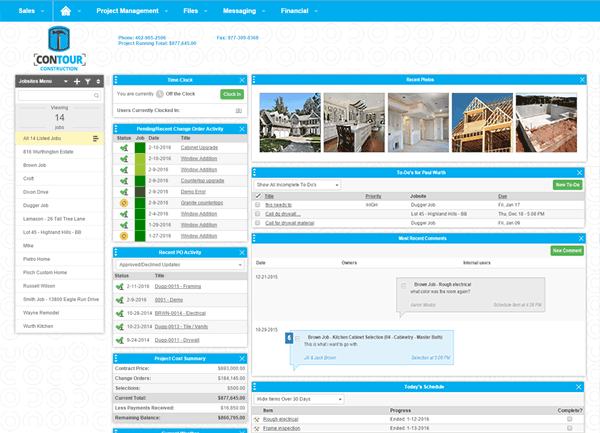
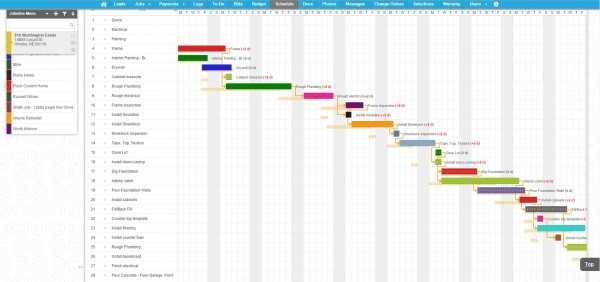
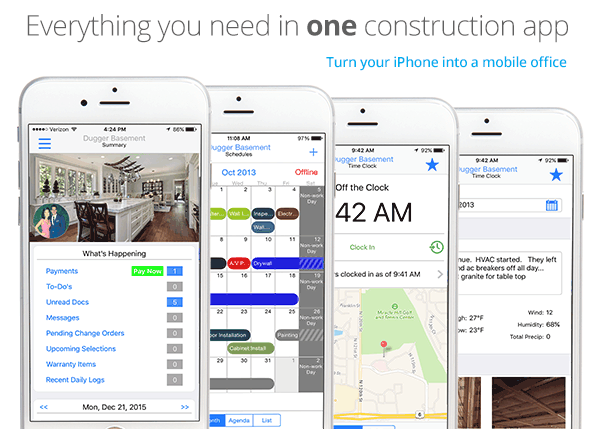
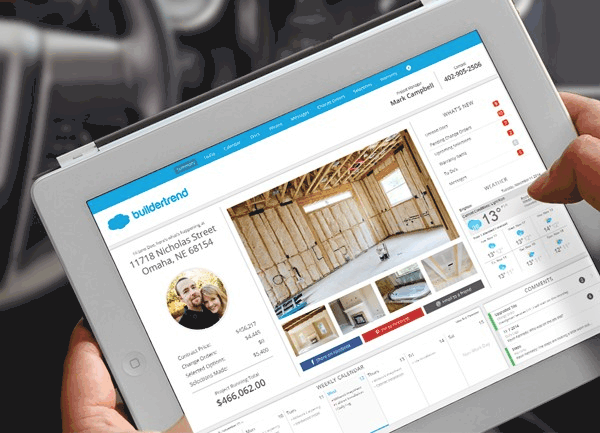
Description
Who Buildertrend Is Right For
Buildertrend suits custom home builders, remodelers, specialty contractors, design-build firms, and small to mid-size construction businesses that want end-to-end construction project management with unlimited users and projects on a flat monthly fee rather than per-user pricing.
The ideal buyer manages 5-100 active projects with mixed residential remodels, custom homes, and small commercial work. Core flow covers scheduling, daily logs, customer communication, selections, change orders, and accounting handoff to QuickBooks Online or Xero.
It is overkill for one-person handymen with under 5 projects per year (use Jobber Core or Housecall Pro) and underbuilt-by-comparison for commercial general contractors with deep RFI/submittal workflows, BIM coordination, and trade subcontractor management (look at Procore, Autodesk Construction Cloud, or Trimble Viewpoint).
Buildertrend vs Procore, CoConstruct, and Jobber
Procore wins on commercial construction depth and enterprise-grade workflows. CoConstruct (now part of Buildertrend after 2022 acquisition) was the residential alternative. Jobber wins on lower entry pricing for SMB service trades.
Buildertrend wins on unlimited users and projects on every plan, residential and remodelling focus, customer portal for selections and approvals, QuickBooks Online and Xero native integration, and 1 million+ users across 30,000+ companies. Three tiers (Essential ~$339/month, Advanced ~$499/month, Complete ~$829/month) plus volume-based custom quotes since 2026 rebrand.
Buildertrend 2026 Pricing
| Plan | Monthly USD (Annual Billing) | What's Included |
|---|---|---|
| Essential | ~$339/month | Core PM, scheduling, customer portal, daily logs, change orders, unlimited users/projects |
| Advanced (Most Popular) | ~$499/month | Everything in Essential + estimates and bids, financial tools, integrations |
| Complete | ~$829/month | Everything in Advanced + selections, RFIs, submittals, advanced financial tools |
| Onboarding Fee | $400-$1,500 | Depending on plan; annual subscribers sometimes get included |
Published pricing was removed in 2026 and replaced with volume-based custom quotes tied to 11 annual construction volume brackets. Third-party estimates: Essential $339, Advanced $499, Complete $829 per month. Annual prepayment reduces monthly cost by approximately 15-30%.
Fees and Limits to Watch For
- Volume-based custom quotes (2026): published pricing removed; quotes tied to 11 annual construction volume brackets.
- Onboarding fees: $400-$1,500 depending on plan; annual subscribers sometimes get included.
- Unlimited users and projects: flat monthly fee covers unlimited team members and active projects.
- Annual prepayment: reduces monthly cost by 15-30% vs month-to-month.
- Estimates and bids gated: requires Advanced or Complete tier.
- Selections, RFIs, and submittals: gated to Complete tier.
Integrations
- Accounting: QuickBooks Online (native), QuickBooks Desktop, Xero.
- Payment processing: Stripe, ACH, credit-card processing for client billing.
- Lead capture: built-in forms and lead funnel.
- Email marketing: Mailchimp, Constant Contact via integration.
- CRM: native lightweight CRM plus Salesforce, HubSpot via integration.
- Photos and documents: Dropbox, Google Drive, OneDrive via integration.
- Developer: REST API and webhooks.
Security and Compliance Posture
Buildertrend ships SSL/TLS encryption in transit, AES-256 at rest, role-based access control, GDPR-compliant data handling, SOC 2 Type II attestation, two-factor authentication, audit logs, and US data hosting with Canadian data residency options.
Customer portal access for clients secured with customer-controlled passwords and email-only invitations.
Customer Support and SLA
24/7 chat and email support across all paid tiers. Advanced and Complete tiers add priority response.
Omaha-headquartered Buildertrend with US support coverage and 1 million+ users across 30,000+ companies. Knowledge base, Buildertrend University training, and certified Buildertrend partners.
Eligibility and Sign-up
Buildertrend is available globally with primary focus on US, Canada, Australia, and UK construction. Sign-up via Buildertrend sales consultation.
Free demo available. Onboarding fees apply ($400-$1,500 depending on plan).
Mobile App and Customer Portal
iOS and Android apps cover project management, daily logs, photos, scheduling, and customer communication. Web admin fully responsive. Customer-facing client portal for selections, approvals, and progress tracking.
Pros and Cons
- Pros: unlimited users and unlimited projects on every plan (flat monthly fee), residential and remodelling focus, 1 million+ users across 30,000+ companies, native QuickBooks Online and Xero integration, customer portal for selections and approvals, CoConstruct customer migration post-2022 acquisition, SOC 2 Type II + GDPR-compliant, iOS and Android mobile apps.
- Cons: published pricing removed in 2026 (volume-based custom quotes), $400-$1,500 onboarding fees, estimates and bids gated to Advanced, selections/RFIs/submittals gated to Complete, narrower commercial construction depth vs Procore or Autodesk Construction Cloud, no native BIM coordination.
2026 Updates
The 2026 roadmap removed published pricing and introduced volume-based custom quotes tied to 11 annual construction volume brackets, deepened customer portal selections and change-order workflows, refreshed CoConstruct customer migration post-2022 acquisition, expanded QuickBooks Online and Xero integration, and improved iOS and Android mobile apps.
What Real Buyers Say
Custom home builders and remodelers on the r/Construction subreddit describe Buildertrend as the credible residential construction PM default when the buyer wants unlimited users and projects on flat monthly pricing rather than per-user fees.
Praised: unlimited users, customer portal, and QuickBooks integration. Friction: 2026 volume-based custom quotes and onboarding fees.
Buildertrend Alternatives
| Product | Best Fit | Starting Price |
|---|---|---|
| Procore | Commercial construction enterprise PM | Custom quote |
| Autodesk Construction Cloud | BIM coordination plus construction management | Custom quote |
| Jobber | SMB service trades | Core $49/month single user |
| JobNimbus | Roofing and exterior contractors | From $50/user/month |
| Houzz Pro | Interior design and home renovation | From $99/month |
Field Guide
| Vendor | Buildertrend |
| Headquarters | Omaha, Nebraska, United States |
| Scale | 1 million+ users across 30,000+ companies |
| Certifications | SOC 2 Type II, GDPR-compliant |
| Pricing model | Volume-based custom quotes (2026 rebrand); third-party estimates Essential $339, Advanced $499, Complete $829 |
| Onboarding | $400-$1,500 depending on plan |
How to Get Started With Buildertrend
- Open the official Buildertrend website and request a demo via sales.
- Discuss annual construction volume (Buildertrend uses 11 volume brackets for custom quotes) and modules required.
- Pick Essential (core PM), Advanced (adds estimates/bids/financial tools), or Complete (adds selections, RFIs, submittals).
- Pay onboarding fee ($400-$1,500) and connect QuickBooks Online or Xero for accounting.
- Roll out iOS and Android mobile apps to field crews and clients.
How to Cancel or Pause
Annual contracts per signed agreement. Cancellation terms negotiated at renewal. Data export covers projects, customers, scheduling, daily logs, and financials.
Eligibility Checklist
- You are a custom home builder, remodeler, specialty contractor, design-build firm, or small to mid-size construction business.
- You manage 5-100 active projects with mixed residential remodels, custom homes, and small commercial work.
- You want unlimited users and projects on flat monthly pricing.
- You use QuickBooks Online or Xero accounting.
- You do not need Procore or Autodesk Construction Cloud-scale commercial general contractor workflows with BIM coordination.
Pricing FAQ
- What does Buildertrend cost? Volume-based custom quotes since 2026. Third-party estimates: Essential ~$339/month, Advanced ~$499/month, Complete ~$829/month. Annual prepayment reduces monthly cost by 15-30%.
- Are there per-user fees? No. Every plan includes unlimited users and unlimited projects on flat monthly fee.
- What are onboarding fees? $400-$1,500 depending on plan; annual subscribers sometimes get included.
- When do estimates/bids and selections enable? Estimates and bids gated to Advanced; selections, RFIs, and submittals gated to Complete.
Bottom Line
Buildertrend is a credible 2026 shortlist option for custom home builders, remodelers, specialty contractors, design-build firms, and small to mid-size construction businesses that want end-to-end construction project management with unlimited users and projects on a flat monthly fee rather than per-user pricing.
Highlights: Omaha-built Buildertrend with 1 million+ users across 30,000+ companies. Residential and remodelling focus. Native QuickBooks Online and Xero integration. Customer portal for selections, approvals, and progress tracking. CoConstruct customer migration post-2022 acquisition. iOS and Android mobile apps.
Pricing: Volume-based custom quotes (2026 rebrand). Third-party estimates: Essential ~$339/month, Advanced (Most Popular) ~$499/month, Complete ~$829/month with annual billing. Onboarding fee $400-$1,500 depending on plan; annual subscribers sometimes get included. Unlimited users and unlimited projects on every plan. Annual prepayment reduces monthly cost by 15-30% vs month-to-month.
Trade-offs: Published pricing removed in 2026 (volume-based custom quotes tied to 11 annual construction volume brackets). $400-$1,500 onboarding fees. Estimates and bids gated to Advanced. Selections, RFIs, and submittals gated to Complete. Narrower commercial construction depth vs Procore or Autodesk Construction Cloud. No native BIM coordination.
Shortlist alternatives: Procore for commercial construction enterprise PM (custom quote), Autodesk Construction Cloud for BIM coordination plus construction management (custom quote), Jobber for SMB service trades (Core $49/month single user), JobNimbus for roofing and exterior contractors (from $50/user/month), and Houzz Pro for interior design and home renovation (from $99/month). For broader market context, see the related SaaSRat blog guide.
Verified on 2026-06-27. Vendor information verified from the official Buildertrend website.
Frequently Asked Questions
Is there a free plan or free trial for Buildertrend?
How much does Buildertrend cost?
What does Buildertrend integrate with?
Who is Buildertrend best for?
What are the best alternatives to Buildertrend?
Is Buildertrend GDPR / SOC 2 compliant?
Does Buildertrend have a mobile app?
What do real users say about Buildertrend?
How does Buildertrend compare to its top competitor?
Does Buildertrend offer customer support?
Find Your Perfect Software
See how it can transform your workflow
- Personalized for your needs Tailored recommendations based on your unique requirements.
- Save time & resources Streamline your workflow and boost team productivity.
- Trusted by thousands Join 10,000+ businesses already growing with SaaSrat.
You're all set! 🎉
A specialist for will reach out within 1 business day with tailored recommendations for your needs.