

Bill.com
by Bill.com
What is Bill.com?
Get Best Quote for Bill.com
Connect with SaaSrat experts to get the best quote for your business.
You're all set!
A specialist for Bill.com will reach out within 1 business day.
Bill.com Features
Bill management inbox with email PDF and EDI capture
Automated approval workflows with custom routes
BILL Network of millions of vendors and buyers
Two-way QuickBooks Online Xero NetSuite Sage Intacct sync
AI invoice coding suggestions
Vendor payments via ACH check virtual card and international wire
View All 15 Features
Bill.com Pricing Plans
Essentials
- Manual CSV accounting software integration, automated approval workflows, bill management inbox, W-9 agent, vendor network access, standard approval policies, 6 standard user roles.
Team
- Automatic 2-way sync with QuickBooks Online/Pro/Premier and Xero, granular AP and AR controls, custom user roles, W-9 agent, AI invoice coding, vendor network access.
Corporate
- Most popular tier. Additional customization, automatic 2-way sync with major accounting software, procurement features, custom approval policies, approver-only user discounts, unlimited purchase requesters.
Enterprise
- Enhanced security, multi-location accounting, priority support, 2-way sync with NetSuite/Sage Intacct/Microsoft Dynamics, dual control, API access.
BILL Spend & Expense
- Free product. Corporate cards (physical and virtual), budget enforcement, real-time expense capture, automatic reconciliation. Credit line access up to $5M. Monetized via card interchange rather than subscription fees.
Bill.com Screenshots
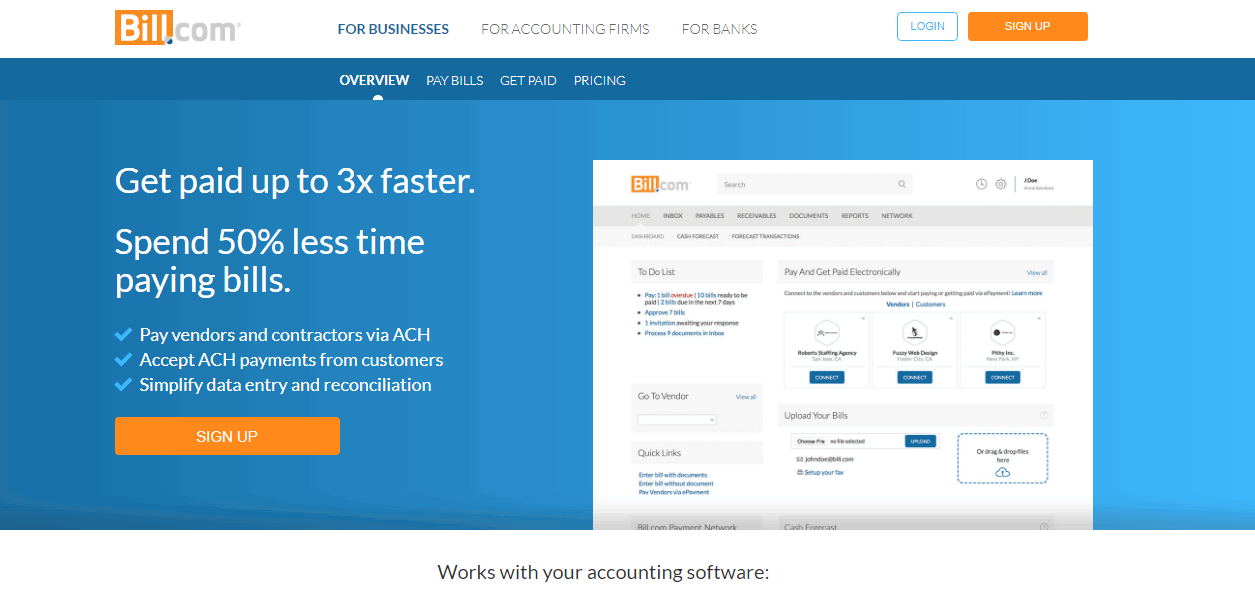
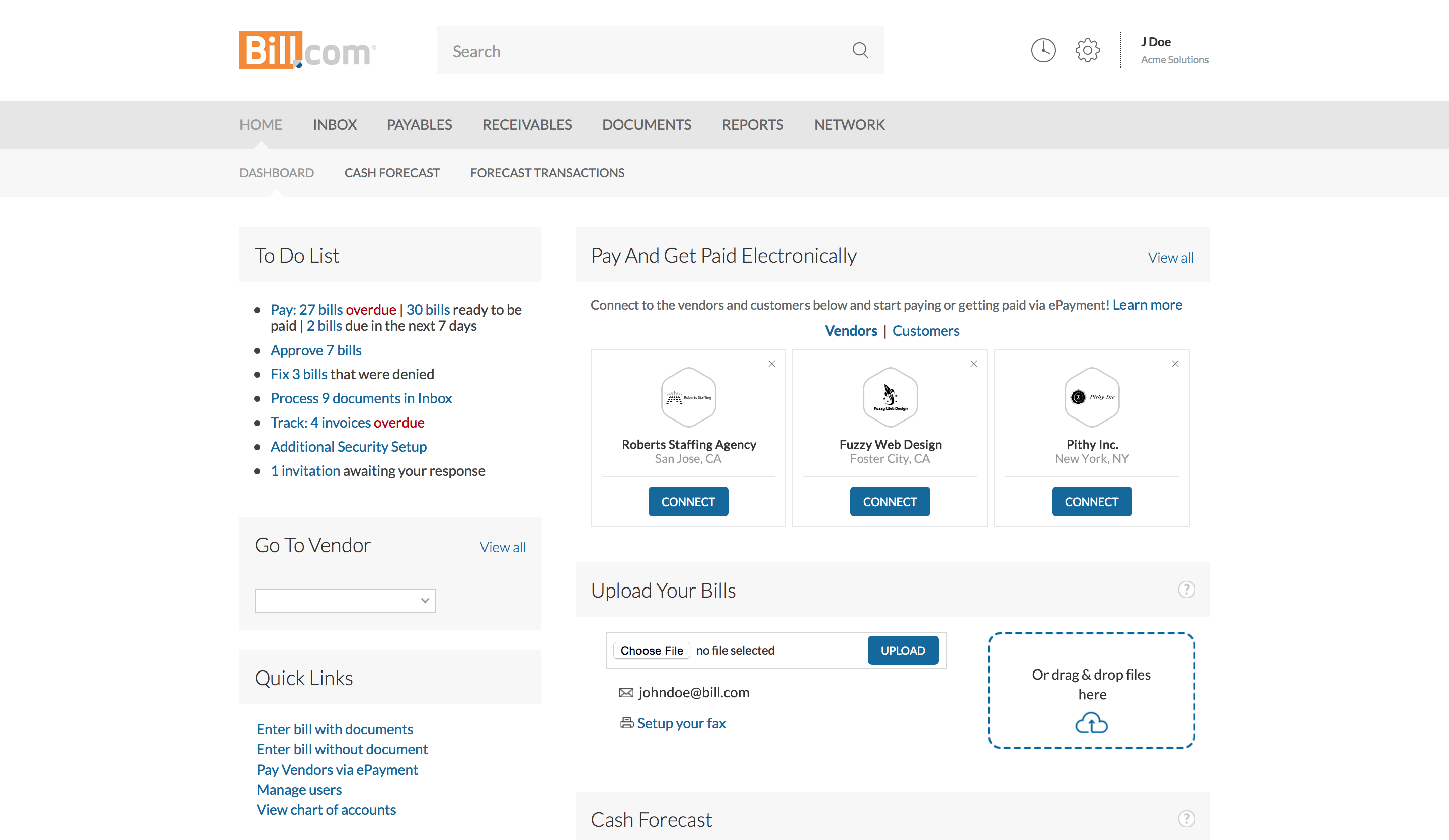
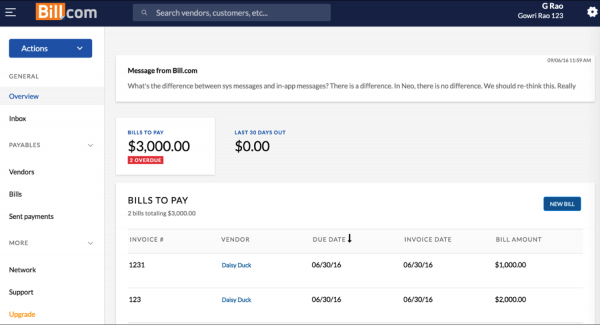
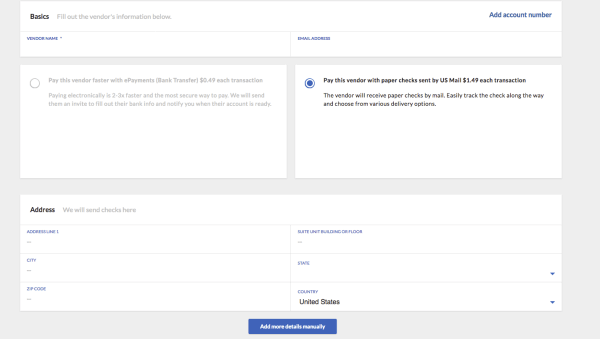
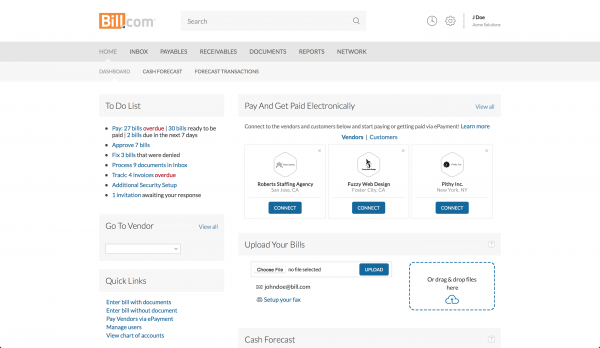
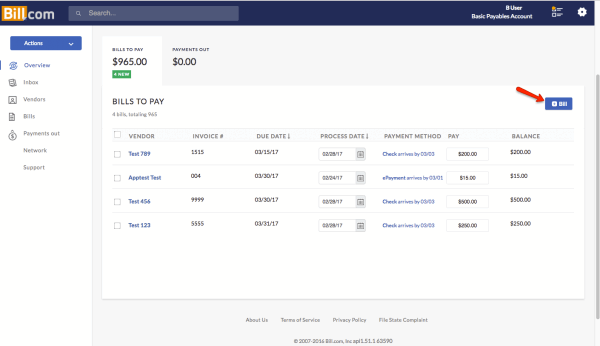
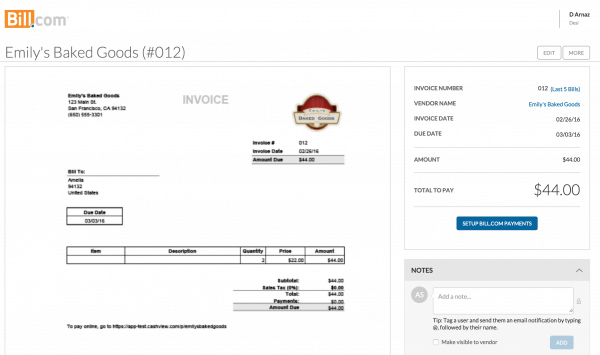
Description
What is BILL?
BILL (formerly Bill.com) is the leading SMB and mid-market accounts payable and accounts receivable automation platform. The company was founded in 2006 and is headquartered in San Jose, California. BILL is publicly traded on NYSE (ticker BILL) and serves more than 480,000 businesses with the BILL Network connecting millions of buyers and suppliers.
The strongest positioning is the BILL Network effect. When a new vendor receives a BILL payment from one customer, that vendor is onboarded into the BILL Network, making it easier for other BILL customers to pay them electronically. The network now covers millions of vendors and buyers, eliminating the manual W-9 collection and ACH banking detail exchange that paper-and-email AP requires.
Who BILL is built for
BILL fits SMB and lower mid-market companies (5 to 500 employees) processing 50 to 5,000 invoices per month, plus the accounting firms that serve them. The strongest fit is QuickBooks Online and Xero shops automating manual AP workflow.
Accounting firms are a major buyer segment. The BILL Accountant Partner Program lets firms manage AP and AR across dozens of client companies from one console. CPA firms running outsourced bookkeeping use BILL as their canonical AP tool for clients.
It is less of a fit for mid-market and enterprise (AvidXchange, Tipalti, Coupa fit better at higher volume and complexity), for global organizations needing international payment depth (Tipalti is stronger globally), or for companies with no formal AP process where the platform overhead exceeds the time savings.
BILL pricing plans
| Plan | Price (user/mo) | Best for |
|---|---|---|
| Essentials | $49 | Manual CSV accounting sync, standard approval |
| Team | $65 | Two-way QuickBooks/Xero sync, AI invoice coding |
| Corporate | $89 (Most Popular) | Custom approvals, procurement, unlimited approvers |
| Enterprise | Custom pricing | NetSuite Sage Intacct Microsoft Dynamics, dual control, API |
| BILL Spend & Expense | $0 | Corporate cards, budgets, expense tracking, $5M credit line |
Essentials at $49/user/month covers the core AP workflow with manual CSV accounting integration, automated approval workflows, BILL Network vendor access, and 6 standard user roles. Team at $65/user/month adds automatic two-way sync with QuickBooks Online/Pro/Premier and Xero, granular AP/AR controls, custom user roles, and AI invoice coding.
Corporate at $89/user/month is the most popular tier with additional customization, automatic two-way sync with major accounting software, procurement features, custom approval policies, approver-only user discounts, and unlimited purchase requesters. Enterprise is custom-quoted with enhanced security, multi-location accounting, priority support, NetSuite/Sage Intacct/Microsoft Dynamics integration, dual control, and API access.
BILL Spend & Expense is the free product covering corporate cards with budget enforcement, expense tracking, and access to credit lines up to $5M. This sits alongside the paid AP/AR platform and uses interchange revenue rather than subscription fees as the business model.
BILL core capabilities
Bill management inbox is the spine. Vendors send invoices to a dedicated BILL email address; OCR extracts vendor, invoice number, amount, GL codes, and due date. Invoices route through approval workflows based on amount thresholds, GL codes, departments, projects, or custom rules. Once approved, BILL initiates the payment.
Approval workflows can be linear (Approver 1 then Approver 2 then Approver 3) or threshold-based (under $1,000 needs 1 approver, over $10,000 needs 3). Mobile approval lets approvers clear queues from phone. Audit trail records every action for SOX compliance.
BILL Network and vendor payments
The BILL Network connects millions of buyers and suppliers. When a vendor receives a payment via BILL, they get auto-enrolled in the network with verified ACH banking details. Subsequent BILL customers paying that vendor see them already in the network and can pay electronically without re-collecting W-9 or ACH details.
Payment methods include ACH (free for domestic), virtual card (BILL earns interchange, some rebate to customer), paper check (BILL prints and mails), and international wire (FX conversion handled). For payments to vendors not yet in the BILL Network, BILL can send the payment by check or invite the vendor to join for electronic payment.
Two-way accounting integration
QuickBooks Online and Xero integrations are two-way: vendors, GL codes, classes, customers, and chart of accounts sync from accounting to BILL; bills, payments, and adjustments sync back from BILL to accounting. The integration is one of the deepest in the SMB AP category and the primary reason QuickBooks and Xero shops standardize on BILL.
NetSuite, Sage Intacct, and Microsoft Dynamics integrations on Enterprise tier handle more complex multi-entity accounting workflows. Sage Intacct integration is particularly deep, supporting project codes, customer codes, and class codes flowing bi-directionally.
AI invoice coding
AI invoice coding (Team tier and up) suggests GL accounts, departments, classes, and customer codes based on past coding patterns for similar invoices from the same vendor. Accountants review and approve coding rather than manually keying it for every invoice. For high-volume AP, this reduces coding time significantly.
Accounts receivable
BILL AR handles customer invoicing, online payment links (ACH and credit card), payment reminders, and aged receivables reporting. Customers receive invoices by email with embedded pay-now button. Once paid, the receivable closes automatically and the deposit reconciles in the accounting system via the two-way sync.
For SMB businesses combining AP and AR in one platform, this provides a single source of truth for cash flow. The AR side is less developed than the AP side; standalone AR tools like Stripe Invoicing or Chargebee offer more depth for SaaS or recurring billing.
BILL Spend & Expense
BILL Spend & Expense (formerly Divvy, acquired in 2021) is the free corporate card and expense management product. Customers receive corporate cards (physical and virtual) for employee spending with budget enforcement, real-time expense capture, and automatic reconciliation to the accounting system. Credit lines up to $5M back the cards.
The free tier is genuine; BILL earns interchange revenue from card transactions rather than subscription fees. For SMB and mid-market companies wanting to control employee spend without buying a separate Ramp or Brex subscription, BILL Spend & Expense is a competitive bundled option.
W-9 agent and vendor onboarding
W-9 Agent automates IRS W-9 collection from vendors during onboarding. Vendors receive an automated email request, complete the W-9 electronically, and BILL stores the document for 1099 generation at year-end. For SMB companies with many small vendors, automated W-9 management eliminates a significant manual finance task.
Procurement on Corporate
Corporate tier adds procurement features: purchase requisitions, purchase orders, three-way match (PO, receipt, invoice), and vendor management. For SMB companies graduating from email-based purchasing to formal procurement, this is the differentiator from Essentials and Team.
Integrations
Beyond accounting, BILL integrates with payroll (ADP, Gusto, Paychex), CRM (Salesforce, HubSpot), inventory (TradeGecko, Cin7), Slack, Microsoft Teams, Tallie (expense management), and many others. REST API on Enterprise handles custom integrations.
Mobile and offline
iOS and Android apps cover invoice approval, payment authorization, document review, and expense capture. Offline mode is limited; most workflows require a connection. Mobile experience focuses on approval rather than full AP workflow management.
Security and compliance
BILL holds SOC 1 Type II, SOC 2 Type II, and PCI DSS compliance. Bank-grade encryption secures payment data. Multi-factor authentication is enforced. SSO via SAML is available on Corporate and Enterprise. Dual control (require two approvers for payments) is Enterprise-only.
BILL vs AvidXchange
AvidXchange is the middle-market AP automation specialist with deeper enterprise approval workflows, real estate verticals (Yardi, MRI integration), and managed payment delivery. BILL is the SMB and lower-mid-market leader with simpler workflow and the BILL Network advantage. Pick AvidXchange for middle-market AP at 1,000+ invoices/month with vertical-specific needs. Pick BILL for SMB and accounting-firm-served AP on QuickBooks or Xero.
BILL vs Tipalti
Tipalti is the global AP and supplier payments specialist with 190+ country support and deeper international payment capabilities. BILL is US-focused with stronger SMB and accountant ecosystem. Pick Tipalti for global AP with international suppliers. Pick BILL for US SMB AP with QuickBooks or Xero focus.
BILL vs Ramp and Brex
Ramp and Brex are spend management challengers with corporate cards, expense management, and bill pay in one product, free for the basic tier. BILL combines paid AP/AR with free BILL Spend & Expense for the cards layer. Different positioning: Ramp/Brex are spend-first with bill pay added, BILL is AP-first with cards bundled separately. Pick Ramp/Brex for VC-backed startups with simple AP. Pick BILL for established SMB AP needs.
BILL vs Stampli
Stampli is the AI-first AP tool with invoice-centric collaboration. BILL has the broader product (AP + AR + cards + procurement) and BILL Network advantage. Pick Stampli for AP-only with AI focus on approval acceleration. Pick BILL for broader SMB financial operations across AP, AR, and cards.
Buyer pitfalls to avoid
Three patterns hurt BILL rollouts. First, picking Essentials when Team's two-way QuickBooks/Xero sync is the value: manual CSV sync becomes the bottleneck quickly. Most paying customers should start on Team.
Second, ignoring the BILL Network: the network effect is the moat. Customers who don't actively use BILL payments (still mailing checks themselves) underuse the platform.
Third, treating it as a complete replacement for accounting: BILL is AP/AR specialist, not general ledger. Pair with QuickBooks Online, Xero, NetSuite, or Sage Intacct for the underlying accounting system.
Implementation and time to value
SMB direct deployment: 1-3 weeks for vendor import, accounting integration, approval workflow setup, and team training. Mid-market deployment (100-500 users): 4-8 weeks adding custom approval policies, procurement workflow, and multi-location setup. Enterprise: 8-16 weeks adding NetSuite or Sage Intacct integration, SSO, dual control, and API integration. BILL provides direct customer success on Corporate and Enterprise.
Customer support
All plans include email and chat support during US business hours. Corporate and Enterprise add priority response and dedicated customer success. The BILL Community is active with SMB finance and accounting practitioners. Annual BILL conference brings customers together.
The Bottom Line on BILL
BILL is the right call for SMB and lower mid-market companies (5-500 employees) and the accounting firms that serve them, especially QuickBooks Online and Xero shops automating manual AP workflow with millions of vendors already in the BILL Network.
Standout strengths: BILL Network of millions of vendors and buyers with verified ACH details, two-way QuickBooks Online Xero NetSuite Sage Intacct sync, AI invoice coding from Team tier, BILL Spend & Expense free corporate cards with $5M credit lines, W-9 agent for vendor onboarding, accounting firm partner program for managing multiple clients, mobile approval for clearing queues from phone.
Pricing fits SMB budgets: Essentials $49/user/mo, Team $65/user/mo, Corporate $89/user/mo (most popular), Enterprise custom-quoted. BILL Spend & Expense free (monetized via card interchange). Per-user pricing scales with finance team size.
Trade-offs to weigh: not the right tool for middle-market high-volume AP (AvidXchange or Coupa fit better at 1,000+ invoices/month). International payment depth lighter than Tipalti. AR functionality less developed than AP; standalone AR tools go deeper. Per-user pricing escalates faster than flat-rate AP tools at larger finance teams.
Alternatives worth comparing: AvidXchange for middle-market US AP automation, Tipalti for global AP with international suppliers, Stampli for AI-first invoice collaboration, Ramp and Brex for VC-backed spend management with bill pay, Coupa for upper-enterprise procure-to-pay, MineralTree for similar middle-market AP, Plate IQ for restaurant AP. Pricing and capabilities verified on bill.com/pricing on 2026-06-27.
Frequently Asked Questions
Is there a free plan or free trial for Bill. com?
How much does Bill. com cost?
What does Bill. com integrate with?
Who is Bill. com best for?
What are the best alternatives to Bill. com?
Is Bill. com GDPR / SOC 2 compliant?
Does Bill. com have a mobile app?
What do real users say about Bill. com?
How does Bill. com compare to its top competitor?
Does Bill. com offer customer support?
Find Your Perfect Software
See how it can transform your workflow
- Personalized for your needs Tailored recommendations based on your unique requirements.
- Save time & resources Streamline your workflow and boost team productivity.
- Trusted by thousands Join 10,000+ businesses already growing with SaaSrat.
You're all set! 🎉
A specialist for will reach out within 1 business day with tailored recommendations for your needs.