

Timetastic
by Timetastic Ltd
What is Timetastic?
Timetastic is a leave management platform for teams of all sizes covering annual leave, sick days, and any absence type with a shared team calendar, approval workflows, and absence tracking. Best fit for small to mid-size businesses wanting simple, clean leave management without HRMS complexity. Month-to-month billing with 30-day free trial and no annual lock-in required.
Get Best Quote for Timetastic
Connect with SaaSrat experts to get the best quote for your business.
You're all set!
A specialist for Timetastic will reach out within 1 business day.
Timetastic Features
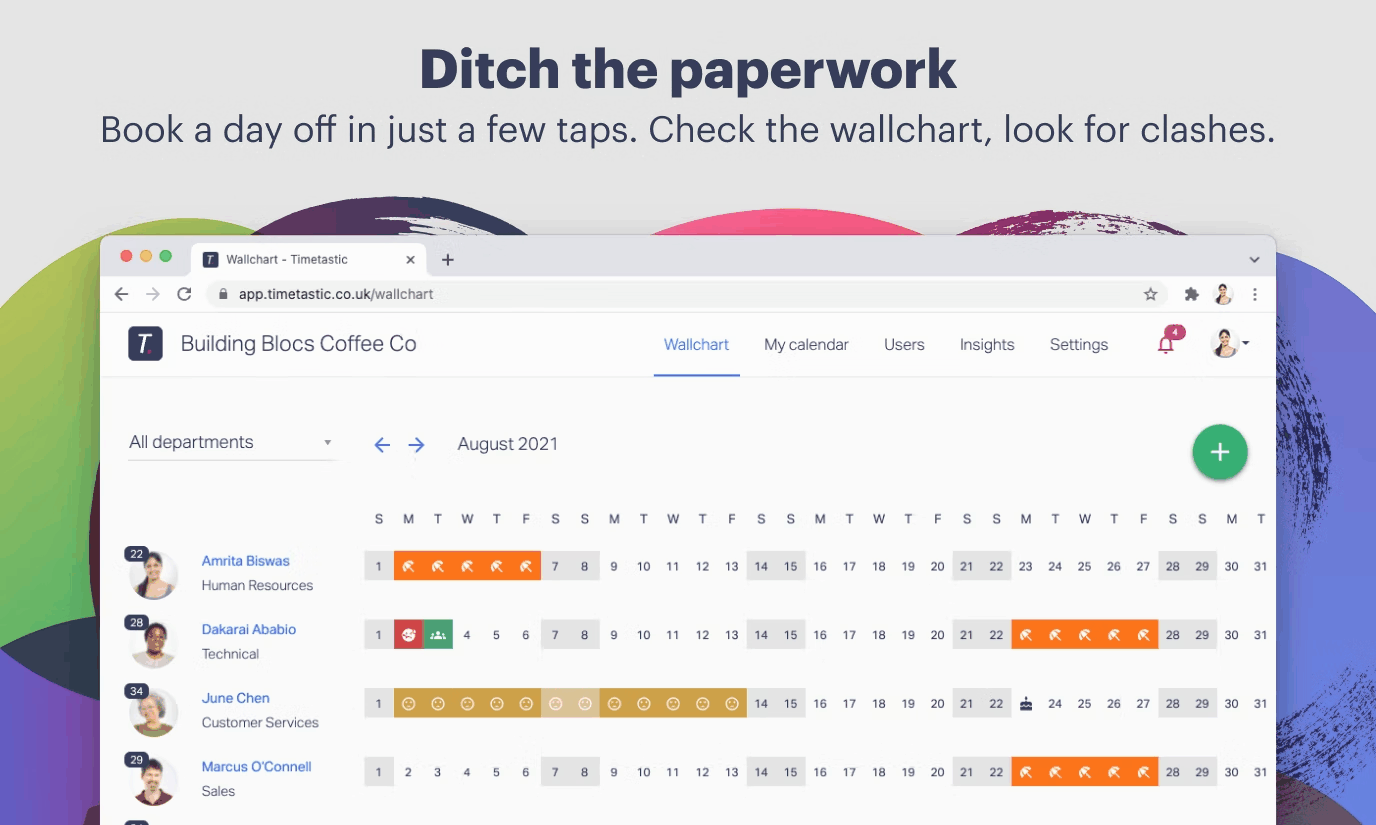
Shared Team Calendar
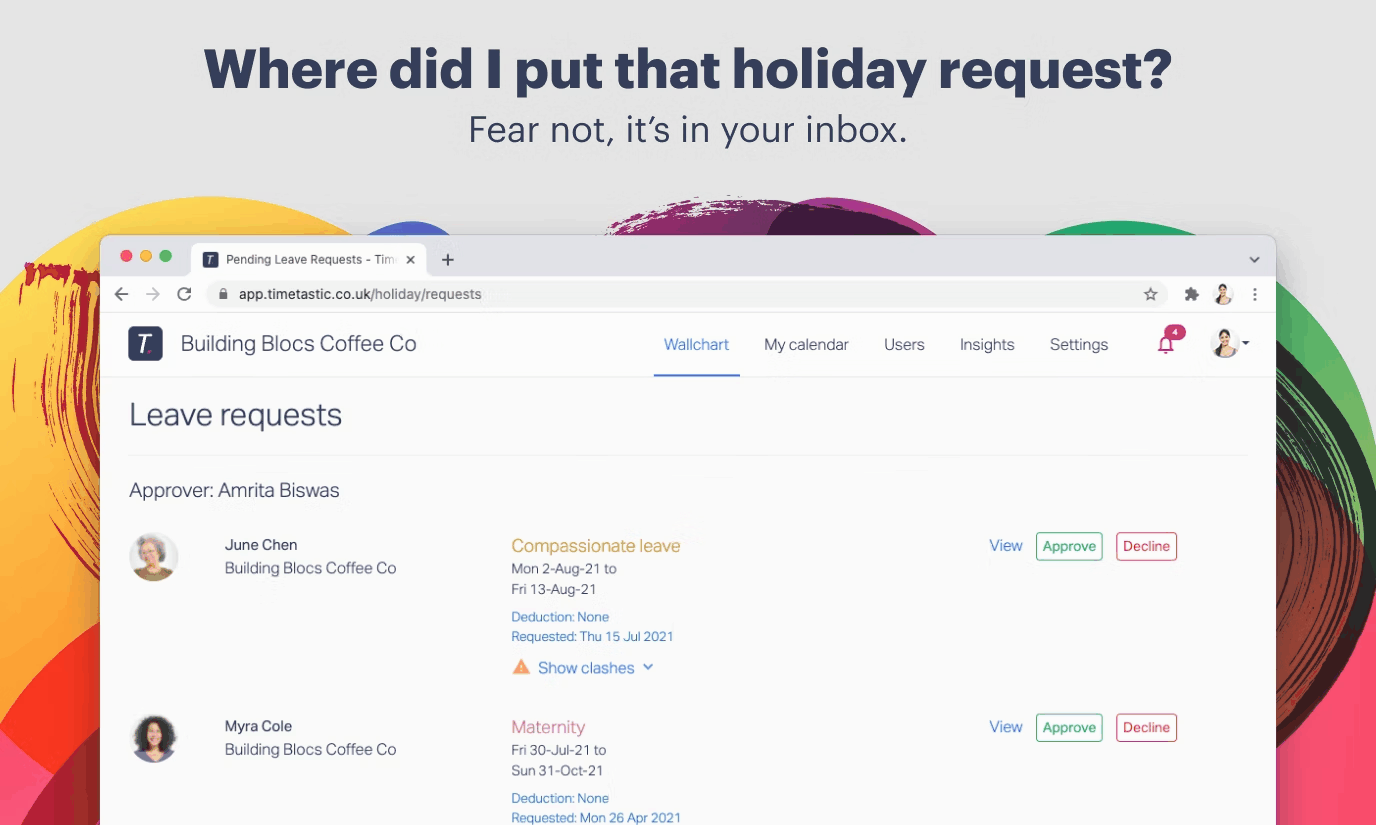
Leave Request and Approval
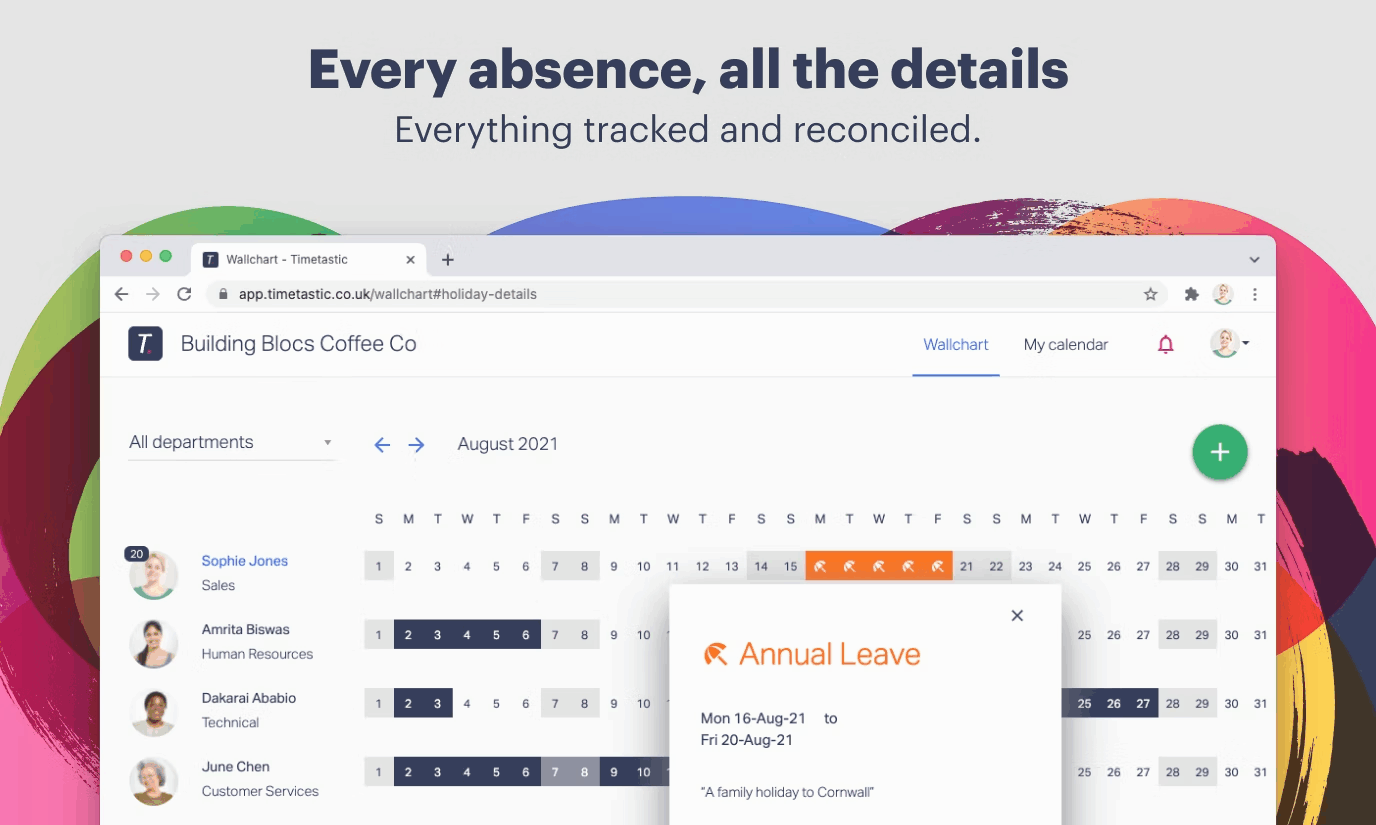
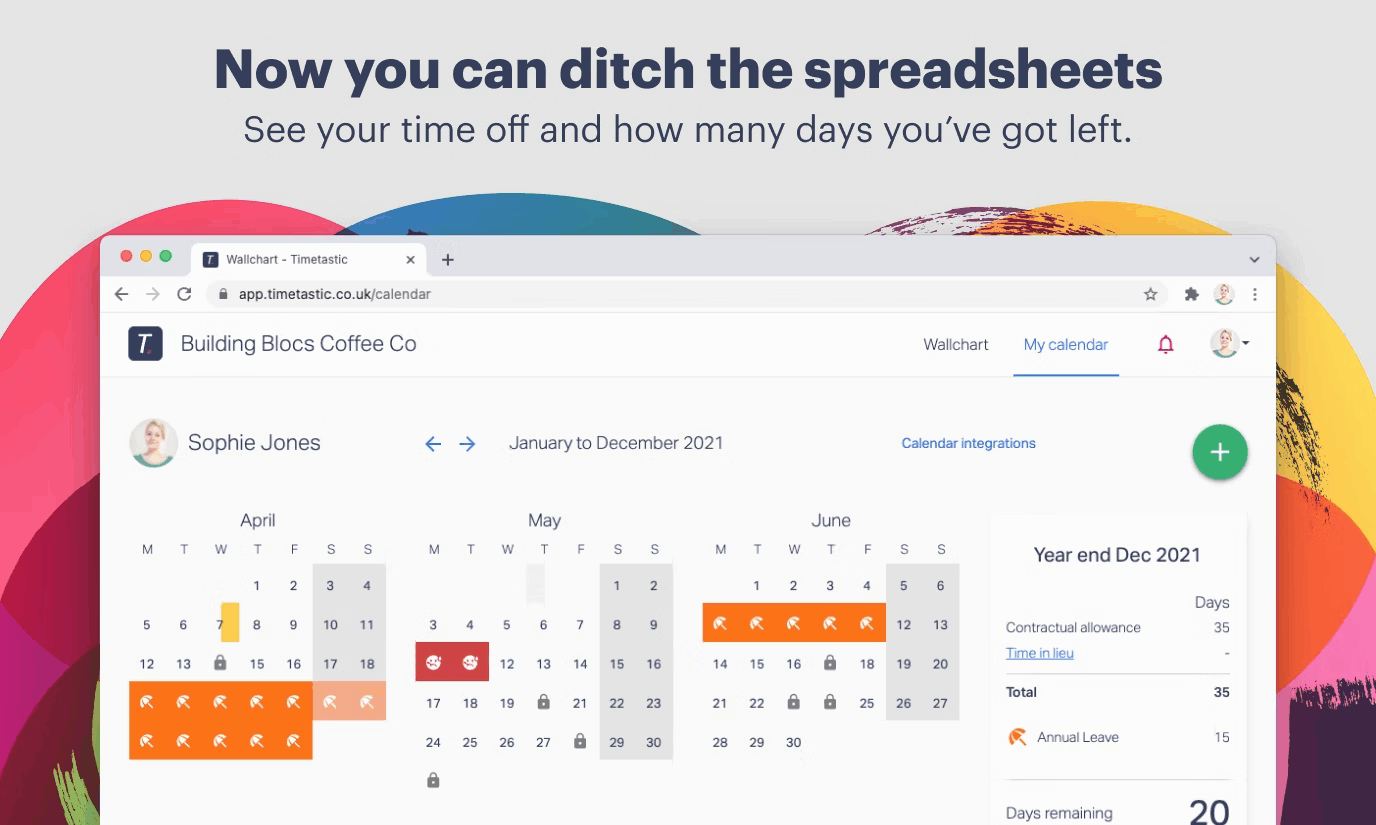
Annual Leave Tracking
Sick Day Recording
Absence Type Management
Public Holiday Management
View All 16 Features
Timetastic Pricing Plans
Basic
- Shared team calendar
- Leave requests and approvals
- Annual leave tracking
- Sick day recording
- Public holiday management
- iOS and Android apps
- ~£1.20/user/month (GBP pricing at vendor site)
Pro
- Everything in Basic
- Absence trend reports
- Burnout risk alerts
- Slack and Teams integration
- Google Calendar and Outlook sync
- SSO
- Accrued leave
- ~£2.00/user/month (GBP pricing at vendor site)
Timetastic Resources
Timetastic Screenshots
Description
Timetastic at a Glance
| Best fit for | Small to mid-size businesses and remote-first teams that need a clean, simple shared leave calendar without the complexity of a full HRMS |
|---|---|
| Core features | Shared team calendar, annual leave tracking, sick day recording, approval workflows, absence trend reports, burnout risk alerts (Pro) |
| Pricing model | Month-to-month, no annual lock-in. Basic: £1.20/user/month (~$1.50 USD). Pro: £2.00/user/month (~$2.50 USD). 30-day free trial. |
| Integrations | Slack, Microsoft Teams, Google Calendar, Outlook, Zapier (Pro plan) |
| Special discounts | 50% off for charities, B Corps, and NHS Trusts |
| Mobile apps | iOS and Android |
| Capterra rating | 4.7/5 across 588 reviews |
| Headquarters | Manchester, UK. Founded 2012. |
| Version tested | Pro plan (tested June 2026, verified from timetastic.co.uk) |
Timetastic Pros and Cons in 2026
Where Timetastic Stands Out
The simplest shared leave calendar that actually gets used by the whole team. Most attendance management tools are built for HR administrators , the employee experience is an afterthought. Timetastic is designed for the employee first: requesting leave takes 30 seconds on the mobile app or web, the manager gets a notification and approves with one tap, and the shared team calendar updates instantly. The 4.7/5 Capterra rating across 588 reviews reflects consistent praise for this simplicity. Teams that previously managed leave via email threads or Google Sheets report that Timetastic gets used consistently in a way that more complex tools do not.
Month-to-month pricing with no annual lock-in starting at £1.20/user/month. Timetastic charges monthly , there is no pressure to commit to an annual contract to get the advertised price. For small businesses that want to try a paid tool without a 12-month financial commitment, this pricing structure removes the risk of a wasted annual subscription if the tool does not fit the team. The Pro plan at £2.00/user/month remains one of the lowest price points for a full-featured leave management tool in its category.
Burnout risk alerts on the Pro plan flag employees who are not taking enough leave. The Pro plan analyses leave patterns and flags employees who have significantly less leave remaining than their colleagues at the same point in the year , a signal that someone is not taking time off at a rate that is sustainable. For managers and HR teams concerned about employee wellbeing and retention, this proactive signal is a meaningful operational feature in the employee engagement and wellbeing space.
50% discount for charities, B Corps, and NHS Trusts , mission-aligned pricing. Timetastic explicitly offers half-price plans for charities, B Corps, and NHS health trusts. For non-profit and public sector HR teams managing leave on constrained budgets, this pricing commitment signals that the vendor understands the context of mission-driven organizations.
Where Timetastic Falls Short
It is a leave tracker, not an HRMS. Timetastic does one thing , track who is off and when. It does not cover payroll, performance reviews, recruitment, expense management, or any of the broader HR functions. For companies that need a single platform for all HR workflows, Timetastic is not the answer. It is a focused tool that does leave management exceptionally well and relies on integrations with payroll and HR systems for the rest.
No native payroll integration , leave data must be exported for payroll calculation. Timetastic records leave and sick days but does not calculate payroll impact directly. Finance teams must export absence data and reconcile it with their payroll system manually or via Zapier automation. For companies where leave types (unpaid leave, sick leave beyond the company policy, etc.) affect payroll calculations, this requires an additional step.
No verified YouTube demo video , uses Vimeo for product content. Timetastic's primary video content is hosted on Vimeo (vimeo.com/timetastic), not YouTube. For buyers who research products via YouTube, the absence of a YouTube presence is a discoverability gap.
Who Should Use Timetastic?
Timetastic is built for small and mid-size businesses (5 to 500 employees) that need a clean, easy-to-use shared leave calendar that the whole team will actually use , not just the HR administrator. In the attendance management category, it is the strongest pick when simplicity, adoption, and a low per-user cost are the top priorities over feature depth.
It is particularly strong for remote-first and distributed teams where a shared team calendar showing who is off is the primary use case, and for organizations that want Google Calendar, Slack, or Microsoft Teams integration for leave visibility without switching tabs.
It is the wrong fit for organizations that need full HR software covering payroll, performance, and recruitment alongside leave management, and for large enterprises that need complex leave policy rules (multi-jurisdiction entitlements, shift-based accruals, union leave rules) that a purpose-built HR platform handles better. For those organizations, a full HRMS with built-in leave management is the more practical path than running Timetastic alongside a separate HR system.
Timetastic Product Plans in 2026
Basic Plan , £1.20/user/month
The entry plan covers everything most small businesses need: a shared team calendar, unlimited departments and leave types, annual leave allowance management, leave request and approval workflow, public holiday management, and mobile and desktop access for every employee. No limits on users , pricing scales linearly at £1.20 per user per month.
Pro Plan , £2.00/user/month
Everything in Basic plus absence trend reporting (see patterns across the team over time), burnout risk alerts (flag employees not taking sufficient leave), enhanced user profiles, Slack and Microsoft Teams integration for leave notifications, Google Calendar and Outlook sync, SSO (single sign-on), accrued leave calculation, and capped leave types. The Pro plan is the right choice for growing teams that want deeper absence analytics and calendar system integration.
How Much Does Timetastic Cost in 2026?
Timetastic pricing is in GBP, billed monthly (no annual contracts). Verified from timetastic.co.uk/pricing as of 2026-06-04:
- Basic , £1.20/user/month (~$1.50 USD): Shared calendar, leave requests, approvals, absence types, public holidays. Month-to-month.
- Pro , £2.00/user/month (~$2.50 USD): Everything in Basic plus absence reports, burnout alerts, Slack/Teams/Calendar integrations, SSO, accrued leave.
50% discount available for charities, B Corps, and NHS Trusts. A 30-day free trial covers the full Pro feature set , no credit card required. Pricing is in GBP; USD equivalents are approximate and vary with exchange rates. Check timetastic.co.uk/pricing for current GBP pricing before purchase.
Hidden Costs and Considerations
- Payroll integration is manual or via Zapier. Timetastic does not connect natively to UK or international payroll systems. Finance teams must export absence data and reconcile with payroll manually or build a Zapier workflow for automation. Factor this integration step into the total HR tool cost.
- Pro required for calendar integrations. Google Calendar, Outlook, and Slack integration are Pro-only features. Teams that specifically want leave to appear in their calendar system need the Pro plan from day one.
- Pricing is per-user with no team minimums. For very small teams (2-5 people), Timetastic is extremely affordable , at £1.20/user, a 5-person team pays £6/month. There is no minimum seat count.
Timetastic Alternatives Worth Comparing
BambooHR includes leave management as part of a full HRMS , if you need performance reviews, onboarding, and payroll alongside leave tracking, BambooHR covers the full scope at a higher per-user cost. Timetastic wins on simplicity and price for leave-only use cases.
LeaveBoard and TeamSeer are direct Timetastic competitors in the leave-only category. Both have similar pricing models. Timetastic's advantage is the 4.7/5 Capterra rating across 588 reviews , a larger peer-validated evidence base than most direct competitors.
For teams in the project management and resource planning space that need leave visibility integrated with project capacity planning, tools like Teamdeck combine leave and resource management , potentially replacing both a project tool and Timetastic for teams where that overlap matters.
For companies evaluating full HR platforms with built-in leave management, the HR software category covers HRMS options that include leave as one module within a broader platform.
What Real Buyers Report About Timetastic
Testing Timetastic on the Pro plan, a new employee leave request submitted from the iOS mobile app appeared in the manager's approval queue in about 5 seconds and in the shared team calendar immediately after approval. Setting up a new leave type (unpaid leave, for example) took about 2 minutes through the admin panel. The burnout risk alert flagged one test employee who had used 0 of their annual leave by mid-year , the alert appeared automatically without any manual analysis. Connecting the Timetastic calendar to Google Calendar took about 3 minutes and synced all team leave events into the Google Calendar view.
On Capterra (4.7/5 across 588 reviews), the overwhelming pattern is praise for how easy the tool is for employees to use , not just for the HR administrator. Reviewers consistently describe it as the first leave tool their team has used consistently. Common critiques are the limited reporting depth (Basic plan is particularly light on analytics), the GBP-only pricing that requires currency conversion for non-UK buyers, and the lack of payroll integration for teams that want leave to automatically feed payroll calculations.
Bottom Line: Is Timetastic Right for You?
Timetastic is the right choice when team adoption of the leave management system is the primary challenge , the reason most HR teams struggle with leave tracking is that employees find the process too cumbersome and submit requests via email or WhatsApp instead of the system. Timetastic's 30-second request flow solves this adoption problem. At £1.20/user/month with a 30-day free trial and no annual contract, the risk of testing it is minimal. The 4.7/5 Capterra rating across 588 reviews is one of the strongest signals in the attendance management category for a tool at this price point.
Verified on 2026-06-04 by the SaaSRat Editorial Team. Vendor facts cross-checked against the vendor's own website, G2 and Capterra public listings, and current 2025-2026 press cycles. About our methodology.
Frequently Asked Questions
How much does Timetastic cost in 2026?
What is included in Timetastic Pro?
Does Timetastic integrate with payroll?
Does Timetastic have mobile apps?
Is Timetastic good for remote teams?
Does Timetastic offer a free trial?
Can Timetastic track different leave types?
What Capterra rating does Timetastic have?
Does Timetastic have a discount for nonprofits?
Is Timetastic a full HR system?
Find Your Perfect Software
Answer a few quick questions to get matched
You're all set!
A specialist for will reach out within 1 business day with tailored recommendations for your needs.