

Stripo
by Stripo • Founded 2007
What is Stripo?
Get Best Quote for Stripo
Connect with SaaSrat experts to get the best quote for your business.
You're all set!
A specialist for Stripo will reach out within 1 business day.
Stripo Features
Drag-and-drop email editor with HTML and AMP support
1450+ pre-designed templates
Image bank with 300K+ stock images
Module library for reusable email blocks
Cloud collaboration with team commenting
Export to Mailchimp Brevo SendGrid HubSpot Klaviyo Constant Contact MailerLite and 80+ other ESPs
View All 15 Features
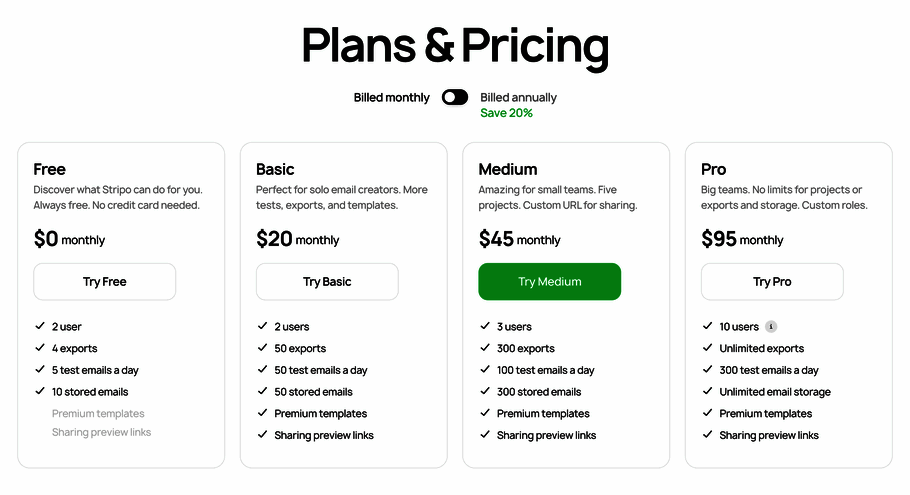
Stripo Pricing Plans
Free
- Basic editor functionality with watermark on exports, 4 exports per month limit, basic template access. For solo evaluation and very light use.
Basic (annual)
- $20/month with annual billing only. Removes Stripo branding from exports, HTML imports, additional cloud storage, expanded template access. For solo email designers and freelancers. Annual TCO: $240/year.
Medium (annual)
- $45/month with annual billing. Team collaboration tools, additional user seats included up to plan limit, expanded template access. For small email teams. 5-person team TCO: $540/year.
Pro (annual)
- $95/month with annual billing. Enterprise features: roles and permissions, priority support, white-labeling options, Litmus rendering test integration (requires separate Litmus subscription). 20-person team TCO: $1,140/year.
Prime
- Custom pricing for SaaS companies embedding the Stripo Plugin into their own products. White-labeling, custom integration, dedicated support. For platforms wanting to offer a native email editor to their customers.
Stripo Screenshots
Description
What Stripo actually is
Stripo is a cloud-based email template editor built by Ukraine-based Stripo Inc., founded in 2017. The product positions as the drag-and-drop alternative to hand-coding HTML emails or paying enterprise prices for Litmus Builder. More than 1.2 million users have created emails on the platform globally.
The positioning is squarely as the cloud-collaborative email builder. Email designers and marketing teams build templates with drag-and-drop blocks, save them to cloud storage, share with teammates for review, then export the rendered HTML to whichever ESP the team uses for sending (Mailchimp, Brevo, SendGrid, HubSpot, Klaviyo, and 80+ others).
Who actually uses Stripo
Stripo fits three buyer profiles. First, in-house email marketers at SMB and mid-market SaaS companies (10 to 500 employees) producing 5-50 emails per month who need design control beyond their ESP's basic template editor. Second, marketing agencies and email design freelancers producing client work across multiple ESPs. Third, SaaS companies embedding the Stripo Plugin into their own products to give end-users a built-in email editor.
The strongest fit is teams that want to design once and export to multiple ESPs. Many growing companies switch ESPs (from Mailchimp to Klaviyo, from HubSpot to Brevo) and find their template work locked into the original platform. Stripo's design-then-export model keeps templates portable.
Not for you if: you're using a single ESP's native editor adequately (Mailchimp's editor handles basic templates), you need full email production with sending, tracking, and analytics in one tool (HubSpot Marketing or Brevo are bundled options), or you require on-premise deployment (Stripo is cloud-only).
Stripo pricing
| Plan | Annual (monthly) | Best for |
|---|---|---|
| Free | $0 | Basic functionality, 4 exports/month |
| Basic | $20/mo | Removes branding, HTML imports, more storage |
| Medium | $45/mo | Team collaboration, user seats, more templates |
| Pro | $95/mo | Enterprise features, white-labeling, priority support |
| Prime | Contact Sales | Custom Plugin embedding for SaaS |
Stripo pricing is annual-billing only (no monthly billing on paid plans). Free includes basic functionality with watermark and limited exports per month. Basic at $20/month annual removes Stripo branding from exports and adds HTML imports and additional cloud storage. Medium at $45/month annual unlocks team collaboration with additional user seats and expanded template access.
Pro at $95/month annual is the enterprise tier with roles and permissions, priority support, and white-labeling options. Prime is custom-priced for organizations embedding the Stripo Plugin into their own SaaS products. With annual billing, the savings versus monthly equivalent is 20% across paid tiers.
Annual TCO benchmarks
A solo email designer on Basic annual: $240/year. A 5-person email team on Medium annual: $540/year (single seat, additional team members are included up to plan limit). A 20-person email and design department on Pro annual: $1,140/year with full team features and white-labeling.
Compare to Litmus Builder which starts at $99/user/month or $1,188/user/year , a 20-person email team on Litmus would run roughly $24,000/year for the editor alone. Stripo's same team at $1,140/year is dramatically cheaper, with the trade-off being lighter email rendering tests and integration depth than Litmus offers.
The drag-and-drop editor
The editor canvas works like a layered visual builder: drop content blocks (headline, paragraph, image, button, divider, social icons, video, countdown timer, navigation menu) into rows and columns. Each block styles independently with font, color, padding, alignment, and link controls. Mobile-responsive preview shows the rendering at phone, tablet, and desktop viewports.
The module library lets designers save reusable blocks (newsletter header, product card, footer with social links, CTA section) and drop them into new emails. For teams sending similar email types repeatedly (weekly newsletters, transactional emails, promotional campaigns), modules cut design time by 50-70% versus rebuilding from scratch.
Template gallery and image bank
1,450+ pre-designed templates cover newsletters, promotional emails, transactional emails (welcome, password reset, order confirmation), event invitations, and event-specific (Black Friday, Christmas, Mother's Day). Templates are sorted by industry, occasion, and email type.
Image bank includes 300K+ stock images from Unsplash and partner libraries. Designers search by keyword and drop images directly into templates without leaving the editor. For solo designers without access to paid stock libraries, the bundled image bank saves Shutterstock or Adobe Stock subscriptions.
ESP exports and integrations
Direct export to 80+ ESPs: Mailchimp, Brevo (formerly Sendinblue), SendGrid, HubSpot, Klaviyo, Constant Contact, MailerLite, ActiveCampaign, AWeber, ConvertKit, Campaign Monitor, GetResponse, Marketo, Pardot (now Marketing Cloud Account Engagement), Mailjet, Drip, Iterable, Customer.io, Postmark, Mandrill, and many more.
The integration is one-way: design in Stripo, export rendered HTML to the ESP. There's no two-way sync of campaign performance back into Stripo. For most email design workflows this is sufficient because the ESP is the system of record for sending and analytics.
AMP for Email support
Stripo supports AMP for Email, the Google-developed standard for interactive email content (carousels, accordions, forms inside email, RSVPs without leaving the inbox). AMP emails work in Gmail and a few other clients; legacy clients fall back to HTML.
For brands like Pinterest, Booking.com, and Google that have invested in AMP email programs, Stripo's editor is one of the few tools supporting AMP design without writing AMPHTML by hand. For most marketing teams not yet building AMP emails, this is forward-looking capability rather than immediate need.
Stripo Plugin for SaaS embedding
Stripo Plugin lets SaaS companies embed the Stripo editor inside their own product, giving their customers a built-in email design tool without building one from scratch. Pricing for the Plugin is custom (Prime tier) and includes white-labeling so end-users see the SaaS company's brand rather than Stripo's.
Brands using the Plugin include CRM platforms, marketing automation tools, e-commerce platforms, and email service providers that want a competitive native editor. For SaaS product teams, embedding Stripo saves the 6-12 months of engineering effort to build a comparable editor in-house.
Litmus rendering integration
Pro tier integrates with Litmus rendering tests, sending designs through Litmus's 100+ email client preview infrastructure. This provides actual rendering verification across Outlook desktop, Outlook web, Gmail, Yahoo Mail, Apple Mail, Samsung Mail, and other major clients before sending campaigns.
The trade-off: Litmus integration requires a separate Litmus subscription. For teams without Litmus, Stripo's built-in preview covers basic mobile/desktop responsiveness but not the deep client-specific quirks that cause emails to render differently in different inboxes.
What real users say
From G2 reviews and email designer communities on Reddit r/emailmarketing, the consistent praise patterns: drag-and-drop editor quality matches Litmus Builder at one-tenth the cost, ESP export coverage is broad and reliable, module library reduces template production time meaningfully, and the team collaboration features work well for distributed email teams.
The consistent complaints: rendering across older Outlook versions can be inconsistent without Litmus testing integration; the annual-only billing model is a barrier for occasional users wanting month-to-month flexibility; and the Free tier export cap of 4 per month is too restrictive for evaluation.
A specific recurring observation from Ukrainian-built software: Stripo's team has remained productive despite the ongoing war in Ukraine since 2022, with no significant product slowdowns reported, though some support response times have lengthened.
Stripo vs Litmus Builder
Litmus Builder is the enterprise email editor with the deepest rendering tests (100+ email clients, automated previews) and bundled deliverability tools at $99-$199/user/month. Stripo is the cloud-collaborative editor at one-tenth the price with lighter native rendering tests but Litmus integration available on Pro. Choose Litmus for enterprise email programs requiring rendering verification as part of QA. Choose Stripo for budget-conscious email design with optional Litmus integration.
Stripo vs BEE Pro
BEE Pro is the closest direct cloud email editor competitor with similar drag-and-drop UI, ESP exports, and pricing. BEE has stronger team brand controls and approval workflows; Stripo has more templates and broader ESP integration. Both are credible at SMB pricing; choice often comes down to UI preference after free trial.
Stripo vs MailStyler
MailStyler is the Windows desktop email editor with one-time lifetime licensing ($99-$199). Stripo is the cloud-first subscription alternative with team collaboration. Choose MailStyler for solo Windows users wanting offline desktop work with one-time payment. Choose Stripo for team collaboration with cloud-first workflow.
Stripo vs Mailchimp and Brevo native editors
ESP-native editors (Mailchimp, Brevo, HubSpot) handle basic templates well but lack the design depth that brand-conscious marketing teams need. Stripo's design-then-export approach lets teams design once with full control and export to whichever ESP they currently use. For teams switching ESPs frequently or running multiple ESPs, Stripo keeps templates portable.
Stripo vs Tabular and Maizzle
Tabular and Maizzle are code-first email frameworks for developers who prefer building emails in HTML and Tailwind CSS. Stripo is the visual drag-and-drop alternative. Choose code-first tools for engineering teams building emails as code. Choose Stripo for design teams without front-end engineering capacity.
Common rollout mistakes
The most common Stripo rollout mistake is picking Basic when Medium's team collaboration is the value. Basic is single-user; teams quickly outgrow it. Medium's collaboration with reviewer comments and shared template library is what makes Stripo work for teams.
The second common mistake is skipping the module library investment. Teams that don't build their own reusable modules end up rebuilding similar designs repeatedly. The 2-3 hour upfront investment in module library setup saves 50-70% of subsequent template time.
The third common mistake is exporting without ESP-specific testing. Stripo exports clean HTML but each ESP has quirks (Mailchimp wraps in extra divs, HubSpot's merge tag syntax differs, Klaviyo handles dynamic content uniquely). Always test the first export per ESP, then trust subsequent exports.
Implementation timeline
Solo designer: productive same day. Small team (5-10 designers): 1-2 weeks for template library import, module setup, ESP export configuration, and team training. Mid-market deployment (20-100 users): 4-6 weeks adding roles and permissions design, custom branding setup, Litmus integration if applicable, and workflow standardization across teams.
Customer support
Free and Basic plans get community support via documentation and forums. Medium adds email support during business hours. Pro and Prime get priority support with faster response. Documentation is in English with localized interfaces in 9 languages including Ukrainian, Russian, Spanish, French, German, Portuguese, Italian, Polish, and Chinese.
Final take on Stripo
Stripo is the right call for SMB and mid-market email teams, marketing agencies, and SaaS companies embedding email editing into their products, especially organizations switching ESPs frequently or running multiple ESPs in parallel.
What Stripo does well: drag-and-drop editor matching Litmus quality at one-tenth the cost, 80+ ESP export coverage keeping templates portable, 1,450+ pre-designed templates plus 300K+ stock images, module library for reusable email blocks, AMP for Email support, Stripo Plugin for SaaS embedding, cloud collaboration with comments.
Pricing reality: Free with 4 exports/month, Basic $20/mo annual, Medium $45/mo annual, Pro $95/mo annual, Prime custom for SaaS embedding. Annual savings 20% versus monthly equivalent. Solo designer $240/yr. 5-person team on Medium $540/yr. 20-person team on Pro $1,140/yr. Same team on Litmus Builder would run $24,000/yr , dramatic cost difference for organizations not requiring Litmus's deeper rendering tests.
Honest weaknesses: annual-only billing on paid plans (no monthly flexibility), Free tier 4-export cap too restrictive for evaluation, native rendering tests lighter than Litmus, ESP-specific export quirks require first-time testing per ESP, Ukrainian-based team operating during ongoing war (no major slowdowns reported but some support response lag).
Worth comparing: Litmus Builder for enterprise email with full rendering verification, BEE Pro for similar cloud email editor with team brand controls, MailStyler for one-time-license Windows desktop alternative, Mailchimp and Brevo native editors for ESP-bundled basic editing, Tabular and Maizzle for code-first developer email frameworks, Knak for enterprise marketing operations email workflow. Pricing verified on stripo.email pricing page and Capterra/G2 2026 sources on 2026-06-27.
Frequently Asked Questions
Is there a free plan or free trial for Stripo?
How much does Stripo cost?
What does Stripo integrate with?
Who is Stripo best for?
What are the best alternatives to Stripo?
Is Stripo GDPR / SOC 2 compliant?
Does Stripo have a mobile app?
What do real users say about Stripo?
How does Stripo compare to its top competitor?
Does Stripo offer customer support?
Find Your Perfect Software
See how it can transform your workflow
- Personalized for your needs Tailored recommendations based on your unique requirements.
- Save time & resources Streamline your workflow and boost team productivity.
- Trusted by thousands Join 10,000+ businesses already growing with SaaSrat.
You're all set! 🎉
A specialist for will reach out within 1 business day with tailored recommendations for your needs.