

ProperSoft (ProperConvert)
by ProperSoft
What is ProperSoft (ProperConvert)?
Get Best Quote for ProperSoft (ProperConvert)
Connect with SaaSrat experts to get the best quote for your business.
You're all set!
A specialist for ProperSoft (ProperConvert) will reach out within 1 business day.
ProperSoft (ProperConvert) Features
Bank statement conversion
PDF to QuickBooks (QBO)
PDF to Quicken (QFX)
CSV to accounting software
Multi-bank format support
QIF conversion
View All 12 Features
ProperSoft (ProperConvert) Pricing Plans
ProperConvert License
- Per-app license per propersoft.net/pricing
- Desktop-only conversion
- Universal accounting compatibility
- Verified via Playwright screenshot at propersoft.net on 2026-07-06
ProperConvert License
- Per-app license per propersoft.net/pricing
- Desktop-only conversion
- Universal accounting compatibility
ProperSoft (ProperConvert) Resources
ProperSoft (ProperConvert) Screenshots
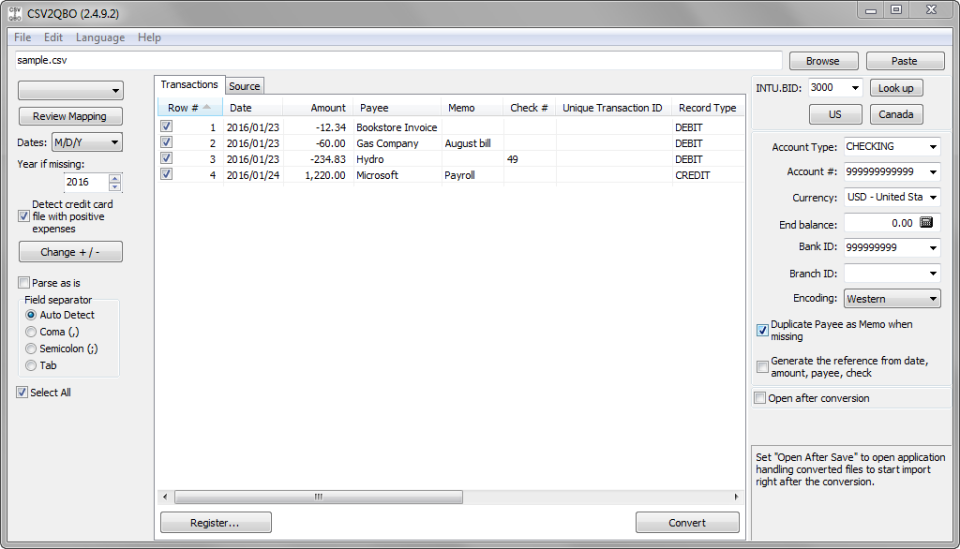
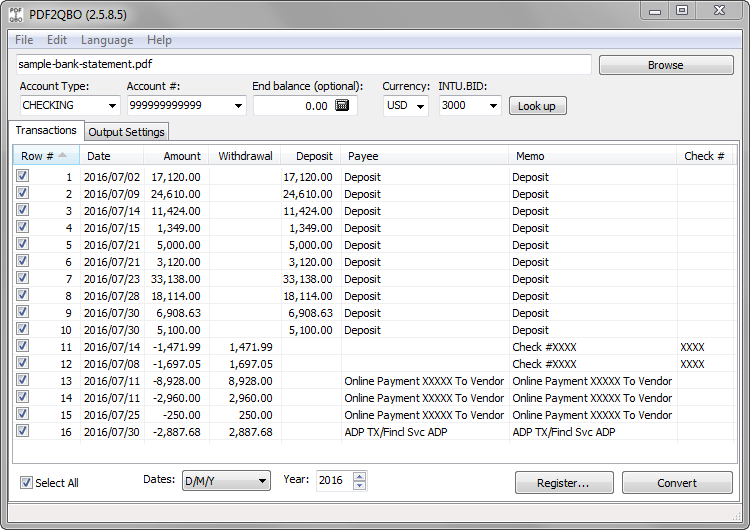
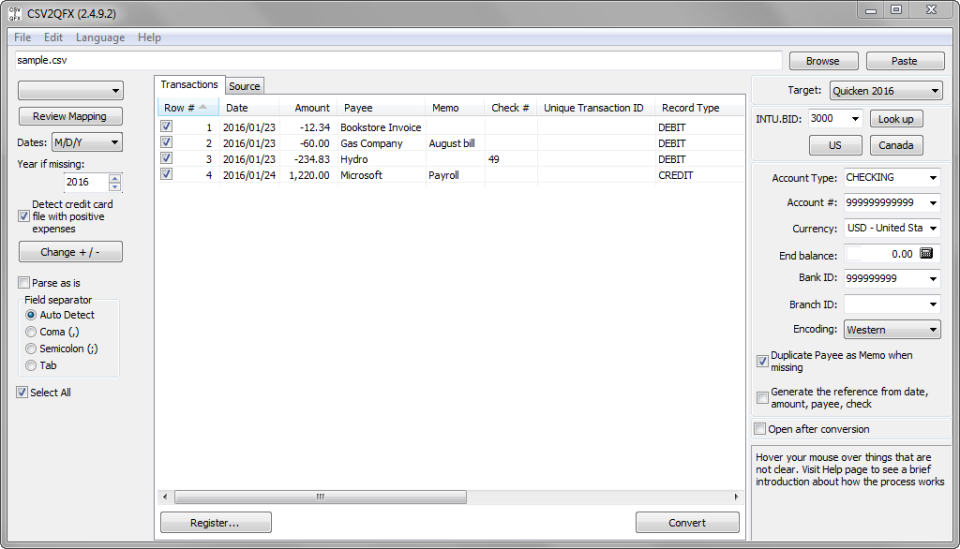
Description
What Is ProperSoft (ProperConvert) and How Does It Work?
ProperSoft (ProperConvert) is a desktop bank transaction converter and QuickBooks importer used by accountants, bookkeepers, and QuickBooks ProAdvisors to convert PDF, CSV, QBO, QFX, OFX, QIF, MT940, and STA bank statements into QuickBooks-ready files.
The typical ProperSoft (ProperConvert) deployment covers accountants, bookkeepers, and QuickBooks ProAdvisors converting bank statements.
ProperSoft (ProperConvert) competes against MoneyThumb and other alternatives in this category.
ProperSoft (ProperConvert) at a Glance
| Best for | accountants, bookkeepers, and QuickBooks ProAdvisors converting bank statements |
|---|---|
| Deployment | Cloud |
| Pricing model | ProperSoft publishes per-app pricing on propersoft |
| Free trial | Demo-driven |
| Signature capability | a desktop bank transaction converter and QuickBooks importer used by accountants, bookkeepers, and Q |
| Compliance | Standard |
| HQ | Ontario, Canada |
| Support | Standard |
ProperSoft (ProperConvert) Pros and Cons in 2026
Where ProperSoft (ProperConvert) Stands Out
- Desktop-only conversion keeps sensitive financial data on the user machine (no cloud upload).
- Broad input support: PDF, CSV, QBO, QFX, OFX, QIF, MT940, STA.
- Universal accounting compatibility: QuickBooks (Desktop + Online), Quicken, Xero, Sage, Wave, NetSuite.
- 4.8 rating across 345+ Google Reviews per vendor claim.
Where ProperSoft (ProperConvert) Falls Short
- Windows PC and Mac desktop only; no cloud version.
- Requires per-app license purchase (ProperConvert, PDF2QBO, etc.).
- Not a full accounting DMS - focused on bank statement conversion.
Who Should Use ProperSoft (ProperConvert)?
Accountants, bookkeepers, CPAs, and QuickBooks ProAdvisors regularly importing bank transactions from non-native formats into QuickBooks or Quicken should evaluate ProperConvert.
Alternative-fit teams may consider MoneyThumb or similar.
ProperSoft (ProperConvert) Product Suite in 2026
ProperConvert
Bank statement converter app.
PDF to QBO
PDF bank statement to QuickBooks.
QuickBooks integration
Direct QuickBooks (Desktop + Online) import.
Multi-format input
PDF, CSV, QBO, QFX, OFX, QIF.
Payee renaming rules
Auto-cleanup of messy bank descriptions.
ProperSoft (ProperConvert) Deep Dive: ProperSoft (ProperConvert) Deep Dive
Local-only processing
ProperConvert runs entirely on user Windows PC or Mac. Financial data never uploads to cloud.
Universal accounting compatibility
Output files for QuickBooks (QBO/IIF), Quicken (QFX/QIF), and cloud accounting (OFX/CSV for Xero, Sage, Wave, NetSuite).
Payee renaming automation
Auto-detects transaction details and cleans messy bank descriptions with consistent expense/income categorization.
Google reviews
345+ Google Reviews with 4.8 rating per vendor claim.
How Much Does ProperSoft (ProperConvert) Cost in 2026?
ProperSoft publishes per-app pricing on propersoft.net/pricing. Contact ProperSoft for current pricing and volume discounts.
Hidden Costs and Contract Notes to Watch
- Higher tiers open up advanced features.
- Enterprise deployment may need Contact Sales.
- Custom scope handled via services.
ProperSoft (ProperConvert) Alternatives Worth Comparing
MoneyThumb. Cloud bank statement converter alternative.
Windows Bank2QBO. Individual bank format converter.
Bank2CSV. CSV converter alternative.
Who Uses ProperSoft (ProperConvert)?
ProperSoft (ProperConvert) supports customers across the target segment. Customer references live on www.propersoft.net.
How ProperSoft (ProperConvert) Compares to MoneyThumb
| Dimension | ProperSoft (ProperConvert) | MoneyThumb |
|---|---|---|
| Deployment | Desktop only | Cloud + desktop |
| Data privacy | Local-only processing | Cloud processing |
| Best-fit buyer | Accountants + bookkeepers | Accountants + bookkeepers |
Buyers evaluating ProperSoft (ProperConvert) versus MoneyThumb typically weigh these dimensions during procurement. Neither is universally better; the fit depends on document volume, industry regulatory requirements, existing enterprise stack, and whether the primary constraint is capture speed, retrieval accuracy, records-retention compliance, or workflow automation.
Points to Verify Before Buying ProperSoft (ProperConvert)
Independent software review threads consistently flag a similar set of due-diligence questions buyers wish they had asked earlier. Cover these during your evaluation.
- Confirm bank format support for your specific bank statements.
- Ask about volume discount for accounting firms with multiple licenses.
- Verify Mac/PC compatibility.
- Test with a sample bank statement before purchase.
- Ask about license transfer policy.
What Real Buyers Report About ProperSoft (ProperConvert)
Buyers on software communities evaluate ProperSoft (ProperConvert) on the trade-offs described above.
Bottom Line: Is ProperSoft (ProperConvert) Right for You?
ProperSoft (ProperConvert) is a legitimate pick for teams needing accountants, bookkeepers, and QuickBooks ProAdvisors converting bank statements.
Core value: a desktop bank transaction converter and QuickBooks importer used by accountants, bookkeepers, and QuickBooks ProAdvisor.
Trade-off: Windows PC and Mac desktop only; no cloud version..
Alternatives worth pricing: MoneyThumb and similar platforms.
Verified on 2026-07-06 by the SaaSRat Editorial Team (Chirantan). Vendor facts cross-checked against the propersoft vendor website, LinkedIn showcase pages, and community discussions on Reddit and industry LinkedIn groups. About our methodology.
Frequently Asked Questions
What is ProperConvert?
Which formats does ProperConvert accept?
Does ProperConvert run in the cloud?
Does ProperConvert integrate with QuickBooks?
Is a free trial available?
Where is ProperSoft headquartered?
Does ProperConvert handle scanned PDFs?
Can I customize payee names?
How does ProperConvert compare to MoneyThumb?
Does ProperConvert support Xero?
Find Your Perfect Software
See how it can transform your workflow
- Personalized for your needs Tailored recommendations based on your unique requirements.
- Save time & resources Streamline your workflow and boost team productivity.
- Trusted by thousands Join 10,000+ businesses already growing with SaaSrat.
You're all set! 🎉
A specialist for will reach out within 1 business day with tailored recommendations for your needs.