
Kixie
by Kixie Web, inc
What is Kixie?
Get Best Quote for Kixie
Connect with SaaSrat experts to get the best quote for your business.
You're all set!
A specialist for Kixie will reach out within 1 business day.
Kixie Features
Business phone with US Canada unlimited minutes
Click-to-call from CRM and web
Two-way SMS with templates and bulk send
Single-line and multi-line PowerDialer
AI voicemail drop and human voice detection
Live call coaching with whisper barge
View All 15 Features
Kixie Pricing Plans
Integrated
- Business phone, click-to-call from CRM, two-way SMS, CRM integration with Salesforce HubSpot Pipedrive Zoho. Unlimited US and Canada minutes. Billed quarterly on annual commitment.
Professional
- Everything in Integrated plus advanced automations, voicemail drop, SMS templates, live call coaching (listen, whisper, barge), real-time dashboards.
Outbound PowerCall
- Everything in Professional plus single-line PowerDialer for sequential auto-dialing, calling session management, advanced analytics. Designed for outbound SDR teams.
Multi-Line PowerDialer
- PowerDial up to 4 lines simultaneously, connecting rep to first live answer. AI Human Voice Detection available as premium add-on. Quote-based pricing.
AI Human Detection (add-on)
- AI add-on that detects real person answers versus voicemail or auto-attendant. On multi-line PowerDialer roughly doubles effective dial volume. Available across all tiers.
ConnectionBoost (add-on)
- Local-area-code caller ID rotation based on prospect location. Increases pickup rates typically 30-70%. Quote-based.
Kixie Screenshots
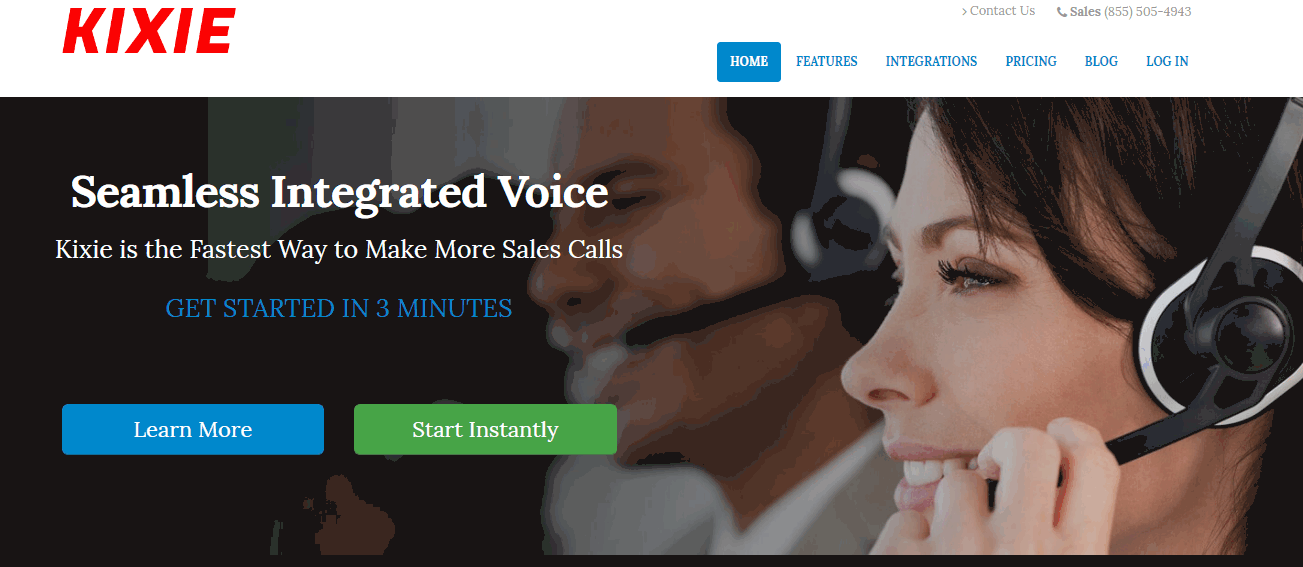
Description
What is Kixie?
Kixie (Kixie PowerCall & SMS) is a US-based sales engagement platform built around dialer-driven outbound sales workflow. The product was founded in 2013 in Los Angeles, California and serves inside sales teams, sales development organizations, real estate teams, mortgage brokers, insurance agencies, and other phone-heavy sales operations.
The core value is volume: Kixie lets a single rep dial 200-400 prospects per day rather than the 40-80 typical of manual dialing, by combining click-to-call, automated voicemail drop, multi-line PowerDialer, and CRM-integrated sequencing. The product competes most directly with Aircall, Dialpad, Five9, RingCentral, and Outreach for sales engagement.
Who Kixie is built for
Kixie fits inside sales teams (5 to 200 reps) running outbound prospecting against a database of contacts. SDR organizations at SaaS companies, mortgage and real estate brokerages, insurance agencies, financial services firms, and B2B services companies are typical buyers.
The strongest fit is teams where reps make 50+ calls per day, work from Salesforce, HubSpot, or Pipedrive, and need text and call sequences that fire automatically based on CRM events ("send SMS 5 minutes after demo no-show"). Inbound support teams have lighter Kixie use cases; Aircall or RingCentral fit better there.
It is less of a fit for very small teams (under 5 reps) where the per-user cost is hard to justify, for contact center operations needing IVR and skills-based routing at scale (Genesys or Five9 fit better), or for video meeting-first teams (Zoom Phone or Microsoft Teams Calling are simpler).
Kixie pricing plans
| Plan | Price (annual, billed quarterly) | Best for |
|---|---|---|
| Integrated | ~$35 user/mo | Click-to-call, SMS, CRM integration |
| Professional | ~$65 user/mo | Adds analytics, advanced automation |
| Outbound PowerCall | ~$95 user/mo | Single-line PowerDialer and full features |
| Multi-Line PowerDialer | Quote-based | Up to 4-line concurrent dialing |
| Add-ons | $30+ user/mo | AI Human Detection, ConnectionBoost, DNC |
Kixie pricing is billed quarterly on annual commitment. Month-to-month billing is restricted to teams with 10 or more users; smaller teams must commit annually. A $50 reserve charge funds a prepaid balance for SMS and certain calling charges.
The published tiers do not include all calling minutes; unlimited US and Canada calling is bundled in the higher tiers, while certain features (AI Human Detection at ~$30/user/mo, ConnectionBoost local presence dialing, DNC compliance) are paid add-ons. Real-world spending per buyer reports often runs 50-200% above the headline price once minutes bundles, AI features, and SMS costs are factored in.
Kixie core capabilities
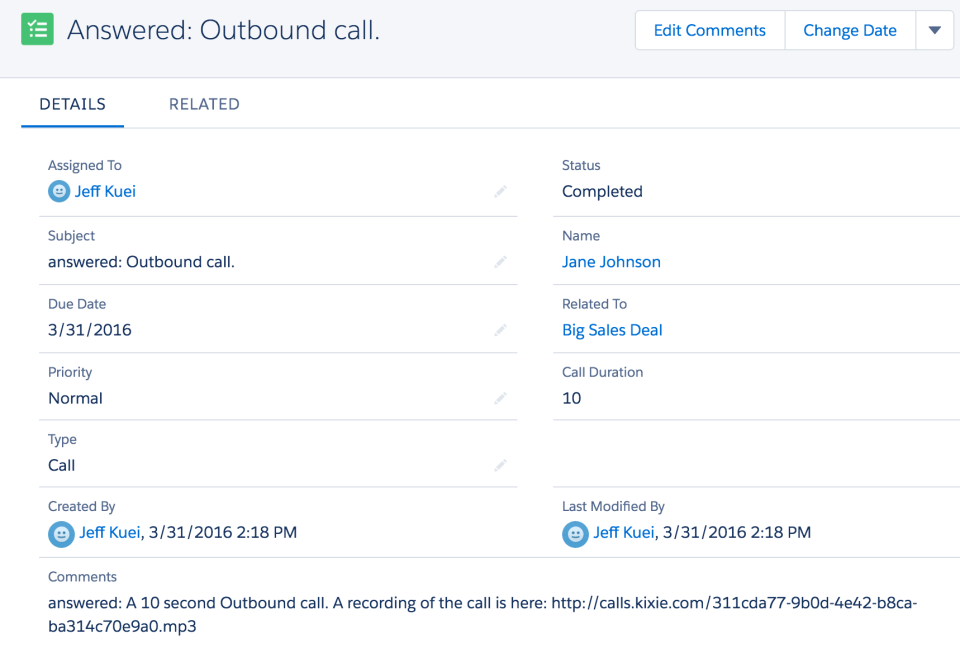
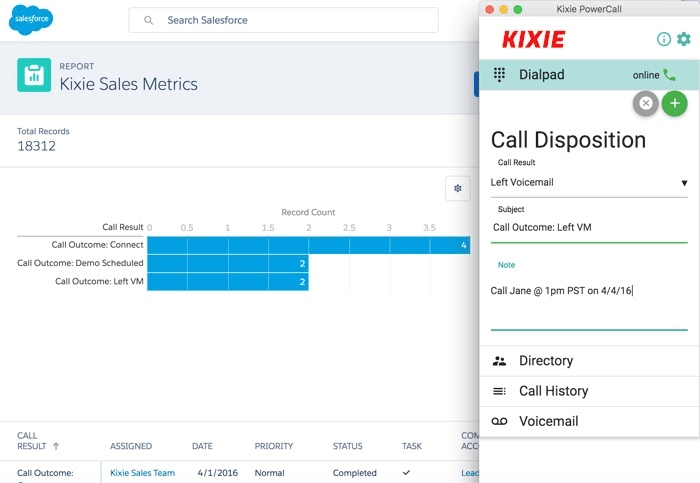
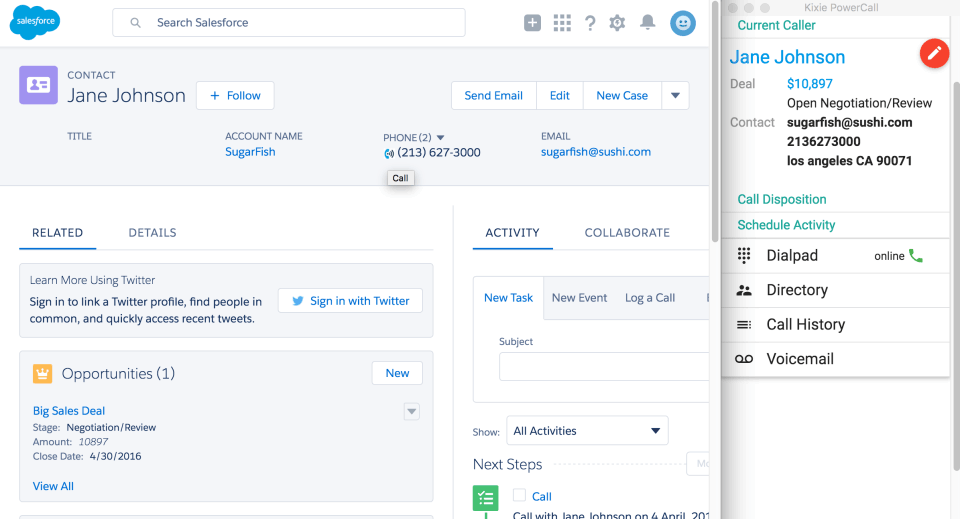
The dialer is the spine. Click-to-call from the CRM lets reps dial any prospect with one click; the call connects through the Kixie phone system with caller ID rotation and call recording. Outbound calls log automatically to the CRM with disposition, recording link, and notes.
Single-line PowerDialer auto-dials a list of prospects sequentially, advancing to the next when the rep ends the call. Multi-line PowerDialer dials up to 4 lines simultaneously and connects the rep to the first live answer, skipping voicemails and disconnected numbers. This is what drives 200-400 calls per day per rep.
SMS and texting
Two-way SMS lets reps text prospects from the same interface as calls. Templates speed up common messages (intro, follow-up, demo confirmation, no-show response). Bulk send goes to lists with merge fields for personalization. Inbound SMS routes to the assigned rep.
SMS automation triggers from CRM events: "send follow-up text 1 hour after demo," "send reminder SMS 30 minutes before scheduled call." This pairs with calls to build multi-touch cadences without standalone sales engagement tooling.
AI features
AI Human Voice Detection (paid add-on at ~$30/user/mo) detects when a real person answers versus a voicemail or auto-attendant. On multi-line PowerDialer this means the rep only handles live human answers, with voicemails handled by automatic voicemail drop. This roughly doubles effective dial volume.
Conversation Intelligence (add-on) transcribes calls and extracts insights: pricing objections, competitor mentions, key keywords, sentiment. Sales leaders use it to review rep performance without listening to every call.
CRM integrations
Native deep integrations cover Salesforce, HubSpot, Pipedrive, Zoho CRM, Insightly, ActiveCampaign, Copper CRM, and others. The integration logs calls, recordings, and SMS automatically into the CRM contact record, surfaces a click-to-call button inside CRM screens, and powers automation triggered by CRM events.
Salesforce integration is the deepest, including Lightning Component embedded dialer, automated activity logging, and bi-directional sync of dispositions. HubSpot integration similarly embeds in the HubSpot interface.
Live call coaching
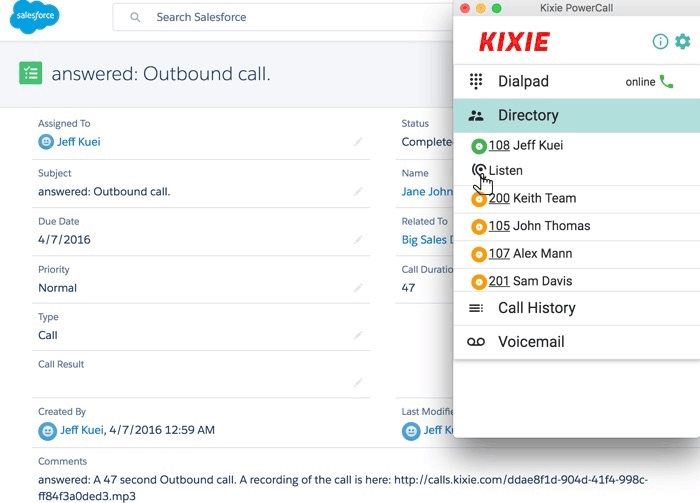
Sales managers can join active calls in three modes: listen (silent monitor), whisper (rep hears manager, prospect does not), or barge (all parties hear). This is one of the strongest reasons sales managers pick Kixie over basic VoIP tools, since coaching during live calls accelerates rep development.
ConnectionBoost local presence
ConnectionBoost (add-on) automatically displays local-area-code caller IDs to prospects based on their location. Studies and Kixie's internal data show local presence dialing significantly increases pickup rates (typically 30-70% improvement over a single fixed caller ID). For B2C and SMB B2B prospecting this lift is meaningful.
DNC compliance
DNC (Do Not Call) compliance add-on scrubs outbound dialing against federal, state, and internal DNC lists. For US insurance, mortgage, and financial services teams, this is required for compliance with TCPA and state-level DNC regulations.
Mobile and offline
iOS and Android apps cover click-to-call, SMS, and incoming call routing. The mobile experience is functional for reps working remotely or traveling; the desktop is the primary work surface for high-volume dialing sessions.
Security and compliance
Kixie holds SOC 2 Type II certification with PCI DSS controls for payment data handling. Call recordings are stored encrypted in the customer's cloud. HIPAA compliance is available on Enterprise contracts. SSO via SAML is available on higher tiers.
Kixie vs Aircall
Aircall is the European-origin sales phone platform with strong call routing and broader VoIP feature set. Kixie has stronger PowerDialer and outbound sales focus. Pick Aircall for inbound-heavy sales and support phone needs. Pick Kixie for outbound dialer-driven prospecting.
Kixie vs Dialpad
Dialpad is the broader business communications platform with AI-driven contact center, messaging, and meetings. Kixie is the focused sales dialer. Pick Dialpad for unified communications with sales as one of many use cases. Pick Kixie for dialer-first sales engagement.
Kixie vs Outreach and Salesloft
Outreach and Salesloft are sales engagement platforms with sequence orchestration, email-first cadences, and CRM integration. Kixie is dialer-first with calls and SMS as primary touches. Some teams pair Kixie with Outreach or Salesloft: Outreach orchestrates the cadence, Kixie executes the calls. Others use Kixie standalone for call-and-SMS-only cadences.
Kixie vs Five9 and Genesys
Five9 and Genesys are contact center platforms with IVR, skills-based routing, and workforce management at scale. Kixie is a smaller sales-specific dialer. Pick Five9 or Genesys for contact center operations at hundreds of agents. Pick Kixie for sales team dialer-driven outbound.
Buyer pitfalls to avoid
Three patterns hurt Kixie rollouts. First, ignoring true TCO: published per-user pricing does not include minutes bundle (~$30/user/mo), AI Human Detection (~$30/user/mo), or SMS costs ($0.01-0.013 per message). Build a complete TCO model.
Second, treating it as a phone system: Kixie is sales-specific. Companies that want a general business phone (e.g., RingCentral, Zoom Phone) plus a separate sales dialer can use both rather than forcing Kixie to be the company phone.
Third, under-investing in cadence setup: SMS and call sequences are the highest-impact Kixie feature. Teams that buy Kixie and never build sequences miss the multi-touch lift.
Implementation and time to value
Small teams: 1-2 weeks for CRM integration setup, number porting (if applicable), and rep training. Mid-market rollouts (50-200 reps): 4-6 weeks including PowerDialer training, sequence setup, and reporting configuration. Kixie provides direct customer success on annual contracts.
Customer support
Standard support includes email and chat during US business hours. Annual contracts include onboarding and dedicated success management. Higher tiers add priority response SLAs. The Kixie Knowledge Base covers most setup tasks and the support team has a strong response track record.
The Bottom Line on Kixie
Kixie is the right call for inside sales and SDR teams running high-volume outbound prospecting from Salesforce, HubSpot, or Pipedrive, where dial volume per rep is the primary lever for revenue.
Standout strengths: single-line and multi-line PowerDialer for 200-400 calls per rep per day, deep CRM integration with auto-logging and click-to-call, two-way SMS with sequences, AI Human Voice Detection on add-on, ConnectionBoost local presence for higher pickup rates, live call coaching (listen, whisper, barge).
Pricing starts at ~$35 user/mo (Integrated, billed quarterly on annual), Professional ~$65 user/mo, Outbound PowerCall ~$95 user/mo, Multi-Line PowerDialer quote-based. Add-ons include AI Human Detection (~$30 user/mo), ConnectionBoost, DNC compliance, and minutes bundles (~$30 user/mo). Real-world spend typically 50-200% above headline price.
Trade-offs to weigh: published pricing does not include minutes or AI features. Annual commitment required for teams under 10 users. $50 reserve charge for SMS prepaid balance. UI is functional but less polished than Aircall or Dialpad. International calling rates apply outside US/Canada.
Alternatives worth comparing: Aircall for inbound-heavy and European teams, Dialpad for unified communications platform, Outreach and Salesloft for sales engagement orchestration on top of any phone, Five9 and Genesys for contact center scale, RingCentral for general business phone with light sales features, Orum and Nooks for AI-powered parallel dialing. Pricing data from G2, Capterra, CheckThat.ai 2026 sources, capabilities verified on kixie.com/pricing on 2026-06-27.
Frequently Asked Questions
Is there a free plan or free trial for Kixie?
How much does Kixie cost?
What does Kixie integrate with?
Who is Kixie best for?
What are the best alternatives to Kixie?
Is Kixie GDPR / SOC 2 compliant?
Does Kixie have a mobile app?
What do real users say about Kixie?
How does Kixie compare to its top competitor?
Does Kixie offer customer support?
Find Your Perfect Software
See how it can transform your workflow
- Personalized for your needs Tailored recommendations based on your unique requirements.
- Save time & resources Streamline your workflow and boost team productivity.
- Trusted by thousands Join 10,000+ businesses already growing with SaaSrat.
You're all set! 🎉
A specialist for will reach out within 1 business day with tailored recommendations for your needs.