

G-Lock EasyMail7
by G-Lock Software
What is G-Lock EasyMail7?
Get Best Quote for G-Lock EasyMail7
Connect with SaaSrat experts to get the best quote for your business.
You're all set!
A specialist for G-Lock EasyMail7 will reach out within 1 business day.
G-Lock EasyMail7 Features
Windows desktop client
Server components
Bulk email marketing
Newsletter management
Subscriber list management
List segmentation
View All 20 Features
G-Lock EasyMail7 Pricing Plans
Contact G-Lock Software
- Pricing not published in detailed tiers. Contact G-Lock Software via glocksoft.com for licensing (on-premise) or SaaS variant pricing. Windows-based client-server deployment.
G-Lock EasyMail7 Screenshots
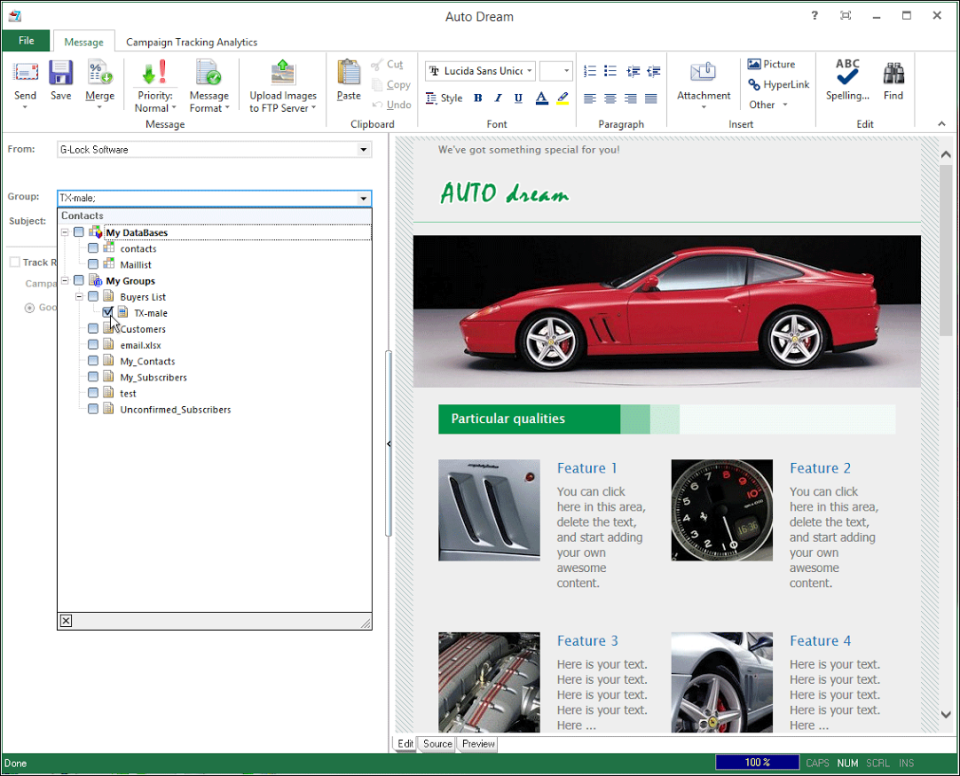
Description
What Is G-Lock EasyMail7 and How Does It Work?
G-Lock EasyMail7 gives small businesses, marketers, and agencies a Windows-based client-server email marketing platform for bulk email campaigns, newsletter management, subscriber list management, autoresponders, and campaign scheduling.
The typical G-Lock EasyMail7 deployment covers a small business or agency running bulk email campaigns on Windows infrastructure with subscriber lists managed via the desktop client and server components handling sending.
G-Lock EasyMail7 competes against SendBlaster, MailBrother, and Atomic Mail Sender in the desktop email marketing category with a differentiator on client-server architecture and Windows-based deployment.
G-Lock EasyMail7 at a Glance
| Best for | Small businesses, marketers, agencies wanting Windows-based email marketing software |
|---|---|
| Deployment | Windows desktop client with server components; on-premise + SaaS variants |
| Pricing model | Contact G-Lock Software for licensing and SaaS pricing |
| Free trial | Contact for evaluation |
| Integrations | SMTP servers, standard email marketing connectors |
| HQ | G-Lock Software |
G-Lock EasyMail7 Pros and Cons in 2026
Where G-Lock EasyMail7 Stands Out
- Client-server architecture with Windows desktop client suits Windows-based operations.
- Both on-premise licensed and SaaS variants available for deployment flexibility.
- Bulk email campaign focus with subscriber list management.
- Autoresponders and campaign scheduling for automated flows.
- G-Lock Software has established history in email software.
Where G-Lock EasyMail7 Falls Short
- Windows-only client limits fit for Mac or Linux operations.
- Feature depth vs cloud email platforms (Mailchimp, ConvertKit) may vary.
- Learning curve for teams new to client-server email software.
- SMTP server relationships and deliverability sit outside platform.
- Marketing materials less extensive than cloud SaaS competitors.
Who Should Use G-Lock EasyMail7?
G-Lock EasyMail7 fits small businesses running email campaigns on Windows infrastructure, marketers wanting desktop client control, and agencies offering email marketing services with client-server architecture. On-premise licensed version appeals to teams wanting full data control. SaaS variant offers cloud convenience.
Windows-based operations benefit from native desktop client. Agencies use client-server architecture to manage multiple client campaigns from central server.
Not the right fit for Mac or Linux operations (client is Windows-only), teams wanting cloud SaaS convenience without desktop client (try Mailchimp or ConvertKit), or enterprises needing enterprise-grade support (try Yesmail).
G-Lock EasyMail7 Product Suite in 2026
Windows Desktop Client
Windows-based desktop client for campaign creation and management.
Server Components
Server components handle email sending, autoresponders, and subscriber management.
Bulk Email Campaigns
Bulk email marketing with newsletter management.
Subscriber Lists
Subscriber list management with segmentation and cleaning.
On-Premise + SaaS
Both on-premise licensed and SaaS variants for deployment flexibility.
How Much Does G-Lock EasyMail7 Cost in 2026?
G-Lock EasyMail7 does not publish detailed public pricing tier structure on glocksoft.com/easymail7. Contact G-Lock Software for licensing and SaaS pricing.
Pricing typically covers on-premise licensed edition or SaaS variant. On-premise involves one-time license plus your own hosting infrastructure.
Windows-only client limits deployment to Windows-based operations.
Hidden Costs and Contract Notes to Watch
- SMTP server relationships and sending costs sit outside G-Lock EasyMail7 purchase.
- Windows server infrastructure and licensing costs may apply for on-premise.
- Additional user seats or subscriber limits may involve tier upgrades.
- Data migration from existing platforms billed as professional services.
- Deliverability infrastructure (dedicated IPs, DKIM, SPF) is customer responsibility.
G-Lock EasyMail7 Alternatives Worth Comparing
SendBlaster. Windows-based bulk email software with desktop client.
MailBrother. Bulk email marketing platform.
Atomic Mail Sender. Bulk email software for Windows-based operations.
Mailchimp. Cloud SaaS email marketing for small business with strong template library.
Who Uses G-Lock EasyMail7?
G-Lock EasyMail7 serves small businesses, marketers, and agencies using Windows-based email marketing software. Specific named enterprise customers are not disclosed on the public vendor page.
Points to Verify Before Buying G-Lock EasyMail7
Independent software review threads consistently flag a similar set of due-diligence questions buyers wish they had asked earlier. Cover these during your evaluation.
- Confirm Windows infrastructure fits G-Lock EasyMail7 client-server architecture.
- Verify SMTP server relationships (SendGrid, Mailgun, Amazon SES) for sending.
- Test on-premise vs SaaS variant against your deployment preference.
- Ask about subscriber limit tiers and pricing.
- Confirm ongoing maintenance and update terms.
What Real Buyers Report About G-Lock EasyMail7
Independent operator discussions on Reddit r/marketing email discussions and Reddit r/Emailmarketing operator threads surface the following themes. Windows-based small business and agency email marketing forums describe G-Lock EasyMail7 as a Windows desktop client-server email marketing option for teams wanting native Windows workflow rather than browser-based SaaS.
Common friction points center on Windows-only client limiting Mac or Linux operations and feature depth vs cloud SaaS platforms varying.
Long-term users on Windows small business forums praise the desktop client control and on-premise licensed option for teams preferring full data control over cloud SaaS.
Related G-Lock EasyMail7 Comparisons and Categories on SaaSRat
Explore related products and categories on SaaSRat to compare G-Lock EasyMail7 against alternatives and see which vertical or feature comparison matches your buying criteria.
- Email Marketing category
- Mailchimp
- Sendblaster
- Magemail
- Sms Text Marketing
- Email Archiving
- Email List Validation
- Email On Acid
- Popcorn Email Marketing
- Kirim Email
- Eliteemail
- Juvlon Email Marketing
Bottom Line: Is G-Lock EasyMail7 Right for You?
G-Lock EasyMail7 is a pick for small businesses, marketers, and agencies wanting Windows-based email marketing software with client-server architecture and on-premise or SaaS deployment options.
Highlights: Windows desktop client with server components, on-premise licensed + SaaS variants, bulk email campaign focus, subscriber list management, autoresponders, and campaign scheduling.
Trade-offs to weigh: Windows-only client limits Mac/Linux operations, feature depth vs cloud email platforms may vary, and SMTP server relationships sit outside platform.
Consider SendBlaster for Windows-based bulk email, MailBrother for bulk email marketing, Atomic Mail Sender for Windows bulk email, or Mailchimp for cloud SaaS small business email marketing.
Verified on 2026-07-08 by the SaaSRat Editorial Team (Chirantan Patel, Senior SaaS Research Editor). Vendor facts cross-checked against the glock-easymail7 vendor website, LinkedIn showcase pages, and community discussions on Reddit and industry LinkedIn groups. About our methodology.
Frequently Asked Questions
What is G-Lock EasyMail7 used for?
How much does G-Lock EasyMail7 cost in 2026?
Does G-Lock EasyMail7 offer a free trial?
Is G-Lock EasyMail7 cloud-based or desktop?
Does G-Lock EasyMail7 work on Mac or Linux?
What features does G-Lock EasyMail7 include?
Who develops G-Lock EasyMail7?
Does G-Lock EasyMail7 handle autoresponders?
What is the difference between on-premise and SaaS G-Lock EasyMail7?
How does G-Lock EasyMail7 compare to SendBlaster and MailBrother?
Find Your Perfect Software
See how it can transform your workflow
- Personalized for your needs Tailored recommendations based on your unique requirements.
- Save time & resources Streamline your workflow and boost team productivity.
- Trusted by thousands Join 10,000+ businesses already growing with SaaSrat.
You're all set! 🎉
A specialist for will reach out within 1 business day with tailored recommendations for your needs.