

FileCenter
by Lucion Technologies
What is FileCenter?
Get Best Quote for FileCenter
Connect with SaaSrat experts to get the best quote for your business.
You're all set!
A specialist for FileCenter will reach out within 1 business day.
FileCenter Features
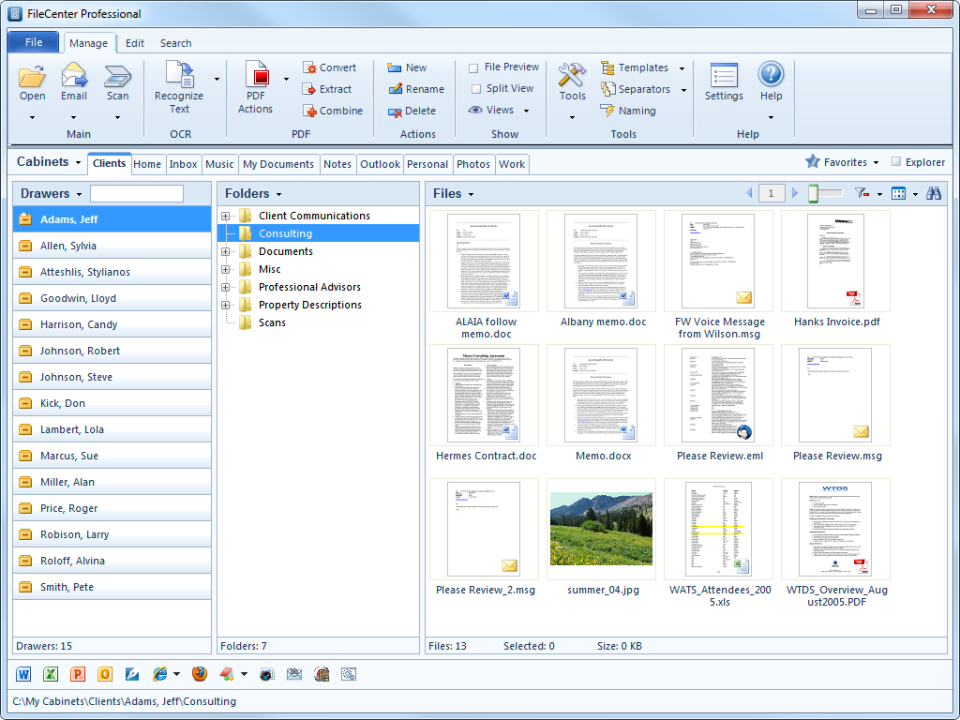
Cabinet-style folder organization
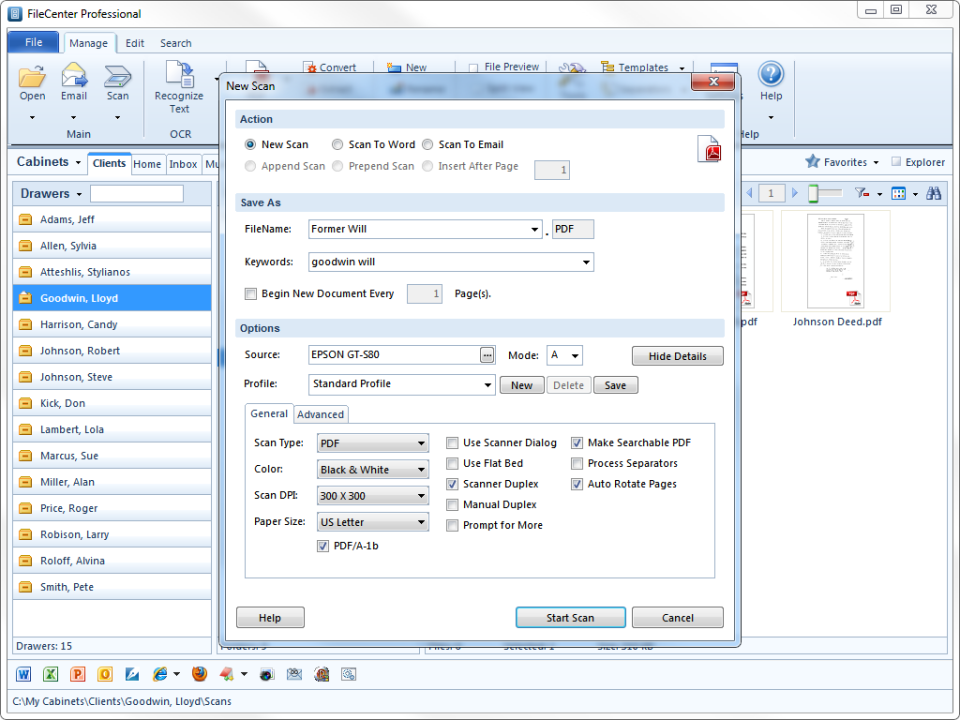
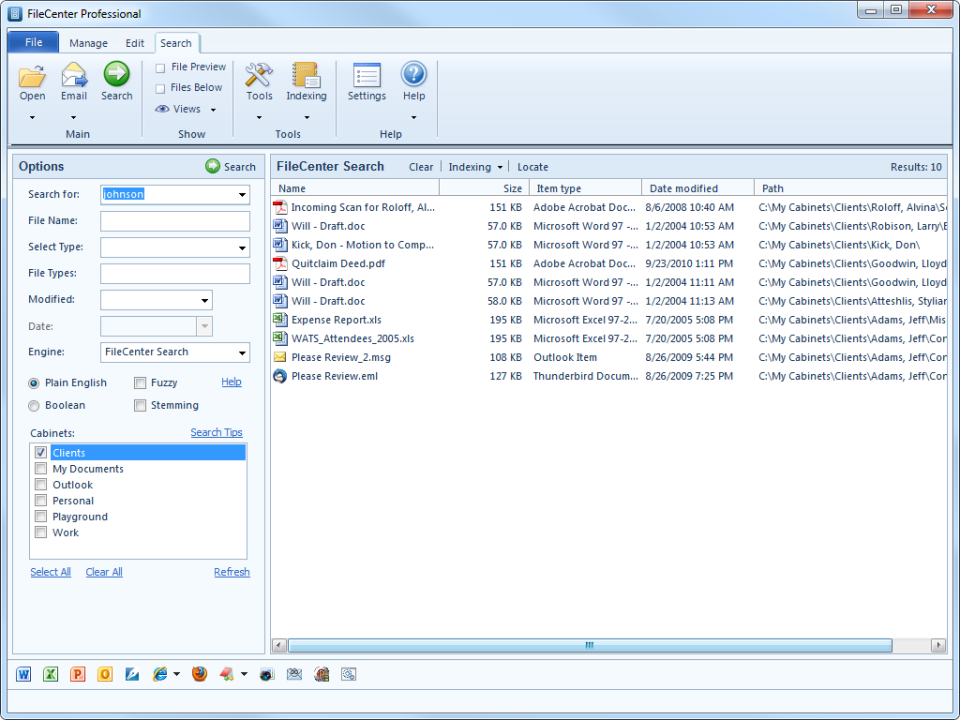
Document scanning + OCR
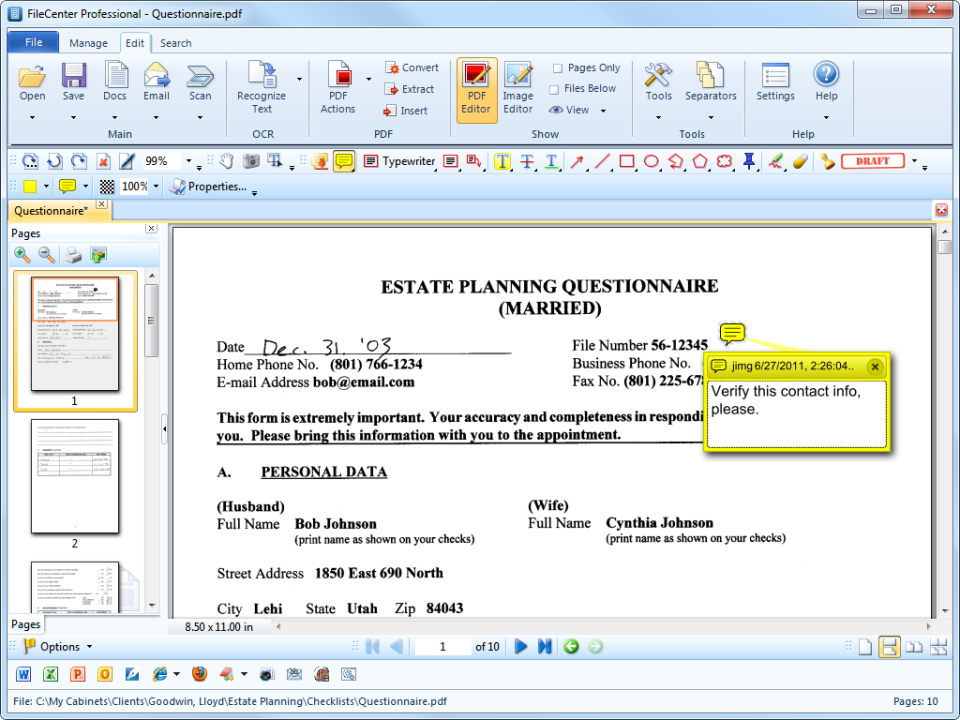
PDF editing
Windows desktop deployment
FileCenter Cloud subscription
Email integration (Outlook + others)
View All 12 Features
FileCenter Pricing Plans
FileCenter Standard
- Standard edition per filecenter.com/pricing
- Cabinet-style organization + basic PDF editing
- Verified via Playwright screenshot at filecenter.com on 2026-07-05 (store page 404; homepage cited)
FileCenter Pro
- Pro edition per filecenter.com/pricing
- Advanced PDF editing + OCR
- Verified via Playwright screenshot at filecenter.com on 2026-07-05
FileCenter Cloud
- Cloud deployment option per filecenter.com/pricing
- Cloud access alongside Windows desktop
- Verified via Playwright screenshot at filecenter.com on 2026-07-05
FileCenter Standard
- Standard edition per filecenter.com/pricing
- Cabinet-style organization + basic PDF editing
FileCenter Pro
- Pro edition per filecenter.com/pricing
- Advanced PDF editing + OCR
FileCenter Cloud
- Cloud deployment option per filecenter.com/pricing
- Cloud access alongside Windows desktop
FileCenter Resources
FileCenter Screenshots
Description
What Is FileCenter and How Does It Work?
FileCenter DMS by Lucion Technologies is a paperless office document management system serving small business, professional services, accounting firms, legal firms, and home office users. Buyers use FileCenter to scan paper documents, organize files in cabinet-style folder structures, OCR scanned documents, edit PDFs, and manage the document lifecycle on Windows desktop and cloud.
The typical FileCenter deployment covers document capture from scanners, cabinet folder organization, OCR indexing, PDF editing, and email integration. Small business and home office users value the simplified adoption experience and cabinet-style organization that mirrors physical filing cabinets.
FileCenter competes against Adobe Acrobat Pro (for PDF-centric workflows), eBridge Cloud, DocuWare, and other mid-market DMS platforms. Its differentiator is desktop-first architecture plus cabinet-style organization tuned for small business and home office adoption.
FileCenter at a Glance
| Best for | Small business, professional services, accounting, legal, home office |
|---|---|
| Deployment | Windows desktop + FileCenter Cloud |
| Pricing model | Perpetual license + subscription (Contact Sales for current) |
| Free trial | Yes - free trial available |
| Parent company | Lucion Technologies |
| Signature capability | Paperless office DMS with cabinet-style folder organization |
| Compliance | Standard document retention workflows |
| HQ | United States (Lucion) |
FileCenter Pros and Cons in 2026
Where FileCenter Stands Out
- Cabinet-style folder organization mirrors physical filing cabinets; intuitive for small business and home office users transitioning from paper.
- Windows desktop deployment plus FileCenter Cloud gives buyers flexibility for on-premises versus cloud preference.
- OCR + PDF editing included so buyers avoid buying Adobe Acrobat Pro separately.
- Long-standing US market presence with a real customer reference base among accounting and legal firms.
Where FileCenter Falls Short
- Windows desktop focus limits Mac and Linux availability.
- Modern SaaS UX polish trails newer cloud-first competitors.
- International non-US coverage minimal.
- Cloud collaboration features lighter than pure cloud-first DMS platforms.
Who Should Use FileCenter?
Small business, professional services firms (accounting, legal), and home office users wanting paperless office DMS with cabinet-style organization should evaluate FileCenter. Windows-first buyers valuing perpetual license option get the strongest fit.
Mac and Linux users should look at alternative platforms. Enterprise buyers with complex workflow requirements may prefer larger DMS platforms.
FileCenter Product Suite in 2026
Document scanning and OCR
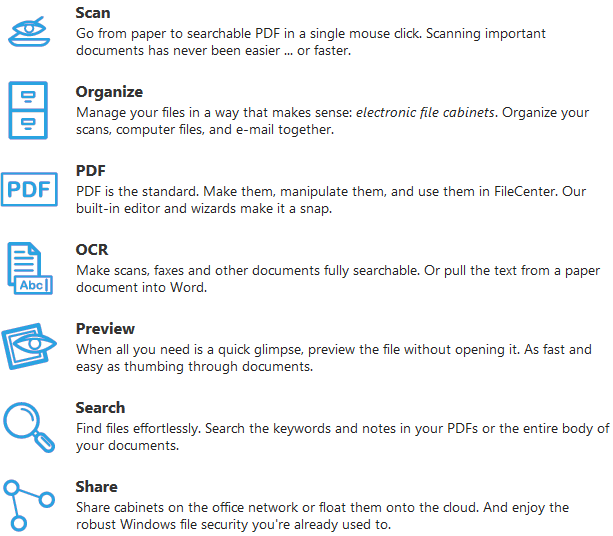
Scan paper documents with OCR to create searchable PDFs.
Cabinet-style organization
Folder structures that mirror physical filing cabinets for intuitive adoption.
PDF editing
Edit PDF documents including annotation, markup, and page manipulation.
FileCenter Cloud
Cloud deployment option alongside Windows desktop.
Email integration
Save emails to FileCenter cabinets from Outlook and other email clients.
FileCenter Deep Dive: Cabinet-Style Organization, Windows Desktop Focus, Small Business Fit
Cabinet-style folder organization
FileCenter organizes documents in cabinet-style folder structures that mirror physical filing cabinets. Small business and home office users transitioning from paper find this mental model intuitive and reduce the learning curve versus enterprise DMS complexity.
Windows desktop plus cloud
FileCenter runs primarily on Windows desktop with FileCenter Cloud as a subscription cloud deployment option. Buyers can choose desktop-first for on-premises control or cloud for remote access.
OCR + PDF editing included
FileCenter includes OCR and PDF editing so buyers avoid buying Adobe Acrobat Pro separately for PDF workflows.
Long-standing small business focus
Lucion Technologies has been serving small business, accounting, and legal firms for years with FileCenter. Established buyers value platform stability.
How Much Does FileCenter Cost in 2026?
FileCenter pricing is available at filecenter.com. Historical pricing has been perpetual license around $199 to $599 depending on Standard, Pro, or Pro Plus edition, plus subscription options for FileCenter Cloud. Current pricing may vary; the filecenter.com/store page returned 404 during audit, so buyers should visit filecenter.com/pricing to see current Standard, Pro, and Pro Plus edition pricing.
Buyers should model FileCenter against Adobe Acrobat Pro (subscription), eBridge Cloud, and small business DMS platforms.
Hidden Costs and Contract Notes to Watch
- Annual maintenance may apply on perpetual licenses for major version updates.
- FileCenter Cloud subscription is separate from desktop perpetual license.
- Enterprise volume licensing requires Contact Sales.
FileCenter Alternatives Worth Comparing
Adobe Acrobat Pro. Industry-standard PDF editor with subscription-only pricing.
eBridge Cloud. Cloud DMS with retention automation.
DocuWare. Cloud + on-premises mid-market DMS.
Who Uses FileCenter?
FileCenter supports small business, professional services (accounting, legal), and home office users across US markets. Customer references live on filecenter.com. Long-standing Lucion Technologies customer base includes accounting firms, legal practices, and small business owners.
How FileCenter Compares to Adobe Acrobat Pro
| Dimension | FileCenter | Adobe Acrobat Pro |
|---|---|---|
| Primary focus | Paperless office DMS + PDF editing | PDF editor + Adobe ecosystem |
| Organization model | Cabinet-style folders | File-by-file |
| Platform | Windows desktop + Cloud | Mac + Windows |
| Pricing model | Perpetual + subscription | Subscription-only |
| Best-fit buyer | Small business + accounting + legal | Adobe ecosystem + design-heavy shops |
Buyers evaluating FileCenter versus Adobe Acrobat Pro typically weigh these dimensions during procurement. Neither is universally better; the fit depends on document volume, industry regulatory requirements, existing enterprise stack, and whether the primary constraint is capture speed, retrieval accuracy, records-retention compliance, or workflow automation.
Points to Verify Before Buying FileCenter
Independent software review threads consistently flag a similar set of due-diligence questions buyers wish they had asked earlier. Cover these during your evaluation.
- Confirm Windows version compatibility for FileCenter desktop.
- Ask about FileCenter Cloud vs desktop pricing implications.
- Verify OCR quality on your typical scanned documents during pilot.
- Test cabinet-style organization during trial to gauge learning curve.
- Ask about email integration with your specific email client.
What Real Buyers Report About FileCenter
Small business owners and professional services users on r/sysadmin and accounting/legal community forums evaluate FileCenter on cabinet-style organization intuitiveness and Windows desktop deployment. Trade-offs mentioned include Windows-only focus limiting Mac and Linux users.
Bottom Line: Is FileCenter Right for You?
FileCenter is a solid pick for small business, professional services, and home office users wanting paperless office DMS with cabinet-style organization.
Cabinet-style folders plus Windows desktop and FileCenter Cloud plus OCR + PDF editing cover small business paperless office needs cleanly.
Trade-off: Windows-first focus limits Mac and Linux availability; UX polish trails cloud-first competitors.
Alternatives worth pricing against FileCenter: Adobe Acrobat Pro for PDF-centric workflows and eBridge Cloud for pure cloud DMS.
Verified on 2026-07-05 by the SaaSRat Editorial Team (Chirantan). Vendor facts cross-checked against the filecenter vendor website, LinkedIn showcase pages, and community discussions on Reddit and industry LinkedIn groups. About our methodology.
Frequently Asked Questions
Who makes FileCenter?
What platforms does FileCenter support?
Does FileCenter include OCR?
Does FileCenter include PDF editing?
Is a free trial available?
Which editions are available?
Does FileCenter support Mac?
How does FileCenter compare to Adobe Acrobat Pro?
Where is FileCenter hosted for cloud?
Which industries does FileCenter serve?
Find Your Perfect Software
See how it can transform your workflow
- Personalized for your needs Tailored recommendations based on your unique requirements.
- Save time & resources Streamline your workflow and boost team productivity.
- Trusted by thousands Join 10,000+ businesses already growing with SaaSrat.
You're all set! 🎉
A specialist for will reach out within 1 business day with tailored recommendations for your needs.