

Dotnet Report
by dotnet report builder • Founded 2018
What is Dotnet Report?
Get Best Quote for Dotnet Report
Connect with SaaSrat experts to get the best quote for your business.
You're all set!
A specialist for Dotnet Report will reach out within 1 business day.
Dotnet Report Features
Data connectivity
Drag and drop interface
Customizable reports
Interactive dashboards
Real time data
Scheduled reporting
View All 29 Features
Dotnet Report Pricing Plans
Enterprise
- No limit on Databases
- No limit on Multitenant end Clients
- No limit on API Requests
- No limit on Saved Reports
- Priority technical support
- Free redistribution with your product
Premium plus
- Upto 10 Databases
- Upto 100 Multitenant end Clients
- Upto 100 Multitenant end Clients
- 7.5K API Requests /mo
- Upto 100 Saved Reports
- Private e-mail support
Premium
- Upto 10 Databases
- Upto 10 Multitenant end Clients
- 1K API Requests /mo
- Upto 100 Saved Reports
- Private e-mail support
- Redistribution with back link intact
Dotnet Report Resources
Dotnet Report Screenshots
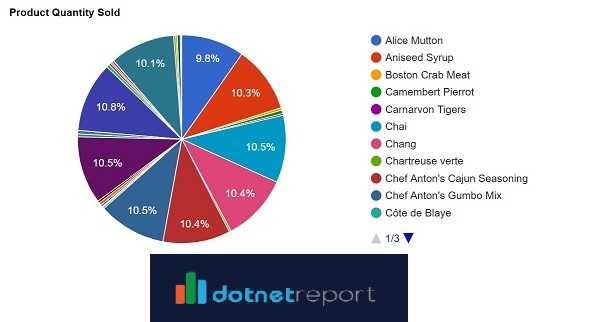
Description
Dotnet Report at a Glance
| Best fit for | .NET SaaS product teams wanting to ship self-service reporting inside the app without paying per-user fees or hitting AI feature paywalls |
|---|---|
| Premium tier | Eighty-five dollars per month with ten multitenant clients + fifty saved reports + one data environment + one thousand API requests per month + managed hosting + white-label distribution |
| Premium Plus tier (most popular) | Two-hundred-sixty-five dollars per month with one hundred multitenant clients + one hundred saved reports + three data environments + seven-thousand-five-hundred API requests per month + unlimited dashboards + scheduled email reports + priority email support |
| Enterprise | Custom pricing with no limits on multitenant clients + no limit on saved reports + unlimited data environments + no limit on API requests + self-hosted or on-prem backend API + air-gapped deployment option + SAML SSO SCIM + dedicated Slack or Teams support with SLAs + implementation and migration services |
| Annual savings | Save approximately ten percent on annual billing |
| License model | Per App (one license per deployment) with no per-user fees |
| Named capabilities | Ad-hoc report builder, drag-and-drop live dashboards, twelve plus chart types, AI Assistant with Live Preview, scheduled email delivery, row-level security, white-label distribution |
| Named quantified metrics | Twelve plus chart types, approximately thirty minutes to embed, five minutes for cloud setup, one hundred percent your data |
| Free trial | Yes, all plans include a free trial, no credit card required, cancel anytime |
| Headquarters | Global (dotnetreport.com) |
Dotnet Report Overview
Dotnet Report is Embedded Reporting and Dashboards for the .NET Web App with an AI Assistant and Live Preview. Give the end users beautiful ad-hoc reports, drag-and-drop live dashboards, twelve plus chart types, and automated scheduled exports, all running inside the .NET application with the customer own data.
The vendor positions on Simple pricing. No per-user fees. Start free. Pick the plan that fits how you will deploy. Talk to us anytime for a custom shape. Rather than a per-user pricing model that punishes team growth, the licensing is per app.
Full embedded reporting scope: ad-hoc report builder (end users build reports field-by-field with no SQL required, both Standard and Live Designer modes), live dashboards (drag-and-drop layouts with real-time data, global filters, audience-specific views on every plan), twelve plus chart types (tables, bars, lines, pies, heatmaps, treemaps, geo-maps, KPIs, pivots), scheduled email delivery (PDF, Excel, CSV on daily, weekly, monthly, or custom cron), row-level security (forced filters based on the logged-in user claims), and AI Assistant built into the designer (describe a report in plain English).
Dotnet Report Capabilities and Named Features
Simple per-app pricing with no per-user fees is the vendor differentiator. Rather than punishing team growth or product adoption, licensing is per app or per deployment. Meaningful for SaaS product teams where end-user counts can spike without warning.
Embedded reporting scope covers the full self-service BI need: ad-hoc report builder where end users build reports field-by-field with no SQL required (both Standard and Live Designer modes available on every plan), live dashboards with drag-and-drop layouts and real-time data, global filters, and audience-specific views, plus twelve plus chart types (tables, bars, lines, pies, heatmaps, treemaps, geo-maps, KPIs, pivots) switchable with one click.
AI Assistant with Live Preview is built into the designer. Describe a report in plain English, and the AI Assistant generates the query and layout. No upsells, no AI-feature paywall - included on every plan. Rare in embedded BI category where AI features are typically Enterprise-tier gated.
Row-level security uses forced filters based on the logged-in user claims to keep tenants, departments, and regions isolated automatically. Meaningful for SaaS product teams shipping multitenant reporting.
Scheduled email delivery auto-delivers PDF, Excel, and CSV reports daily, weekly, monthly, or on a custom cron schedule to any recipient. White-label distribution keeps the customer own brand on delivered reports.
Deployment flexibility: managed hosting on Premium and Premium Plus, self-hosted or on-prem backend API on Enterprise, air-gapped deployment option on Enterprise. Meaningful for regulated industries and buyers with data residency requirements.
Named vendor-quoted metrics: approximately thirty minutes to embed and five minutes for cloud setup. Meaningful for product teams evaluating time-to-first-report before committing to a per-app license.
Named feature list
- Ad-hoc report builder (field-by-field, no SQL required)
- Standard and Live Designer modes
- Drag-and-drop live dashboards
- Twelve plus chart types
- Global filters and audience-specific views
- Scheduled email delivery (PDF, Excel, CSV)
- Custom cron scheduling
- Row-level security (forced filters from user claims)
- AI Assistant with Live Preview (included on every plan)
- White-label distribution
- Live Preview
- Managed hosting (Premium and Premium Plus)
- Self-hosted or on-prem backend API (Enterprise)
- Air-gapped deployment option (Enterprise)
- SAML SSO SCIM provisioning (Enterprise)
- Multitenant client isolation
- API access (1K on Premium, 7.5K on Premium Plus, no limit on Enterprise)
- Free trial (no credit card required)
Dotnet Report Pricing
Dotnet Report publishes real transparent per-app pricing on dotnetreport.com with monthly and annual billing (annual saves approximately ten percent). Premium eighty-five dollars per month: everything to ship self-service reporting in the .NET app with the full feature set, up to ten multitenant clients, up to fifty saved reports, one data environment, one thousand API requests per month, managed hosting, self-service BI + embedded analytics, ad-hoc report builder, white-label distribution, export to PDF Excel CSV. Premium Plus (most popular) two-hundred-sixty-five dollars per month: everything in Premium plus up to one hundred multitenant clients, up to one hundred saved reports, three data environments, seven-thousand-five-hundred API requests per month, unlimited dashboards, scheduled email reports, priority email support. Enterprise custom: everything in Premium Plus plus no limit on multitenant clients, no limit on saved reports, unlimited data environments, no limit on API requests, self-hosted or on-prem backend API, air-gapped deployment option, SAML SSO SCIM provisioning, dedicated Slack or Teams support with SLAs, implementation and migration services.
Embedded reporting and BI buyers should compare Dotnet Report against Logi Symphony (established embedded BI standard), Sisense (embedded analytics standard), Reveal BI (embedded analytics for .NET and Angular), Bold BI (embedded reporting and dashboards), and Stimulsoft Reports (established .NET reporting library). Dotnet Report differentiators are per-app licensing with no per-user fees, AI Assistant included on every plan (no AI-feature paywall), transparent published tier pricing, and the customer spotlight noting teams switching from Logi Symphony for transparent pricing, responsive support, and embedded reporting that does not punish you at renewal.
| Tier | Price | What is included |
|---|---|---|
| Premium | $85/mo | 10 clients + 50 reports + 1 env + 1K API + managed hosting + full feature set + no per-user fees |
| Premium Plus (Most Popular) | $265/mo | Premium + 100 clients + 100 reports + 3 envs + 7.5K API + unlimited dashboards + scheduled email + priority support |
| Annual billing | Save ~10% | Same tier features + approximately 10% annual savings |
| Enterprise | Contact Sales | Premium Plus + no limits + self-hosted or on-prem + air-gapped + SAML SSO SCIM + dedicated Slack/Teams SLAs + implementation and migration |
Dotnet Report Pros
- Per-app licensing with no per-user fees. Product adoption growth does not punish the bill.
- Transparent published tier pricing. Premium $85/mo + Premium Plus $265/mo + Enterprise Custom.
- AI Assistant included on every plan. No AI-feature paywall. Describe a report in plain English.
- Full feature set on entry tier. Ad-hoc report builder + live dashboards + 12+ chart types + scheduled email + row-level security + white-label included in Premium.
- Self-hosted or on-prem backend on Enterprise. Air-gapped deployment option for regulated industries.
- SAML SSO SCIM on Enterprise. Enterprise identity provisioning.
- Approximately 30 minutes to embed + 5 minutes for cloud setup. Vendor-stated fast time-to-first-report.
- Free trial no credit card required. Cancel anytime removes evaluation friction.
Dotnet Report Cons and Trade-offs
- Multitenant client limits on Premium and Premium Plus. Ten and one hundred client caps require Enterprise for larger customer bases.
- API request limits on Premium and Premium Plus. One thousand and seven-thousand-five-hundred per month limits require Enterprise for high API-consuming embed patterns.
- Data environment limits on Premium and Premium Plus. One and three environment limits require Enterprise for multi-region or multi-database backend needs.
- .NET focus. While the embedded frontend can render in any web app, backend integration is optimized for .NET stacks.
Dotnet Report vs Alternatives
| Dotnet Report | Logi Symphony | Sisense | |
|---|---|---|---|
| Real published tier pricing | $85 + $265 + Enterprise Custom | Contact Sales | Contact Sales |
| License model | Per App (no per-user fees) | Per user + per app blend | Established embedded BI licensing |
| AI Assistant on every plan | Yes (no AI paywall) | Enterprise-tier gated | Enterprise-tier gated |
| Free trial no credit card | Yes | Yes | Yes |
| Self-hosted / on-prem (Enterprise) | Yes + air-gapped option | Yes | Yes |
| SAML SSO SCIM | Enterprise | Yes | Yes |
| Time to embed | Approximately 30 minutes | Established embedded BI standard | Established embedded analytics standard |
| Best fit | .NET SaaS product teams wanting per-app licensing with no per-user fees and AI included on every plan | Established embedded BI standard | Established embedded analytics standard |
Who Should Choose Dotnet Report
Dotnet Report is the right pick for .NET SaaS product teams wanting to ship self-service reporting inside the app without paying per-user fees or hitting AI-feature paywalls. Per-app licensing rather than per-user model is meaningful for teams where end-user counts spike unpredictably. Transparent published tier pricing removes the surprise-upgrade renewal risk.
Small SaaS teams benefit from Premium eighty-five dollars per month (ten clients + fifty reports + one environment + one thousand API requests + full feature set + AI Assistant + managed hosting). Growing SaaS teams benefit from Premium Plus two-hundred-sixty-five dollars per month (one hundred clients + one hundred reports + three environments + seven-thousand-five-hundred API + unlimited dashboards + scheduled email + priority support). Regulated industries or teams needing self-hosting benefit from Enterprise (no limits + self-hosted or on-prem backend + air-gapped option + SAML SSO SCIM + dedicated SLA support).
Dotnet Report is not the right fit for non-.NET stacks needing deep native integration. For the established embedded BI standard compare Logi Symphony. For established embedded analytics standard compare Sisense. For embedded analytics for .NET and Angular compare Reveal BI. For embedded reporting and dashboards compare Bold BI. For established .NET reporting library compare Stimulsoft Reports.
Named Alternatives to Dotnet Report
- Logi Symphony. Established embedded BI standard. Compare for established embedded BI standard.
- Sisense. Established embedded analytics standard. Compare for established embedded analytics standard.
- Reveal BI. Embedded analytics for .NET and Angular. Compare for .NET and Angular embed focus.
- Bold BI. Embedded reporting and dashboards. Compare as embedded reporting and dashboards alternative.
- Stimulsoft Reports. Established .NET reporting library. Compare as established .NET reporting library.
Dotnet Report Implementation and Deployment
Dotnet Report engagement begins with Start Free Trial on dotnetreport.com (no credit card required). Vendor-stated metrics: approximately thirty minutes to embed, five minutes for cloud setup. Premium is instant self-serve after trial, Premium Plus and Enterprise activate via plan selection or Talk to Sales.
Standard .NET SaaS embed reaches production within 1 to 3 weeks including account setup, ad-hoc report builder integration, live dashboard configuration, chart selection from the twelve plus types, scheduled email delivery setup, row-level security implementation using logged-in user claims, white-label branding configuration, and AI Assistant testing. Enterprise deployments extend to 3 to 12 weeks with self-hosted or on-prem backend API deployment, air-gapped configuration, SAML SSO SCIM provisioning, dedicated Slack or Teams support setup with SLAs, and implementation and migration services (especially for teams migrating from Logi Symphony or Sisense).
What Real Buyers Say About Dotnet Report
Dotnet Report vendor positioning: Now with AI Assistant and Live Preview. Embedded Reporting and Dashboards for Your Web App. Give your users beautiful ad-hoc reports, live drag-and-drop dashboards, twelve plus chart types, and automated scheduled exports, all running inside your own application with your own data. Trusted by teams shipping reporting inside their products. Simple pricing. No per-user fees. Start free. Pick the plan that fits how you will deploy. Talk to us anytime if you need a custom shape.
Named customer spotlight: A migration story worth reading. Teams switch to Dotnet Report for transparent pricing, responsive support, and embedded reporting that does not punish you at renewal. Here is one in their own words. Patrick C., CEO, Computer Networking, 5.0. Switched from Logi Symphony.
For independent perspective search Reddit r slash dotnet r slash reporting r slash SaaS and .NET developer LinkedIn communities for Dotnet Report discussions. Dotnet Report is often discussed alongside Logi Symphony, Sisense, Reveal BI, Bold BI, and Stimulsoft Reports in the embedded reporting and analytics category.
Sources
- vendor website, Dotnet Report home + Embedded Reporting + AI Assistant + No per-user fees positioning
- vendor website, Dotnet Report pricing (Premium $85/mo + Premium Plus $265/mo Most Popular + Enterprise Custom)
Frequently Asked Questions about Dotnet Report
What is Dotnet Report?
Dotnet Report is Embedded Reporting and Dashboards for the .NET Web App with an AI Assistant and Live Preview. Give the end users beautiful ad-hoc reports, live drag-and-drop dashboards, twelve plus chart types, and automated scheduled exports, all running inside the application with the customer own data.
How much does Dotnet Report cost?
Premium eighty-five dollars per month. Premium Plus (Most Popular) two-hundred-sixty-five dollars per month. Annual billing saves approximately ten percent. Enterprise Custom. Per App license with no per-user fees. All plans include a free trial, no credit card required.
What is included in Premium?
Eighty-five dollars per month. Per App license. Up to ten multitenant clients. Up to fifty saved reports. One data environment. One thousand API requests per month. Managed hosting. Self-service BI and embedded analytics. Ad-hoc report builder. White-label distribution. Export to PDF, Excel, CSV. Full feature set.
What does Premium Plus add?
Two-hundred-sixty-five dollars per month. Everything in Premium. Up to one hundred multitenant clients. Up to one hundred saved reports. Three data environments. Seven-thousand-five-hundred API requests per month. Unlimited dashboards. Scheduled email reports. Priority email support.
What does Enterprise add?
Custom pricing. Everything in Premium Plus. No limit on multitenant clients. No limit on saved reports. Unlimited data environments. No limit on API requests. Self-hosted or on-prem backend API. Air-gapped deployment option. SAML SSO SCIM provisioning. Dedicated Slack or Teams support with SLAs. Implementation and migration services.
Are per-user fees charged?
No. License is Per App (one license per deployment) with no per-user fees, no upsells, no AI-feature paywall. Every plan ships with the full feature set.
Is AI included on every plan?
Yes. AI Assistant with Live Preview is built into the designer on every plan. Describe a report in plain English.
How long does it take to embed?
Approximately thirty minutes to embed. Approximately five minutes for cloud setup. Vendor-stated metrics.
Where is Dotnet Report headquartered?
Global (dotnetreport.com).
How do I evaluate Dotnet Report?
Start Free Trial via dotnetreport.com. No credit card required. Cancel anytime.
The Bottom Line on Dotnet Report
Dotnet Report is the right call for .NET SaaS product teams wanting to ship self-service reporting inside the app without paying per-user fees or hitting AI-feature paywalls. Per-app licensing rather than per-user model is meaningful for teams where end-user counts spike unpredictably. Transparent published tier pricing (Premium eighty-five dollars per month + Premium Plus two-hundred-sixty-five dollars per month Most Popular + Enterprise Custom) removes surprise-upgrade renewal risk. AI Assistant with Live Preview included on every plan. Full feature set on entry tier (ad-hoc builder + live dashboards + twelve plus chart types + scheduled email + row-level security + white-label).
For established embedded BI standard compare Logi Symphony. For established embedded analytics standard compare Sisense. For .NET and Angular embed focus compare Reveal BI. For embedded reporting and dashboards alternative compare Bold BI. For established .NET reporting library compare Stimulsoft Reports.
Start Free Trial via dotnetreport.com (no credit card required). Vendor-stated approximately thirty minutes to embed and five minutes for cloud setup. Budget 1-3 weeks for standard .NET SaaS embed (account + report builder + dashboards + chart selection + scheduled email + row-level security + white-label + AI Assistant testing) and 3-12 weeks for Enterprise deployments with self-hosted or on-prem backend, air-gapped configuration, SAML SSO SCIM provisioning, and implementation and migration services (especially for teams migrating from Logi Symphony or Sisense).
Verified on 2026-08-01 against vendor website.
Frequently Asked Questions
Is there a free plan or free trial for dotnet report builder?
How much does dotnet report builder cost?
What does dotnet report builder integrate with?
Who is dotnet report builder best for?
What are the best alternatives to dotnet report builder?
Is dotnet report builder GDPR / SOC 2 compliant?
Does dotnet report builder have a mobile app?
What do real users say about dotnet report builder?
How does dotnet report builder compare to its top competitor?
Does dotnet report builder offer customer support?
Find Your Perfect Software
See how it can transform your workflow
- Personalized for your needs Tailored recommendations based on your unique requirements.
- Save time & resources Streamline your workflow and boost team productivity.
- Trusted by thousands Join 10,000+ businesses already growing with SaaSrat.
You're all set! 🎉
A specialist for will reach out within 1 business day with tailored recommendations for your needs.