
ChronoScan
by Digital File
What is ChronoScan?
Get Best Quote for ChronoScan
Connect with SaaSrat experts to get the best quote for your business.
You're all set!
A specialist for ChronoScan will reach out within 1 business day.
ChronoScan Features
Document scanning
OCR data capture
Automated document workflows
Validation workflows
Business system integration
Accounts payable automation
View All 12 Features
ChronoScan Pricing Plans
ChronoScan Document Capture
- Contact ChronoScan Sales for quote
- Document scanning + OCR + data capture
- Verified via Playwright screenshot at chronoscan.org on 2026-07-05 (pricing page 404; homepage cited)
ChronoScan Document Capture
- Contact ChronoScan Sales for quote
- Document scanning + OCR + data capture
ChronoScan Resources
ChronoScan Screenshots
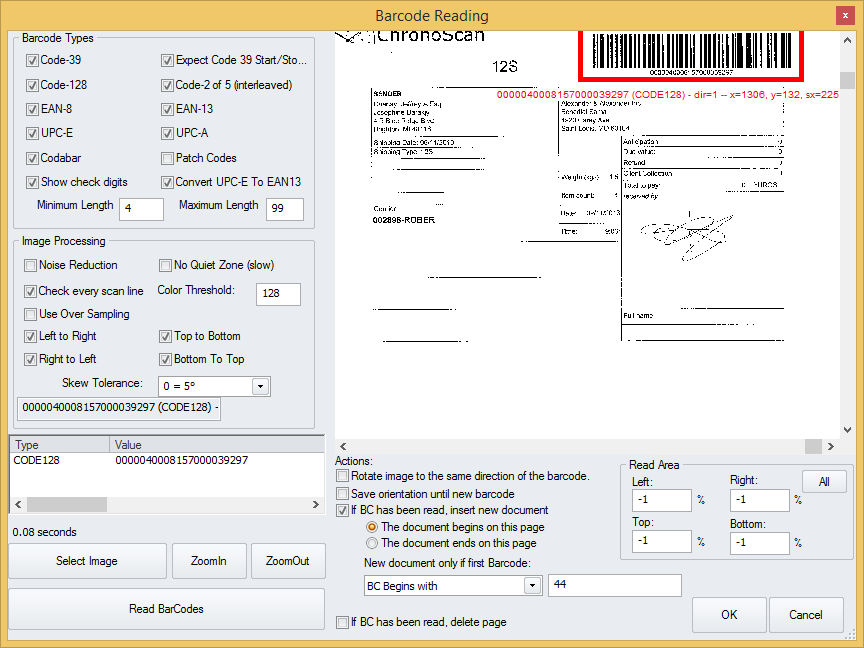
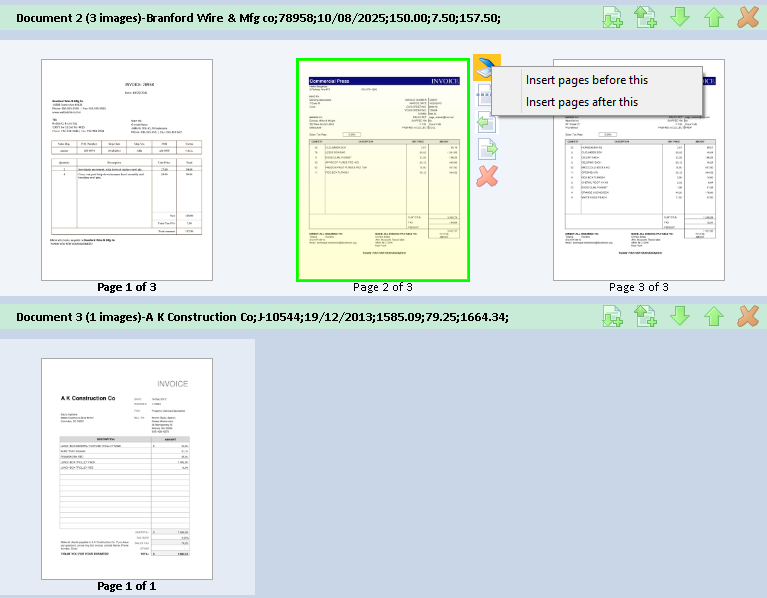
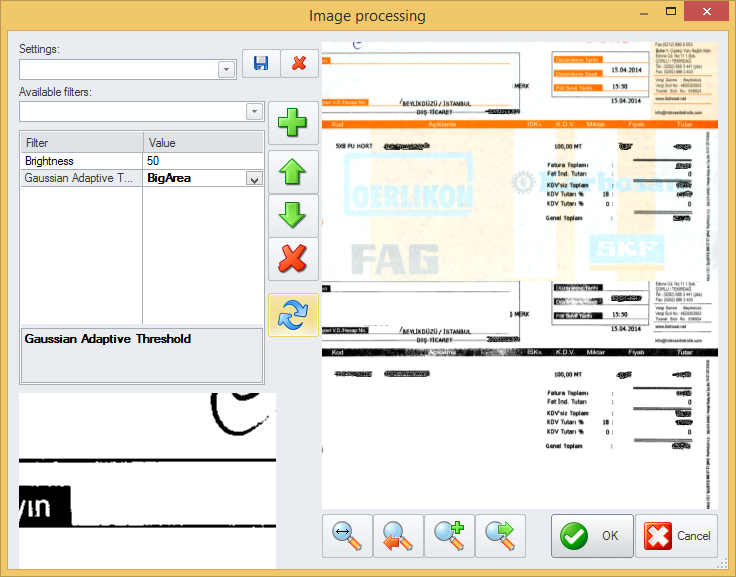
Description
What Is ChronoScan and How Does It Work?
ChronoScan is a document scanning software platform with OCR and data capture capabilities. Businesses use ChronoScan to scan paper documents, extract structured data via OCR, and automate document workflows across accounts payable, HR, and administrative operations.
The typical ChronoScan deployment covers document scanning, OCR data capture, validation workflows, and export to downstream business systems.
ChronoScan competes against Kofax Capture, ABBYY FlexiCapture, and other document capture and OCR platforms.
ChronoScan at a Glance
| Best for | Businesses with document capture and OCR workflows |
|---|---|
| Deployment | Windows desktop + server |
| Pricing model | Perpetual license + maintenance (Contact Sales) |
| Free trial | Free trial available |
| Signature capability | Document scanning + OCR + data capture |
| Compliance | Standard |
| HQ | Global |
ChronoScan Pros and Cons in 2026
Where ChronoScan Stands Out
- OCR data capture for structured extraction from scanned documents.
- Automated document workflows for accounts payable, HR, and administrative operations.
- Free trial available.
- Long-standing document capture heritage.
Where ChronoScan Falls Short
- Windows-focused; Mac and Linux limited.
- Modern SaaS UX polish trails newer cloud-first platforms.
- Public pricing not published.
- Enterprise deployment requires scoped implementation.
Who Should Use ChronoScan?
Businesses with regular document capture and OCR data extraction needs across accounts payable, HR, and administrative operations should evaluate ChronoScan.
ChronoScan Product Suite in 2026
Document scanning
Scan paper documents from scanners.
OCR data capture
Extract structured data via OCR.
Validation workflows
Validate captured data.
Business system integration
Export to downstream ERPs and business systems.
Automation
Automated document workflows.
ChronoScan Deep Dive: Document Scanning + OCR Deep Dive
OCR data capture
ChronoScan OCR extracts structured data from scanned documents including invoices, forms, and business records. Buyers reduce manual data entry versus paper-based workflows.
AP + HR + admin workflows
Automates document capture across accounts payable (invoice processing), HR (employee documents), and administrative operations.
Business system integration
Extracted data exports to downstream ERPs and business systems for straight-through processing.
Long-standing heritage
ChronoScan has served document capture customers for years.
How Much Does ChronoScan Cost in 2026?
ChronoScan pricing is perpetual license with maintenance. Public pricing tiers not published; contact ChronoScan Sales for quote.
Hidden Costs and Contract Notes to Watch
- Annual maintenance for updates.
- Enterprise deployment requires scoped implementation.
- Custom validation workflows may need scoped services.
ChronoScan Alternatives Worth Comparing
Kofax Capture. Enterprise document capture with strong AP automation.
ABBYY FlexiCapture. Enterprise OCR and data capture platform.
Ephesoft. Document capture with cloud + on-premises deployment.
Who Uses ChronoScan?
ChronoScan supports businesses across accounts payable, HR, and administrative operations globally. Customer references live on chronoscan.org.
How ChronoScan Compares to Kofax Capture
| Dimension | ChronoScan | Kofax Capture |
|---|---|---|
| Deployment | Windows desktop + server | Enterprise on-premises + cloud |
| Pricing model | Perpetual + maintenance | Enterprise subscription |
| OCR depth | OCR + data capture | Enterprise OCR + AI |
| Best-fit buyer | SMB + mid-market document capture | Enterprise AP + document capture |
| AI features | Lighter | Available |
Buyers evaluating ChronoScan versus Kofax Capture typically weigh these dimensions during procurement. Neither is universally better; the fit depends on document volume, industry regulatory requirements, existing enterprise stack, and whether the primary constraint is capture speed, retrieval accuracy, records-retention compliance, or workflow automation.
Points to Verify Before Buying ChronoScan
Independent software review threads consistently flag a similar set of due-diligence questions buyers wish they had asked earlier. Cover these during your evaluation.
- Confirm document scanning volume matches your workflow.
- Ask about OCR quality on your typical document types.
- Verify integration with your existing ERP and business systems.
- Test validation workflow during pilot.
- Ask about maintenance costs for perpetual license updates.
What Real Buyers Report About ChronoScan
Business operations and AP teams evaluate ChronoScan on OCR data capture accuracy and AP workflow automation.
Bottom Line: Is ChronoScan Right for You?
ChronoScan is a legitimate pick for businesses with regular document capture and OCR data extraction workflows across accounts payable, HR, and administrative operations.
OCR data capture plus business system integration cover document capture needs.
Trade-off: Windows-focused deployment; enterprise buyers may prefer larger platforms.
Alternatives worth pricing: Kofax Capture for enterprise AP and ABBYY FlexiCapture for enterprise OCR depth.
Verified on 2026-07-05 by the SaaSRat Editorial Team (Chirantan). Vendor facts cross-checked against the chronoscan vendor website, LinkedIn showcase pages, and community discussions on Reddit and industry LinkedIn groups. About our methodology.
Frequently Asked Questions
What is ChronoScan?
Does ChronoScan publish pricing?
What platforms does ChronoScan support?
Which workflows does ChronoScan automate?
Is a free trial available?
Does ChronoScan support OCR?
Where is ChronoScan hosted?
Which industries does ChronoScan serve?
How does ChronoScan compare to Kofax Capture?
Which business systems integrate?
Find Your Perfect Software
See how it can transform your workflow
- Personalized for your needs Tailored recommendations based on your unique requirements.
- Save time & resources Streamline your workflow and boost team productivity.
- Trusted by thousands Join 10,000+ businesses already growing with SaaSrat.
You're all set! 🎉
A specialist for will reach out within 1 business day with tailored recommendations for your needs.