

Any.do
by Any.do
What is Any.do?
Get Best Quote for Any.do
Connect with SaaSrat experts to get the best quote for your business.
You're all set!
A specialist for Any.do will reach out within 1 business day.
Any.do Features
Tasks and lists with subtasks and tags
Calendar integrated with task management
Reminders with location-based and recurring triggers
Daily planner with morning review workflow
Sync across iOS Android web macOS Windows
AI-powered task suggestions and natural language input
View All 15 Features
Any.do Pricing Plans
Personal (Free)
- Free forever, no credit card required. Tasks and lists, reminders, calendar integration, daily planner, sync across iOS Android web macOS Windows. Sufficient for many individual users indefinitely.
Premium (annual)
- $4.99/month billed annually ($7.99 monthly). Everything in Personal plus recurring tasks, WhatsApp reminders, AI-powered features (natural language task input, smart suggestions), color tags, location reminders. Annual TCO: $59.88/year.
Family (annual)
- $8.33/month for 4 members billed annually ($9.99 monthly). Everything in Premium plus shared family space, up to 4 members included, shared grocery list, shared projects (up to 4). Annual TCO: $99.96 for 4 members ($25/member/year).
Teams (annual)
- $4.99/member/month billed annually ($7.99/member monthly). Everything in Premium plus collaborative workspace, unlimited project boards, unlimited team members, 100+ workflow templates, admin tools and permissions. 10-user team annual: $598.80/yr.
10-user Teams annual benchmark
- 10-user team annual: $598.80/year. Compare to Asana Starter at $10.99/user/month annual ($1,318.80/year for 10 users) , Any.do Teams meaningfully cheaper for lightweight needs. Trade-off: Asana has deeper PM depth Any.do Teams lacks (Gantt, time tracking, advanced reporting).
Any.do Screenshots
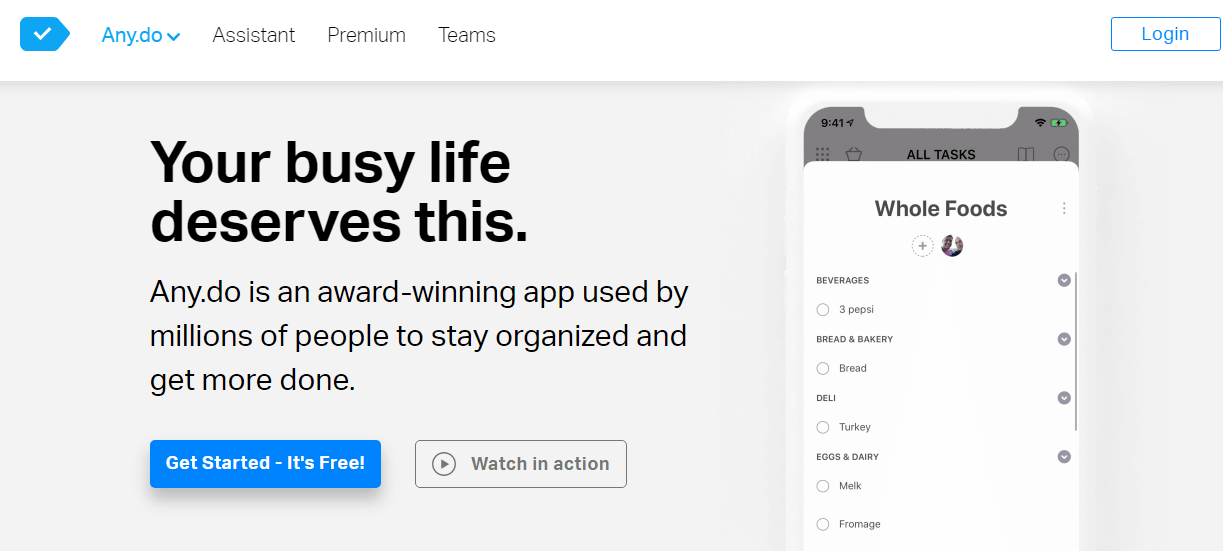
Description
What Any.do actually is
Any.do is a personal and team productivity app built by Israeli software company Any.do Inc., headquartered in Tel Aviv. The product was first released in 2011 as a to-do list app and has grown into a multi-platform productivity suite covering tasks, calendar, reminders, daily planning, family shared spaces, and team collaboration. Available on iOS, Android, web, macOS, Windows, and Apple Watch.
The positioning sits in a crowded productivity category between Todoist (more powerful task management), TickTick (similar feature breadth), Microsoft To Do (Microsoft 365 native), and Apple Reminders (iOS native). Any.do differentiates with cross-platform sync depth, family-shared space, AI-assisted natural language task input, and pricing meaningfully lower than Todoist for similar features.
Who actually uses Any.do
Any.do fits four buyer profiles. First, individual professionals managing personal and work to-do lists across multiple devices (phone, tablet, laptop, work computer) who want consistent sync without paying for Todoist Pro or TickTick Premium. Second, families coordinating household tasks, shared grocery lists, and family projects across multiple members. Third, small teams of 2-50 people running lightweight project management without the complexity of Asana, ClickUp, or Monday. Fourth, freelancers and consultants managing client work alongside personal tasks.
The strongest fit is users who want a single app spanning personal tasks, calendar, reminders, and family coordination , versus running separate apps for each. Any.do's family plan ($8.33/month for 4 members on annual) is one of the most cost-effective family productivity options, undercutting Todoist Family at similar feature depth.
Not for you if: you need powerful project management with dependencies, Gantt charts, and team workflows (Asana, ClickUp, Monday fit better), you're a heavy Microsoft 365 user wanting tight Outlook integration (Microsoft To Do is native there), or you're an Apple-only household where Apple Reminders' iCloud sync covers your needs.
Any.do pricing
| Plan | Annual (monthly) | Monthly | Best for |
|---|---|---|---|
| Personal (Free) | $0 | $0 | Solo users with basic tasks |
| Premium | $4.99/mo | $7.99/mo | Power users wanting AI and recurring |
| Family (4 members) | $8.33/mo | $9.99/mo | Households coordinating shared tasks |
| Teams | $4.99/member/mo | $7.99/member/mo | Small teams with project boards |
Personal (Free) covers tasks, lists, reminders, calendar, daily planner, and sync across devices , sufficient for many individual users indefinitely. Premium at $4.99/month annual ($7.99 monthly) adds recurring tasks, WhatsApp reminders, AI-powered features (natural language task input, smart task suggestions), color tags, and location-based reminders.
Family at $8.33/month annual for 4 members ($9.99 monthly) includes everything in Premium plus shared family space, up to 4 members, shared grocery list, and shared projects up to 4. Additional family members can be added at incremental cost. Teams at $4.99/member/month annual ($7.99/member monthly) adds collaborative workspace, unlimited project boards, unlimited team members, 100+ workflow templates, and admin tools/permissions.
Annual TCO benchmarks
Premium annual: $59.88/year per user. Compare to Todoist Pro at $4/month annual ($48/year) , Any.do Premium is slightly higher but bundles WhatsApp reminders and AI features Todoist Pro doesn't include. Compare to TickTick Premium at $35.99/year , TickTick is cheaper for Premium-equivalent features.
Family annual: $99.96/year for 4 members ($25/year per member). Compare to Todoist Family at ~$60-$72/year for 5 members (slightly cheaper but Any.do's family-specific features like shared grocery list and family space are more polished).
Teams annual for 10 users: 10 × $4.99 × 12 = $598.80/year. Compare to Asana Starter at $10.99/user/month annual ($1,318.80/year for 10 users) , Any.do Teams is meaningfully cheaper at this size but with lighter project management features. For small teams needing lightweight task coordination versus full PM, Any.do's economics work.
Tasks calendar and reminders
Tasks support subtasks (one level deep), due dates, priority levels (low, medium, high), color tags, attachments, notes, and assignment (in shared spaces). Tasks organize into lists, with smart lists like `Today`, `Tomorrow`, `Upcoming`, and `Someday` auto-populating from due-date metadata.
Calendar integration shows tasks alongside calendar events from Google Calendar, Apple Calendar, Outlook Calendar, and other CalDAV providers. The unified view lets users see what's on the calendar and what tasks are due in the same interface rather than switching between calendar app and to-do app.
Reminders trigger by time (specific time, recurring schedule, repeating patterns), location (when arriving at or leaving a defined location), or contextual triggers (when calling a specific contact). Premium adds WhatsApp reminders sending reminder messages to the user's own WhatsApp or shared contacts.
Daily planner and morning review
The daily planner shows the day's tasks in a focused view, encouraging morning review and prioritization. Users mark tasks as planned for today, deferred to tomorrow, or moved to specific dates. The planner is positioned as a calming alternative to the chaos of long task lists, with research-backed productivity practices (morning planning, time-blocking, defer-don't-delete patterns) built into the workflow.
Cross-platform sync
Sync across iOS, Android, web, macOS, Windows, Apple Watch, and Wear OS happens via Any.do cloud infrastructure. Sync latency is typically seconds across all platforms with offline-mode support that queues edits for sync when devices reconnect. For users running iPhone for personal phone and Windows laptop for work, the consistent sync eliminates the iCloud-Reminders-doesn't-work-on-Windows friction that Apple-native users face.
AI features on Premium
AI-powered features include natural language task input (`Buy milk on the way home tomorrow at 6pm` parses into a task with location, time, and date), smart task suggestions based on patterns (Any.do suggests creating recurring `Call mom Sunday` if it sees the pattern in completed tasks), and AI-assisted task breakdown (for complex tasks, suggesting subtasks).
The AI is helpful but not the platform's strongest selling point. Premium users praise the natural language input particularly; the other AI features are more incremental than differentiating.
WhatsApp reminders
WhatsApp reminders (Premium feature) send reminder messages via WhatsApp instead of (or in addition to) the Any.do app's native notification. For users who check WhatsApp more often than they check Any.do's notification, this catches reminders that would otherwise be missed. The integration also works for shared family reminders , send a WhatsApp reminder to a family member's WhatsApp about their assigned task.
Family shared space
The Family plan includes a dedicated shared space for household coordination. Shared grocery list lets family members add items from their phones (anyone can add bread to the list while shopping); the next person at the store sees the current list. Shared projects support family events (vacation planning, holiday meal prep, kid sports schedules) with task assignment to specific family members.
For households where one parent traditionally manages household logistics, the shared family space distributes that load. The cost-effectiveness ($25/member/year on annual) makes this accessible for families wanting structure without committing to full project management complexity.
Teams workspace
Teams plan adds collaborative workspace with project boards (Kanban-style), task assignment, comments, file attachments, and 100+ workflow templates for common use cases (marketing campaign, product launch, hiring pipeline, customer onboarding). Admin tools and permissions provide role-based access.
Teams' depth is lighter than dedicated PM tools (Asana, ClickUp, Monday) , no Gantt charts, no time tracking, no resource management, no advanced reporting. For small teams whose needs are simple task coordination plus light project boards, Any.do Teams covers the basics at meaningfully lower cost than full PM tools.
What real users say
From G2 reviews and r/productivity discussions, the consistent praise: cross-platform sync depth (works equally well on iPhone, Android, Windows, Mac), family space coordination genuinely helps household logistics, AI natural language input is fast and accurate, and pricing is competitive versus Todoist while bundling features Todoist charges extra for.
The consistent complaints: less powerful than Todoist for complex task management (no filters as flexible, no labels system as deep), Teams workspace too light for serious project management beyond 10-person teams, web app slower than native mobile apps on lower-end devices, and the freemium boundary sometimes pushes users to upgrade for features that feel basic (recurring tasks, color tags).
A specific recurring observation from family users: Any.do's family space is one of the few household coordination tools that actually gets used long-term. Many family productivity apps see initial adoption then drop-off as one parent stops maintaining the shared lists; Any.do's WhatsApp reminders + mobile-first design + simple UI sustain family adoption better than competitors.
Any.do vs Todoist
Todoist is the productivity power-user choice with deeper task management (labels, filters, natural language parsing, priority systems), broader integration ecosystem, and stronger keyboard-driven UI. Any.do is the cross-platform-and-family-coordination alternative at lower cost. Choose Todoist for individual power users who live in keyboard shortcuts. Choose Any.do for cross-platform users, families, or small teams.
Any.do vs TickTick
TickTick is the closest direct competitor with similar cross-platform sync, Pomodoro timer integration, and habit tracking at $35.99/year Premium. Any.do has stronger family space; TickTick has Pomodoro and habit features Any.do lacks. Choose TickTick for individual users wanting Pomodoro/habit tracking. Choose Any.do for family or team coordination.
Any.do vs Microsoft To Do and Apple Reminders
Microsoft To Do is bundled with Microsoft 365 and integrates with Outlook tasks. Apple Reminders is bundled with iCloud and integrates with Apple Calendar. Both are free for ecosystem users. Any.do is cross-platform across both Microsoft and Apple ecosystems. Choose Microsoft To Do for Microsoft-shop households. Choose Apple Reminders for Apple-only households. Choose Any.do for mixed-ecosystem households or users wanting more features than the ecosystem-native options provide.
Any.do vs Asana Personal and Notion
Asana Personal (free for up to 15 users) and Notion (free for individuals) overlap with Any.do for individual task management. Asana is project-management-first; Notion is database-and-notes-first. Any.do is task-and-calendar-first. Choose based on whether your primary need is projects (Asana), knowledge management (Notion), or daily task coordination (Any.do).
Common rollout mistakes
The first common Any.do mistake is staying on free when Premium features matter. Recurring tasks, color tags, and location reminders are Premium , users who'd benefit from these often delay upgrading and lose the productivity gains. Premium at $4.99/month annual is one of the easier productivity-tool ROI decisions for active users.
The second common mistake is treating Teams as serious PM. Any.do Teams works for small teams doing lightweight task coordination but breaks down at 25+ users or for complex projects with dependencies. Migrate to Asana or ClickUp when the team outgrows Any.do Teams' depth.
The third common mistake is family-space neglect after launch. Family productivity tools require both parents to maintain the shared lists. Set up an explicit ritual (Sunday family meeting reviewing the week, shared grocery list synced before each shopping trip) or the family space drops off within 2-3 months.
Implementation timeline
Solo user: productive same-day. Family setup: 30-60 minutes to invite all family members, set up shared lists, configure WhatsApp reminders, train family on the workflow. Teams setup for 5-25 users: 1-2 days for project board creation, template selection, admin permissions, and team training. Larger teams over 25 users typically outgrow Any.do's depth; migration to Asana or ClickUp may be necessary.
Support model
Personal (Free) gets community support and documentation. Premium and Family add email support with faster response. Teams add admin support and onboarding assistance. The Any.do help center covers common workflows; documentation is in English with multi-language app interface support.
Verdict on Any.do
Any.do is the right call for individual professionals managing tasks across multiple devices, families coordinating household logistics, and small teams (under 25 people) wanting lightweight task coordination with project boards , at meaningfully lower cost than power-user alternatives like Todoist or full PM tools like Asana.
What Any.do does well: cross-platform sync across iOS Android web macOS Windows Apple Watch Wear OS, family shared space genuinely sustains household coordination versus competitors, AI natural language input is fast and accurate, WhatsApp reminders catch missed notifications, free tier sufficient for many users indefinitely, Teams pricing meaningfully cheaper than dedicated PM tools.
Pricing: Free Personal, Premium $4.99/mo annual ($7.99 monthly), Family $8.33/mo for 4 members annual ($9.99 monthly), Teams $4.99/member/mo annual ($7.99/member monthly). Premium annual: $59.88/user. Family annual: $99.96 for 4 members ($25/member/year). Teams annual for 10 users: $598.80 vs Asana's $1,318.80 , meaningfully cheaper for lightweight needs.
Where it falls short: less powerful than Todoist for complex individual task management (filters, labels), Teams workspace too light for serious PM beyond 10-25 person teams, web app slower than native mobile, freemium boundary sometimes feels punitive (recurring tasks gated), AI features useful but not the platform's strongest differentiator.
Worth comparing: Todoist for power-user individual task management with deeper labels and filters, TickTick for Pomodoro and habit tracking at lower cost, Microsoft To Do for Microsoft 365 households, Apple Reminders for Apple-only households, Asana Personal for free up to 15 users with PM depth, Notion for knowledge-management-first individuals, ClickUp for all-in-one with broader features at higher cost, Trello for Kanban-first small teams. Pricing verified on any.do/pricing on 2026-06-27.
Frequently Asked Questions
Is there a free plan or free trial for Any. do?
How much does Any. do cost?
What does Any. do integrate with?
Who is Any. do best for?
What are the best alternatives to Any. do?
Is Any. do GDPR / SOC 2 compliant?
Does Any. do have a mobile app?
What do real users say about Any. do?
How does Any. do compare to its top competitor?
Does Any. do offer customer support?
Find Your Perfect Software
See how it can transform your workflow
- Personalized for your needs Tailored recommendations based on your unique requirements.
- Save time & resources Streamline your workflow and boost team productivity.
- Trusted by thousands Join 10,000+ businesses already growing with SaaSrat.
You're all set! 🎉
A specialist for will reach out within 1 business day with tailored recommendations for your needs.